I just installed Windows 8 on my computer and tried to load my ASP.net application. The page loads with no problems. But none of the images or stylesheets that are located in the App_Themes directory load. I do have a separate folder that has images in it and they do load. I think it is some security issue but I can’t find out what it could be. If I deploy the site to my dev 2008 R2 box then the site loads correctly, but it doesn’t load correctly on my Windows 8 box.
Some examples of my links are:
<link href="../App_Themes/Debug/style.css" rel="nofollow noreferrer noopener" type="text/css" rel="stylesheet" />
The above does not load.
<img id="ctl00_imgCompanyLogo" title="Header Logo" src="../Images/EmailImage.aspx?ID=6C633997-065C-44AD-9839-B754005B7995" style="border-width:0px;height:50px;width:220px;margin-left: 10px" />
However, this one does.
Note: No errors are loaded on the page the files simply don’t load.
Update: I should also note that this did work when I was using Windows 7 to write my code.
Update: I added a html page to my application and right clicked on that and that page didn’t render. However, if I create a new project, the pages render perfectly.
Update2: I think I found the root of the issue but I don’t know what to do about it. If you create a new project on a Windows 8 machine then change the project so that it uses the virtual directory not IISExpress (use the Project Url) then none of the stylesheets load and the images won’t load as well.
Answers:
Thank you for visiting the Q&A section on Magenaut. Please note that all the answers may not help you solve the issue immediately. So please treat them as advisements. If you found the post helpful (or not), leave a comment & I’ll get back to you as soon as possible.
Method 1
I had a stupid moment. I didn’t check the Static Content check box under the Common HTTP Features group of the IIS configuration.
Method 2
What worked for me:
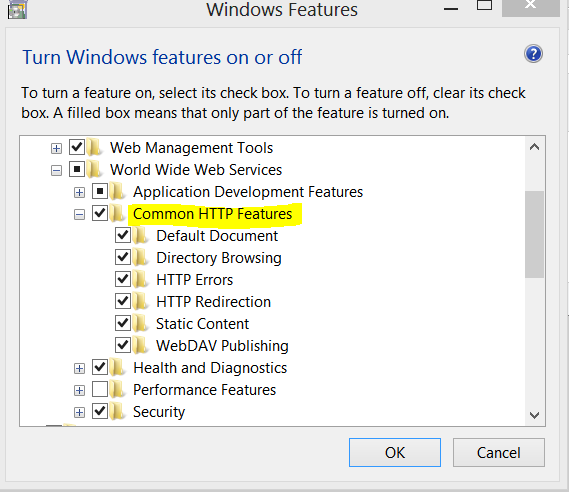
Turning on all the features under Common HTTP Features. I did not check this while installing Windows 8.
Please refer this article:
http://gurustop.net/blog/2009/10/12/funny-problem-windows-7-iis-7-5-images-css-not-showing/
Method 3
Are you running the application through Visual Studio or have it setup in IIS? If you are using Visual Studio to run it, by hitting F5, then you can try this in the web.config to allow anonymous users to access that folder:
   <location path="App_Themes/Default/MyFile.css">
      <system.web>
         <authorization>
            <allow users="*"/>
         </authorization>
      </system.web>
   </location>
All methods was sourced from stackoverflow.com or stackexchange.com, is licensed under cc by-sa 2.5, cc by-sa 3.0 and cc by-sa 4.0