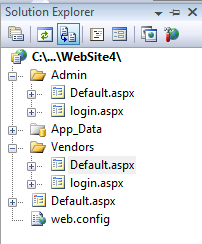
I have two folders in my asp.net website namely VENDORS and ADMIN
i want when any user access any of the page inside the ADMIN folder it redirects to Admin/login.aspx until they login ….
i want when any user access any of the page inside the VENDORS folder it redirects to Vendors/login.aspx until they login ….
How to do that using web.config authorization ….
Answers:
Thank you for visiting the Q&A section on Magenaut. Please note that all the answers may not help you solve the issue immediately. So please treat them as advisements. If you found the post helpful (or not), leave a comment & I’ll get back to you as soon as possible.
Method 1
You need to have web.config files inside the admin and vendors folder separately. Inside these web.config files you would declare your <formsauthentication> elements independently. The global web.config should contain no <formsauthentication> element.
Edit:
I will provide a xml snippet below, but implementing FormsAuthentication is not a task I would recommend for someone who is a beginner. First you should read and understand the process involved in implementing at least a basic FormsAuthentication model. That being said, this would be the relevant web.config entry under the <system.web> section:
<authentication mode="Forms">
    <forms loginUrl="~/vendors/login.aspx"
           protection="All"
           timeout="30"
           name=".ASPXAUTH"
           requireSSL="false"
           slidingExpiration="false"
           defaultUrl="~/vendors/default.aspx"
           cookieless="UseDeviceProfile"/>
</authentication>
Method 2
Unless the vendor and admin site are completely unrelated, I would recommend having a single authentication architecture. Have a login page at the root level, then use <location> elements to define role authorization (or separate web.config files in each subfolder). Is it absolutely necessary that administrators login to /admin/login.aspx and vendors login to /vendors/login.aspx?
All methods was sourced from stackoverflow.com or stackexchange.com, is licensed under cc by-sa 2.5, cc by-sa 3.0 and cc by-sa 4.0