I’m at my wits end trying to force this jQuery datepicker control to understand specific date formats. What the hell is going on here?
View
@Html.TextBoxFor(model => model.StartDate, "{0:dd/MM/yyyy}", new { @class = "datefield" })
Javascript
$(function () {
    $(".datefield").datepicker({
        dateFormat: 'dd/MM/yyyy',
        showOn: "button"
    });
});
On page load
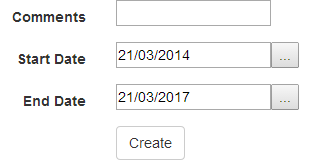
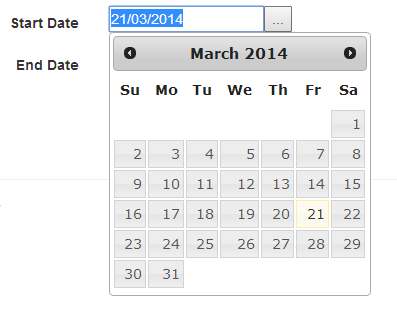
datepicker clicked, so far so good
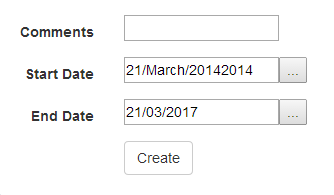
date selected… what?
Answers:
Thank you for visiting the Q&A section on Magenaut. Please note that all the answers may not help you solve the issue immediately. So please treat them as advisements. If you found the post helpful (or not), leave a comment & I’ll get back to you as soon as possible.
Method 1
According to the documentation:
dd– day of month (two digit)MM– month name longyy– year (four digit)
So dd/MM/yyyy should produce that result. (The day, the long month name, and the 4-digit year twice.) To match your initially loaded format, you’d want this:
dd/mm/yy
Method 2
You need to set it like this:
$(function () {
    $(".datefield").datepicker({
        dateFormat: 'dd/mm/yy',
        showOn: "button"
    });
});
As noted in the documentation, the yy format specifies a 4 digit year. When you write yyyy you are basically telling it to render the year twice. Relating to the month, jQuery associates MM (capital letters) with the name of the month and mm with the corresponding digit form.
In conclusion, the date formats differ between .Net and jQueryUI.
All methods was sourced from stackoverflow.com or stackexchange.com, is licensed under cc by-sa 2.5, cc by-sa 3.0 and cc by-sa 4.0