Let me explain the problem I am dealing with:
I have 2 custom taxonomies. One is named “thestate” and the other one is named “thetown”.
In “thestate” I have listed all the states in the U.S.
In “thetown” I have listed the main towns in the U.S.
For each taxonomy I have their items displayed in a drop-down
Do you understand where I am going with this? 😀 I need to be able to display the items in “thetown” based on what state is selected in the taxonomy “thestate”
For example, if the user selects “Michigan” (in the taxonomy called “thestate), the page automatically refreshes, and in the next drop-down, in the taxonomy called “thetown”, I have only the cities “Detroit”, “Grand Rapids”, “Warren”.
If the user then changes his mind and selects “Texas”, the page automatically refreshes and in the next drop-down, in the taxonomy called “thetown” I have only the cities “Houston”, “San Antonio”, “Dallas”.
Hope my explanation makes sense! Can you think of a logic by which I can accomplish this?
Best regards,
Gabriela
Answers:
Thank you for visiting the Q&A section on Magenaut. Please note that all the answers may not help you solve the issue immediately. So please treat them as advisements. If you found the post helpful (or not), leave a comment & I’ll get back to you as soon as possible.
Method 1
Why not make the towns child terms of each state? The taxonomy could be location:
See MikeSchinkel’s detailed q and a regarding hierarchal taxonomies.
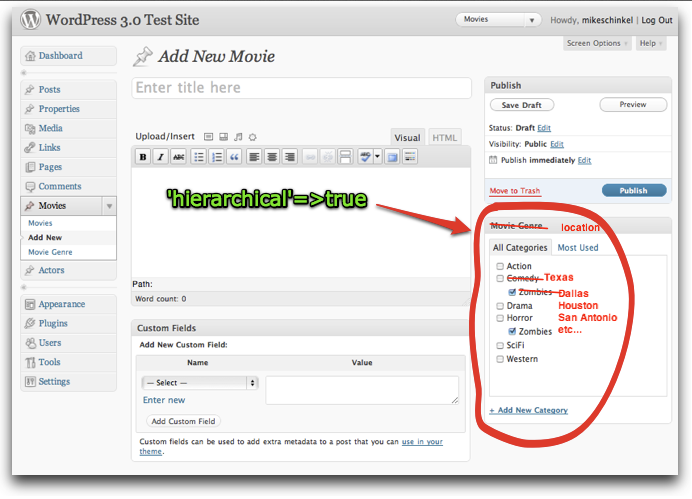
A more elegant solution than refreshing the page upon state selected would be to load the “thetown” child terms using ajax and the get_term_children function or the custom $wpdb query outlined below.
Pass the state selected using jQuery to your back end PHP function that loops through an array of child terms to build out your second drop down.
Here is a quick example using a custom $wpdb query:
PHP backend function:
add_action( 'wp_ajax_nopriv_get_child', 'ajax_get_children' );

function ajax_get_children() {
        global $wpdb;
        $parent = $_POST['parent'];
        $child_string = "";
        $results = $wpdb->get_results ( "SELECT t.term_id, t.name FROM $wpdb->term_taxonomy tt, $wpdb->terms t, $wpdb->term_taxonomy tt2 WHERE tt.parent = $parent AND tt.taxonomy = 'category' AND t.term_id = tt.term_id AND tt2.parent = tt.term_id GROUP BY t.term_id, t.name HAVING COUNT(*) > 0 ORDER BY t.term_order ASC" );
        foreach ( $results as $row ) {
            $child_string = $child_string . "<option value='$row->term_id'>$row->name</option>";
        }
        echo $child_string;

        die(1);

    }
jQuery:
jQuery(document).ready(function() {

    jQuery("#div-id-of-dropdown").select(function(){

        jQuery( "#loading-animation").show();
        var termID = jQuery("#parent-term :selected").val();


        jQuery.ajax({
            type: 'POST',
            url: ajaxurl,
            data: {"action": "get_child", parent: termID },
            success: function(response) {
                jQuery("#empty-div-to-load-child-terms").html(response);
                jQuery("#loading-animation").hide();
                return false;

            }
        });
    });
});
You will have to modify your html to match the above code. When the state is selected WordPress will load the child “towns”
Edit
Forgot to mention that the ajaxurl variable in the jQuery will not be defined. Read up on using AJAX in plugins to get the method along with some other useful information.
All methods was sourced from stackoverflow.com or stackexchange.com, is licensed under cc by-sa 2.5, cc by-sa 3.0 and cc by-sa 4.0