I am using asp.NET 4.0 with C# and have recently created a custom design for my local web application. I would like that when a page is selected, it has a different background colour (usually in plain html + css we just set a menu item as active). I tried using but it is not working, it stays the same colour as the others. Does any one has any experience with this?
Code in Site Master:
            <h2>Dashboard</h2>
            <asp:Menu ID="NavigationMenu" runat="server" CssClass="menu" EnableViewState="false" IncludeStyleBlock="false" Orientation="Vertical" >
                <StaticSelectedStyle CssClass="selectedMenu" />
                <Items>
                    <asp:MenuItem NavigateUrl="~/Default.aspx" Text="View Submissions"/>
                    <asp:MenuItem NavigateUrl="~/Imports.aspx" Text="Import"/>
                    <asp:MenuItem NavigateUrl="~/Submission.aspx" Text="Insert Submission"/>
                    <asp:MenuItem NavigateUrl="~/Reports.aspx" Text="Reports"/>
                    <asp:MenuItem NavigateUrl="~/CurrencyMaintenance.aspx" Text="Currency Maintenance" />
                    <asp:MenuItem NavigateUrl="~/Remittance.aspx" Text="Remittance" />
                </Items>
            </asp:Menu>
CSS:
/* TAB MENU
----------------------------------------------------------*/
div.hideSkiplink
{
    background-color:#3a4f63;
    width:100%;
}

div.menu
{
    padding: 4px 0px 4px 8px;
}

div.menu ul
{
    list-style: none;
    margin: 0px;
    padding: 0px;
    width: auto;
}

div.menu ul li a, div.menu ul li a:visited
{
    background-color: #FFF; /*680840*/
    border: 1px #4e667d solid;
    height: 20px;
    width: 175px;
    color: #000; /*FFF*/
    display: block;
    line-height: 1.35em;
    padding: 4px 20px;
    text-decoration: none;
    white-space: nowrap;
}

div.menu ul li a:hover
{
    background-color: #680840;
    color: #FFF;
    text-decoration: none;
}

.selectedMenu
{
    background-color: #680840 !important;
    color: #FFF !important;
    text-decoration: none !important;
}

div.menu ul li a:active
{
    background-color: #680840;
    color: #cfdbe6;
    text-decoration: none;
}
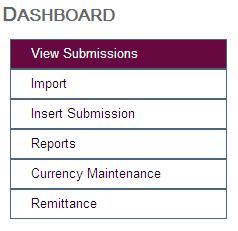
This is what it looks like on Hover, I would like a similar effect on selected.
Answers:
Thank you for visiting the Q&A section on Magenaut. Please note that all the answers may not help you solve the issue immediately. So please treat them as advisements. If you found the post helpful (or not), leave a comment & I’ll get back to you as soon as possible.
Method 1
This seems to be a bug with the .NET menu. There is some information regarding this here. What you might want to do then is remove the staticSelectedStyle attribute and simply add this to your css:
.menu a.static.selected
{
    background-color: #680840 !important;
    color: #FFF !important;
    text-decoration: none !important;
}
You might also have to add some code to your master’s page load to determine which should be the selected item like this:
protected void Page_Load(object sender, EventArgs e)
{
    string path = Request.AppRelativeCurrentExecutionFilePath;
    foreach (MenuItem item in NavigationMenu.Items)
    {
        item.Selected = item.NavigateUrl.Equals(path, StringComparison.InvariantCultureIgnoreCase);
    }
}
All methods was sourced from stackoverflow.com or stackexchange.com, is licensed under cc by-sa 2.5, cc by-sa 3.0 and cc by-sa 4.0