I have the following in my data base –
breedId Species Breed
0       dog      Alsatian
1       dog      pitbull
2       dog      Shetland sheepdog
3       dog      Boxer
4       cat      Dragon Li
5       cat      Australian Mist
6       cat      Korat
In the c# designer view, I have 2 drop-down list one which has species and other for breed.
What I want is that when user picks ‘dog’ in species list,
the breed list should have the following Alsatian, pitbull, Shetland sheepdog,Boxer
At the moment when I pick ‘dog’, all the breed from the database is shown.
<asp:DropDownList ID="DropDownListSpecies" runat="server"
     Height="27px" Width="107px" DataSourceID="hs330"
     DataTextField="Species" DataValueField="Species">
</asp:DropDownList>
<asp:SqlDataSource ID="Species" runat="server"
     ConnectionString="<%$ ConnectionStrings:ConnectionString %>"
     SelectCommand="SELECT DISTINCT [Species] FROM [Breed]">
</asp:SqlDataSource>

<asp:DropDownList ID="DropDownListBreed" runat="server" Height="20px"
    Width="110px" DataSourceID="breed" DataTextField="Breed"
    DataValueField="Breed">
</asp:DropDownList>
<asp:SqlDataSource ID="breed" runat="server"
    ConnectionString="<%$ ConnectionStrings:ConnectionString %>"
    SelectCommand="SELECT DISTINCT [Breed] FROM [Breed]">
</asp:SqlDataSource>
Answers:
Thank you for visiting the Q&A section on Magenaut. Please note that all the answers may not help you solve the issue immediately. So please treat them as advisements. If you found the post helpful (or not), leave a comment & I’ll get back to you as soon as possible.
Method 1
You need to use ControlParameter in SelectParameters.
Make sure that AutoPostBack=”True” for DropDownListSpecies
FYI: You have typo in Speecies
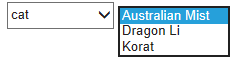
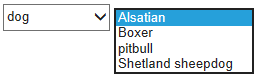
<asp:DropDownList ID="DropDownListSpecies" runat="server"
    Height="27px" Width="107px" DataSourceID="Species"
    DataTextField="Species" DataValueField="Species" AutoPostBack="True">
</asp:DropDownList>
<asp:SqlDataSource ID="Species" runat="server"
    ConnectionString="<%$ ConnectionStrings:ConnectionString %>"
    SelectCommand="SELECT DISTINCT [Species] FROM [Breed]"></asp:SqlDataSource>
<asp:DropDownList ID="DropDownListBreed" runat="server"
    Height="20px" Width="110px"
    DataSourceID="breed" DataTextField="Breed" DataValueField="Breed">
</asp:DropDownList>
<asp:SqlDataSource ID="breed" runat="server"
    ConnectionString="<%$ ConnectionStrings:ConnectionString %>"
    SelectCommand="SELECT DISTINCT [Breed] FROM [Breed] WHERE <a href="https://getridbug.com/cdn-cgi/l/email-protection" class="__cf_email__" data-cfemail="72210217111b17014f32210217111b1701">[email protected]</a>">
    <SelectParameters>
        <asp:ControlParameter ControlID="DropDownListSpecies" PropertyName="SelectedValue"
            Name="Species " Type="String" DefaultValue="cat" />
    </SelectParameters>
</asp:SqlDataSource>
Method 2
You are not filtering the data in the second drop down list, based on the selection made in the first drop down list (which is what you want).
    <asp:DropDownList ID="DropDownListBreed" runat="server" Height="20px" Width="110px" DataSourceID="breed" DataTextField="Breed" DataValueField="Breed">
    </asp:DropDownList>
    <asp:SqlDataSource ID="breed" runat="server" ConnectionString="<%$ ConnectionStrings:ConnectionString %>" SelectCommand="SELECT DISTINCT [Breed] FROM [Breed] WHERE Species = @Species">
    <SelectParameters>
        <asp:ControlParameter ControlID="DropDownListSpecies" PropertyName="SelectedValue"
            Name="Species " Type="String" DefaultValue="cat" />
    </SelectParameters>
</asp:SqlDataSource>
Also, you need to add the AutoPostBack=”True” property to each DropDownList, if you want the changes to be reflected as soon as you change the value of each DropDownList.
All methods was sourced from stackoverflow.com or stackexchange.com, is licensed under cc by-sa 2.5, cc by-sa 3.0 and cc by-sa 4.0