I’m having trouble figuring out why the RowCommand isn’t firing. Oddly enough, I have a different GridView on the page and its RowCommand is firing without issue so I have no idea what the problem could be.
I have the following code:
JavaScript
function displayPayees() {
        $('#payeeList').css("display", "block");
        $('#payeeList').dialog({
            modal: true,
            draggable: false,
            resizable: false,
            maxHeight: 600,
            width: 800,
            position: { my: "center top", at: "center top+15%", of: window }
        });
    }
.aspx Page
<div id="payeeList" title="Available Payees" style="display:none;">
    <asp:GridView ID="gvPayees" runat="server" Visible="true" AutoGenerateColumns="false" ShowHeaderWhenEmpty="true" Width="100%" AllowSorting="True" OnRowCommand="gvPayees_RowCommand" CssClass="table table-striped">
        <HeaderStyle Font-Bold="True" ForeColor="White" Height="15px" BackColor="#46596b" Wrap="False"></HeaderStyle>
        <Columns>
            <asp:BoundField DataField="TaxID" HeaderText="Tax ID"></asp:BoundField>
            <asp:BoundField DataField="Name" HeaderText="Name"></asp:BoundField>
            <asp:BoundField DataField="Address1" HeaderText="Address"></asp:BoundField>
            <asp:BoundField DataField="Address2" HeaderText="Address 2"></asp:BoundField>
            <asp:BoundField DataField="City" HeaderText="City"></asp:BoundField>
            <asp:BoundField DataField="State" HeaderText="State"></asp:BoundField>
            <asp:BoundField DataField="Zip" HeaderText="Zip"></asp:BoundField>
            <asp:TemplateField HeaderText="">
                <ItemStyle HorizontalAlign="Center" VerticalAlign="Middle" />
                <ItemTemplate>
                    <asp:Button ID="btnSelectPayee" runat="server" Text="Select" CssClass="btn btn-default home-btn btn-sm" CausesValidation="false" CommandName="SelectPayee" CommandArgument='<%# Eval("TaxID") & "~" & Eval("Name") & "~" & Eval("Address1") & "~" & Eval("Address2") & "~" & Eval("City") & "~" & Eval("State") & "~" & Eval("Zip") %>' />
                </ItemTemplate>
            </asp:TemplateField>
        </Columns>
    </asp:GridView>
</div>
Code Behind
Protected Sub Page_Load(ByVal sender As Object, ByVal e As System.EventArgs) Handles Me.Load
    If Not Page.IsPostBack Then
            BindDetails()
        End If
End Sub

Protected Sub gvPayees_RowCommand(ByVal sender As Object, ByVal e As GridViewCommandEventArgs)
    Throw New Exception("Hello?") 'Test code
End Sub
UPDATE:
I noticed that moving the GridView out of it’s containing div causes the RowCommand to fire properly.
I’m using jQuery UI to put the GridView into a dialog box to be displayed on a button click. I have display: none on the containing div so that the GridView is invisible until the button click and I think that may be the source of my problem. I’m updating my code here to reflect that.
How can I hide the div until button click without preventing the RowCommand from firing properly?
Answers:
Thank you for visiting the Q&A section on Magenaut. Please note that all the answers may not help you solve the issue immediately. So please treat them as advisements. If you found the post helpful (or not), leave a comment & I’ll get back to you as soon as possible.
Method 1
Change it from a Button to a LinkButton and it will work.
<ItemTemplate>
    <asp:LinkButton ID="btnSelectPayee" runat="server" CommandName="SelectPayee"
        CommandArgument='<%# Eval("TaxID") %>' >Select</asp:LinkButton>
</ItemTemplate>
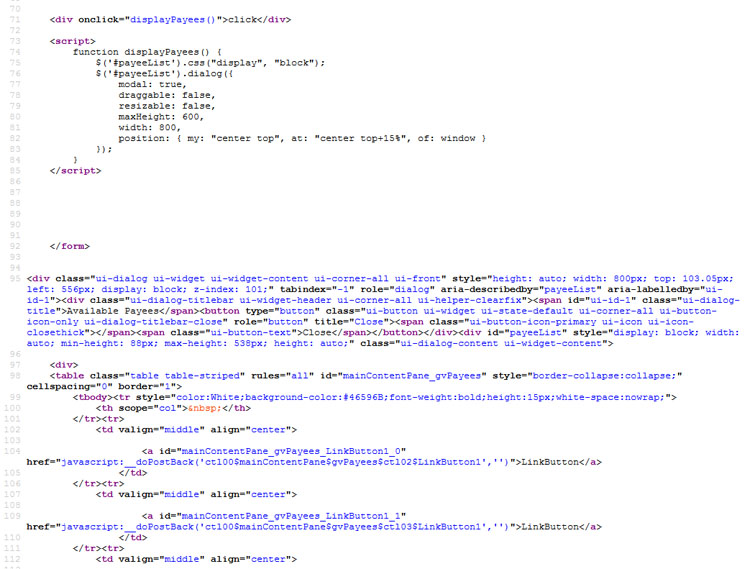
Apparently the jQuery UI dialog places the modal outside the </form> tag, so normal buttons don’t work anymore. But LinkButtons use JavaScript to perform the PostBack, and they are still registered within the framework.
Method 2
first of all you should assign the command name to the buttom in item template like this :
<ItemTemplate>
    <asp:Button ID="Btn1" CssClass="SelectRow" CommandName="Sign" runat="server"
        CausesValidation="false"
        CommandArgument="<%# ((GridViewRow)Container).RowIndex %>"
        Text="" />
</ItemTemplate>
in the code behind
protected void gvPayees_RowCommand(object sender, GridViewCommandEventArgs e)
{
    if (e.CommandName == "Sign")
    {
        GridViewRow gvr = (GridViewRow)(((Button)e.CommandSource).NamingContainer);

        int RowIndex = gvr.RowIndex;
        gvPayees.SelectedIndex = RowIndex;
    }
}
All methods was sourced from stackoverflow.com or stackexchange.com, is licensed under cc by-sa 2.5, cc by-sa 3.0 and cc by-sa 4.0