I have an ASP.NET Web Api solution which doesn’t contain a Startup.cs class. I presume this is because the solution wasn’t created as an MVC solution.
All the code for the startup is defined in the Global.asax.cs file as you can see below
public class Global : HttpApplication
{
    void Application_Start(object sender, EventArgs e)
    {
        // Code that runs on application startup
        AreaRegistration.RegisterAllAreas();
        GlobalConfiguration.Configure(WebApiConfig.Register);
        RouteConfig.RegisterRoutes(RouteTable.Routes);
    }
}
However, now I want to have support for OAuth and all the documentation that I’ve found is based on a Startup.cs with the following class
public partial class Startup
{
    public void Configuration(IAppBuilder app)
    {
        ConfigureAuth(app);
    }
}
Is it possible to just add this new class in my solution and the solution will continue working?
Will this have any conflicts with the Global.asax.cs class?
EDIT: After I added the Startup.cs class, I can’t hit the break point I added into it…
using System;
using System.Collections.Generic;
using System.Linq;
using System.Web;
using Microsoft.Owin;
using Owin;

[assembly: OwinStartup(typeof(MyGame.Startup))]

namespace MyGame
{
    public partial class Startup
    {
        public void Configuration(IAppBuilder app)
        {
            ConfigureAuth(app);
        }
    }
}
Any idea what’s going on?
Answers:
Thank you for visiting the Q&A section on Magenaut. Please note that all the answers may not help you solve the issue immediately. So please treat them as advisements. If you found the post helpful (or not), leave a comment & I’ll get back to you as soon as possible.
Method 1
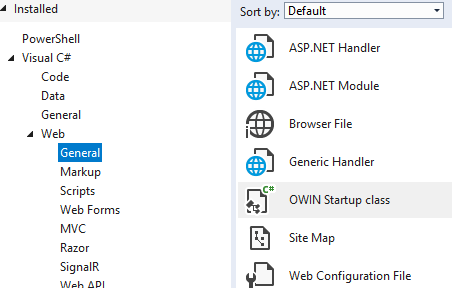
If you have installed the Owin packages, you can simple create the start up class with:
Method 2
Startup.cs is a part of the OWIN authorization package. If the package isn’t added through NuGet, I can’t guarantee it would work. However, judging by this answer, it might work anyway depending on your environment.
https://stackoverflow.com/a/24678109/6442626
Short answer: If you installed Microsoft.Owin.Security.OAuth from NuGet, that should be good. Otherwise, you need to install it.
Update:
In order to get MVC to call the Configuration method in startup, you also need to install the Microsoft.Owin.Host.SystemWeb package from NuGet. There is nothing special you need to change with web.config, IIS will automagically detect the Owin host and load it for you.
Method 3
You can add your own startup class, but you need to make sure that Owin is recognizing it. There are several ways to do this , but if you’d like to use a Startup class then you need to use the OwinStartup attribute.
eg:
[assembly: OwinStartup(typeof(MyNamespace.MyStartupClass))]
Method 4
My Startup.cs would not run until I removed this line on Web.config (in root folder)
<add key="owin:AutomaticAppStartup" value="false" />
Method 5
Yes. first you need to remove the following line from your web.config.
<add key="owin:AutomaticAppStartup" value="false" />
Only then it will call the the method it startup.cs.
All methods was sourced from stackoverflow.com or stackexchange.com, is licensed under cc by-sa 2.5, cc by-sa 3.0 and cc by-sa 4.0