I’ve looped over the Request.ServerVariables collection in ASP.NET, but it’s not as comprehensive as phpinfo().
How can I print all that information, including server software, drivers, etc, for ASP.NET?
Answers:
Thank you for visiting the Q&A section on Magenaut. Please note that all the answers may not help you solve the issue immediately. So please treat them as advisements. If you found the post helpful (or not), leave a comment & I’ll get back to you as soon as possible.
Method 1
An empty page with this header should do the trick:
<%@ Page Trace="true"  Language="C#"
    ContentType="text/html" ResponseEncoding="utf-8" %>
Method 2
http://code.google.com/p/aspnetsysinfo/
The project is a ASP.Net System Information Prober. It’s a single page which trying to get as much as possible of useful hosting information. The concept is similar to PHP page which contains
phpinfo()…
Method 3
ServerInfo.GetHtml() is basically the same as phpinfo(). Not only is the actual returned information extremely similar but also the html presentation. Here is a live demo!
You can also use it even if you’re only making a pure Web API app, but letting a controller return a HttpResponseMessage like so:
    public System.Net.Http.HttpResponseMessage Get()
    {
        var serverinfo = System.Web.Helpers.ServerInfo.GetHtml().ToHtmlString();
        var response = new System.Net.Http.HttpResponseMessage();
        response.Content = new System.Net.Http.StringContent("<html><body>" + serverinfo + "</body></html>");
        response.Content.Headers.ContentType = new System.Net.Http.Headers.MediaTypeHeaderValue("text/html");
        return response;
    }
Method 4
How about using the ASP.Net tracing subsystem? It allows you to get:
Control Tree: Control tree presents an
HTML representation of the ASP.NET
Control Tree. Shows each control’s ID,
run time type, the number of bytes it
took to be rendered, and the bytes it
requires in View State and Control
State.Session State: Lists all the keys for
a particular user’s session, their
types and their values.Application State: Lists all the keys
in the current application’s
Application object and their type and
values.Request Cookies: Lists all the cookies
passed in during the page is
requested.Response Cookies: Lists all the
cookies that were passed back during
the page’s response.Headers Collection: Shows all the
headers that might be passed in during
the request from the browser,
including Accept-Encoding, indicating
whether the browser supports the
compressed HTTP responses and Accept
languages.Form Collection: Displays a complete
dump of the Form Collection and all
its keys and values.QueryString Collection: Displays a
dump of the Querystring collection and
all its contained keys and values.Server Variables: A complete dump of
name-value pairs of everything that
the web server knows about the
application.
See here.
Method 5
Have a look at glimpse.
glimpse: A client side Glimpse to your server
What Firebug is for the client, Glimpse does for the server… in other words, a client side Glimpse into whats going on in your server.
Here’s the request tab as shown in the browser.
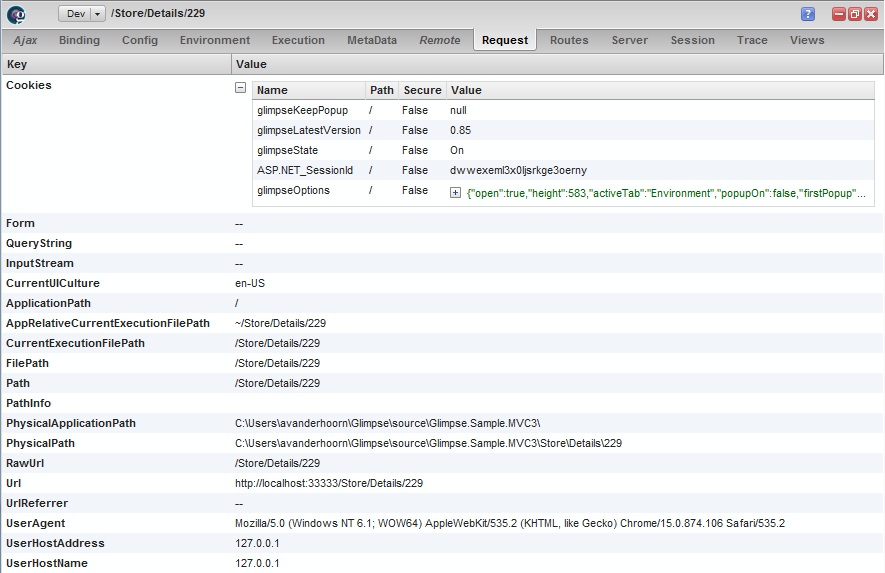
(source: getglimpse.com)
There are other tabs with information, and it’s possible to write plugins.
Method 6
The following might work?
foreach (string Key in Request.ServerVariables.AllKeys)
   Response.Write(Key + ": " + Request.ServerVariables[Key] + "<br>");
I’m not sure what info phpinfo() spits out.
Method 7
here is an answer i found, that looks like it covers it covers it, at first sight:
http://www.actionscript.org/forums/showthread.php3?p=133347
someone scripted it out
Method 8
Quick google result:
http://forums.asp.net/p/901862/2087653.aspx
According to them, the answer is no.
Method 9
For ASP classic with VBScript (not ASP.net – see disclaimer below) there is a Sub aspinfo() on Planet Source Code, to which I’ve made very minor changes (moving the call to aspinfo() and moving the top authorship/comment block).
Here is the source of my modified version of Dennis Pallett’s aspinfo(), which can be saved as aspinfo.asp on the webserver in question.
<%@ Language="VBSCRIPT" %>
<%
'**************************************
' Name: aspinfo()
' Description:aspinfo() is the equivalent of phpinfo(). It displays all kinds of
' information about the server, asp, cookies, sessions and several other things in
' a neat table, properly formatted.
' By: Dennis Pallett (from psc cd)
'
'
' Inputs:None
'
' Returns:None
'
'Assumes:You can include my code in any of your pages and call aspinfo() to show
' the information of your server and asp.
'
'**************************************
Sub aspinfo()
Dim strVariable, strASPVersion
Dim strCookie, strKey, strSession
'Retrieve the version of ASP
strASPVersion = ScriptEngine & " Version " & ScriptEngineMajorVersion & "." & ScriptEngineMinorVersion
%>
<!DOCTYPE HTML PUBLIC "-//W3C//DTD HTML 4.01 Transitional//EN">
<html>
<head>
<style type="text/css"><!--
a { text-decoration: none; }
a:hover { text-decoration: underline; }
h1 { font-family: arial, helvetica, sans-serif; font-size: 18pt; font-weight: bold;}
h2 { font-family: arial, helvetica, sans-serif; font-size: 14pt; font-weight: bold;}
body, td { font-family: arial, helvetica, sans-serif; font-size: 10pt; }
th { font-family: arial, helvetica, sans-serif; font-size: 10pt; font-weight: bold; }
//--></style>
<title>aspinfo()</title></head>
<body>
<div align="center">
<table width="80%" border="0" bgcolor="#000000" cellspacing="1" cellpadding="3">
<tr>
<td align="center" valign="top" bgcolor="#FFFFAE" align="left" colspan="2">
<h3>ASP (<%= strASPVersion %>)</h3>
</td>
</tr>
</table>
<br>
<hr>
<br>
<h3>Server Variables</h3>
<table width="80%" border="0" bgcolor="#000000" cellspacing="1" cellpadding="3">
<%
For Each strVariable In Request.ServerVariables
Response.write("<tr>")
Response.write("<th width=""30%"" bgcolor=""#FFFFAE"" align=""left"">" & strVariable & "</th>")
Response.write("<td bgcolor=""#FFFFD9"" align=""left"">" & Request.ServerVariables(strVariable) & " </td>")
Response.write("</tr>")
Next 'strVariable
%>
</table>
<br>
<hr>
<br>
<h3>Cookies</h3>
<table width="80%" border="0" bgcolor="#000000" cellspacing="1" cellpadding="3">
<%
For Each strCookie In Request.Cookies
If Not Request.Cookies(strCookie).HasKeys Then
Response.write("<tr>")
Response.write("<th width=""30%"" bgcolor=""#FFFFAE"" align=""left"">" & strCookie & "</th>")
Response.write("<td bgcolor=""#FFFFD9"" align=""left"">" & Request.Cookies(strCookie) & " </td>")
Response.write("</tr>")
Else
For Each strKey In Request.Cookies(strCookie)
Response.write("<tr>")
Response.write("<th width=""30%"" bgcolor=""#FFFFAE"" align=""left"">" & strCookie & "(" & strKey & ")</th>")
Response.write("<td bgcolor=""#FFFFD9"" align=""left"">" & Request.Cookies(strCookie)(strKey) & " </td>")
Response.write("</tr>")
Next
End If
Next
%>
</table>
<br>
<hr>
<br>
<h3>Session Cookies</h3>
<table width="80%" border="0" bgcolor="#000000" cellspacing="1" cellpadding="3">
<%
For Each strSession In Session.Contents
Response.write("<tr>")
Response.write("<th width=""30%"" bgcolor=""#FFFFAE"" align=""left"">" & strSession & "</th>")
Response.write("<td bgcolor=""#FFFFD9"" align=""left"">" & Session(strSession) & " </td>")
Response.write("</tr>")
Next
%>
</table>
<br>
<hr>
<br>
<h3>Other variables</h3>
<table width="80%" border="0" bgcolor="#000000" cellspacing="1" cellpadding="3">
<tr><th width="30%" bgcolor="#FFFFAE" align="left">Session.sessionid</th><td bgcolor="#FFFFD9"><%= Session.sessionid %></td></tr>
<tr><th width="30%" bgcolor="#FFFFAE" align="left">Server.MapPath</th><td bgcolor="#FFFFD9"><%= Server.MapPath ("/") %></td></tr>
</table>
</div>
</body>
</html>
<%
End Sub
aspinfo()
%>
Disclaimer: Note that this was initially submitted as an edit to Rob’s answer, but it was suggested that it be made as an entirely new answer response instead. Note also that, as frankadelic points out in a comment to Rob’s answer, this response doesn’t address the OP’s question, as that question was for ASP.net, not ASP classic.
Method 10
I realized a simple library to inlude in projects called InfoPage. This library show you system info, assembly included in application, build number,and changelogs.
You can simply include it in your project by nuget, it is quick to integrate and customizable.
Method 11
I’ve got a gist available to add a razor page with phpinfo type information in .net core…
All methods was sourced from stackoverflow.com or stackexchange.com, is licensed under cc by-sa 2.5, cc by-sa 3.0 and cc by-sa 4.0