I’m trying to enable passthrough or impersonation authentication inside an ASP.NET website that uses the TFS2010 API.
I’ve got this working correctly with Cassini, however with IIS 7.5 (Windows 7) something is going wrong.
I found this blog post on the subject, and tried the following:
private static void Test()
{
    TfsTeamProjectCollection baseUserTpcConnection =
            new TfsTeamProjectCollection(new Uri(Settings.TfsServer));

    // Fails as 'baseUserTpcConnection' isn't authenticated
    IIdentityManagementService ims =
            baseUserTpcConnection.GetService<IIdentityManagementService>();

    // Read out the identity of the user we want to impersonate
    TeamFoundationIdentity identity = ims.ReadIdentity(
            IdentitySearchFactor.AccountName,
            HttpContext.Current.User.Identity.Name,
            MembershipQuery.None,
            ReadIdentityOptions.None);

    TfsTeamProjectCollection impersonatedTpcConnection = new
            TfsTeamProjectCollection(new Uri(Settings.TfsServer),
            identity.Descriptor);
}
When I use Cassini nothing is needed besides
collection = new TfsTeamProjectCollection(new Uri(server));
I have enabled the web.config settings (and have the Windows Auth module installed):
<authentication mode="Windows"/>
<identity impersonate="true" />
Is there something obvious that I’ve missed out?
Answers:
Thank you for visiting the Q&A section on Magenaut. Please note that all the answers may not help you solve the issue immediately. So please treat them as advisements. If you found the post helpful (or not), leave a comment & I’ll get back to you as soon as possible.
Method 1
Solution 1
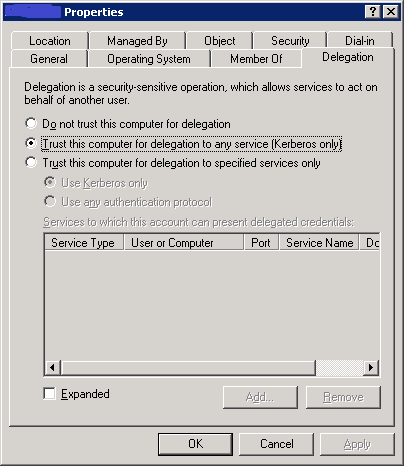
This is the delegation method. As Paul points out it’s a single setting in your active directory:
- Find the IIS server in the computers node of the “Active Directory users and Computers” console.
-
Click on the delegation tab, and select the second option:
- Create a ‘Cache’ directory in your IIS root folder
- Add the following to your web.config:
<appSettings>
<add key="WorkItemTrackingCacheRoot" value="C:path-to-web-rootCache"/>
</appSettings>
- Make sure your web.config contains:
<system.web>
<identity impersonate="true" />
</system.web>
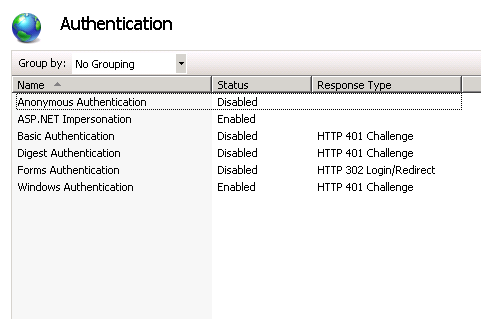
- Turn on Windows authentication and impersatonation and disable everything else in IIS authentication:
Solution 2
Another solution to avoid the steps above is to simply run your application under the TFS:8080 site, as a new application. The hop issue is then removed as you are running in the same context as the web service that your app is calling.
- Create a new app pool, use network identity.
- Make sure your application has anonymous authentication turned off
- Make sure it has windows authentication turned on.
- Add
<identity impersonate="true" />to the web config.
Method 2
I wonder if you’re hitting the old Double-Hop issue here?
All methods was sourced from stackoverflow.com or stackexchange.com, is licensed under cc by-sa 2.5, cc by-sa 3.0 and cc by-sa 4.0