I’m building an ASP.NET website – it’s a solution with a few projects, a data base and a web service. Everything worked fine, but last time I tried to run the project, I got the following error:
There was no endpoint listening at http://localhost:[number]/BooksWS.svc that could accept the
message. This is often caused by an incorrect address or SOAP action. See InnerException,
if present, for more details.
The inner exception says:
Unable to connect to the remote server
This error sort of came out of the blue, so I’m not sure what additional information I should provide. Does anyone have any idea why this could happen?
I suppose even a general answer could help, the only info I found about this error in the web concerned WCF.
Answers:
Thank you for visiting the Q&A section on Magenaut. Please note that all the answers may not help you solve the issue immediately. So please treat them as advisements. If you found the post helpful (or not), leave a comment & I’ll get back to you as soon as possible.
Method 1
go to webconfig page of your site, look for the tag endpoint, and check the port in the address attribute, maybe there was a change in the port number
Method 2
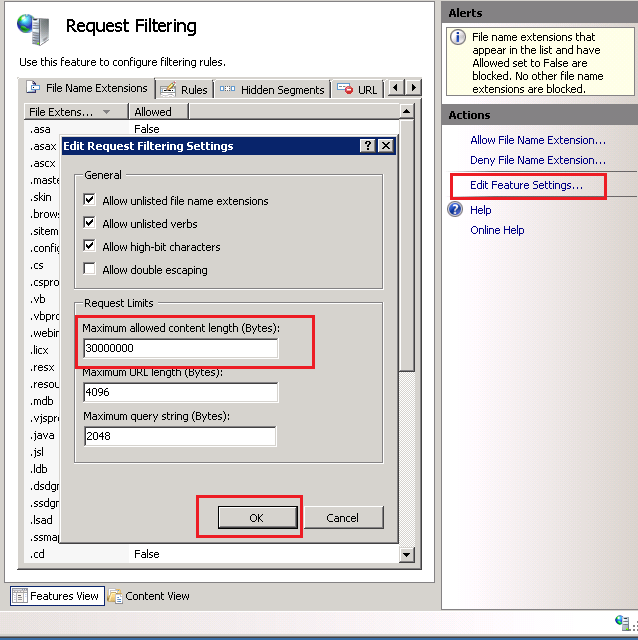
Another case I just had – when the request size is bigger than the request size set in IIS as a limit, then you can get that error too.
Check the IIS request limit and increase it if it’s lower than you need.
Here is how you can check and change the IIS request limit:
- Open the IIS
- Click your site and/or your mapped application
- Click on Feature view and click Request Filtering
- Click – Edit Feature Settings.
I just found also another thread in stack
IIS 7.5 hosted WCF service throws EndpointNotFoundException with 404 only for large requests
Method 3
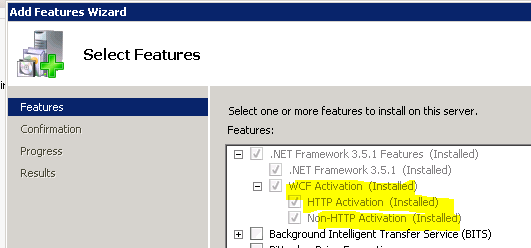
An another possible case is make sure that you have installed WCF Activation feature.
Go to Server Manager > Features > Add Features
Method 4
Short answer but did you have Skype open? This interferes specifically with ASP.NET by default (and localhosts in general) using port:80.
In Windows: Go to Tools -> Options -> Advanced -> Connection and uncheck the box “use port 80 and 443 as alternatives for incoming connections”.
Method 5
Try this:
- Delete the service instance.
- Create a new instance of the service.
Sometimes the port is changed and generated error.
Method 6
I tried a bunch of these ideas to get HTTPS working, but the key for me was adding the protocol mapping. Here’s what my server config file looks like, this works for both HTTP and HTTPS client connections:
  <system.serviceModel>
    <protocolMapping>
      <add scheme="https" binding="wsHttpBinding" bindingConfiguration="TransportSecurityBinding" />
    </protocolMapping>
    <services>
      <service name="FeatureService" behaviorConfiguration="HttpsBehavior">
        <endpoint address="soap" binding="wsHttpBinding" contract="MyServices.IFeature" bindingConfiguration="TransportSecurityBinding" />
        <endpoint address="mex" binding="mexHttpBinding" contract="IMetadataExchange" />
      </service>
    </services>
    <behaviors>
      <serviceBehaviors>
        <behavior name="HttpsBehavior">
          <serviceMetadata httpGetEnabled="true" httpsGetEnabled="true" />
          <serviceDebug includeExceptionDetailInFaults="true" />
        </behavior>
        <behavior name="">
          <serviceMetadata httpGetEnabled="true" httpsGetEnabled="true" />
          <serviceDebug includeExceptionDetailInFaults="false" />
        </behavior>
      </serviceBehaviors>
    </behaviors>
    <bindings>
      <wsHttpBinding>
        <binding name="TransportSecurityBinding" maxReceivedMessageSize="2147483647">
          <security mode="Transport">
            <transport clientCredentialType="None" />
          </security>
        </binding>
      </wsHttpBinding>
    </bindings>
    <serviceHostingEnvironment multipleSiteBindingsEnabled="true" />
  </system.serviceModel>
Method 7
I had this problem when I was trying to call a WCF service hosted in a new server from a windows application from my local. I was getting same error message and at end had this “No connection could be made because the target machine actively refused it 127.0.0.1:8888”. I donot know whether I am wrong or correct but I feel whenever the server was getting request from my windows application it is routing to something else. So I did some reading and added below in Web.config of service host project. After that everything worked like a magic.
<system.net>
    <defaultProxy enabled="false">
    </defaultProxy>
</system.net>
Method 8
If you are using custom binding, please make sure that you are putting the same name for both custom binding (Server and Client)in config files
<bindings>
<customBinding>
 <binding name="BufferedHttpServerNoAuth" closeTimeout="00:10:00" openTimeout="00:10:00" receiveTimeout="00:10:00" sendTimeout="00:10:00">
          <gzipMessageEncoding innerMessageEncoding="textMessageEncoding" MaxArrayLength="10485760" MaxBytesPerRead="31457280" MaxStringContentLength="102400000" />
          <httpsTransport hostNameComparisonMode="StrongWildcard" manualAddressing="False" maxReceivedMessageSize="31457280" authenticationScheme="Anonymous" bypassProxyOnLocal="True" realm="" useDefaultWebProxy="False" />
</binding>
</customBinding>
</bindings>
the binding name “BufferedHttpServerNoAuth” should be same in both.
Hope this would help someone
Method 9
This is ancient history but I just ran into this issue and the fix for me was recycling the application pool of the website in IIS. Easy fix, for once.
Method 10
I changed my website and app bindings to a new port and it worked for me. This error might occur because the port the website uses is not available. Hence sometimes the problem is solved by simply restarting the machine
-Edit-
Alternative (and easier) solution:reference
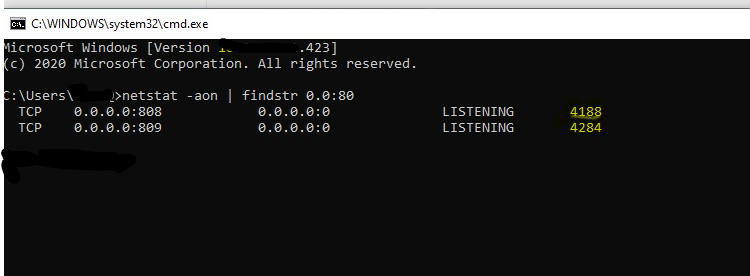
- Get PID of process which is using the port
CMD command-
netstat -aon | findstr 0.0:80
- Use the PID to get process name –
tasklist /FI “PID eq ”
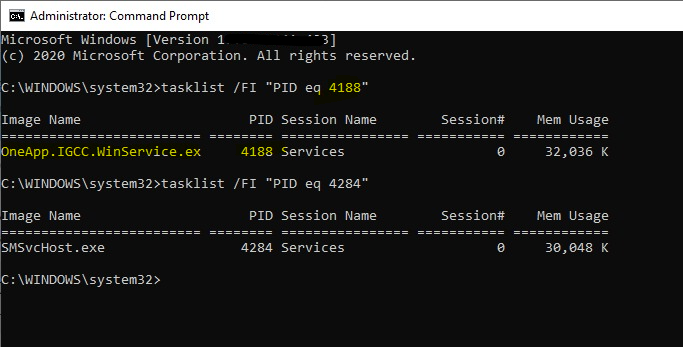
- Open task manager, find this process and stop it.
(Note- Make sure you do not stop Net.tcp services)
Method 11
I solved it by passing the binding with endpoint.
“http://abcd.net/SampleFileService.svc/basicHttpWSSecurity“
Method 12
Click on Service which you have created right click on it then select update references after this rebuild the application it will work
All methods was sourced from stackoverflow.com or stackexchange.com, is licensed under cc by-sa 2.5, cc by-sa 3.0 and cc by-sa 4.0