So after some tries I figured out I needed a driver for this. I’ve installed the Components from the links below. But I still can’t find any SQL references when I try to add them? I’m wondering if anyone would know the reason for this? I just started with asp.net. I’ve found several other questions regarding code for connecting but I can’t find anyone who’ve had trouble with the Connector/components before?
MYSQL connector
http://dev.mysql.com/downloads/connector/net/5.0.html
Microsoft Data Access Components (MDAC) 2.8
http://www.microsoft.com/downloads/details.aspx?FamilyID=6c050fe3-c795-4b7d-b037-185d0506396c&displaylang=en
I am using Visual Studio.
Answers:
Thank you for visiting the Q&A section on Magenaut. Please note that all the answers may not help you solve the issue immediately. So please treat them as advisements. If you found the post helpful (or not), leave a comment & I’ll get back to you as soon as possible.
Method 1
Right click on References, then select “Add Reference”. Browse and select Mysql.Data.dll.
The dll should be found in the installation directory of the connector you downloaded.
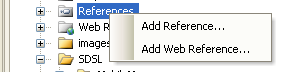
Finally, in code:
using MySql.Data.MySqlClient;
And, sample connection:
MySqlConnection connection = new MySqlConnection("Database=database_name;Data Source=server_domain_or_ip;User Id=mysql_user;Password=mysql_password");
connection.Open();

MySqlCommand command =  connection.CreateCommand();
command.CommandText = "select * from mytable";
MySqlDataReader reader = command.ExecuteReader();
while (reader.Read())
{
  //reader.GetString(0)
  //reader["column_name"].ToString()
}
reader.Close();
Method 2
You can browse to the DLL and add a reference.
All methods was sourced from stackoverflow.com or stackexchange.com, is licensed under cc by-sa 2.5, cc by-sa 3.0 and cc by-sa 4.0