I get the following error when I start my asp net mvc 4 application:
Could not load file or assembly 'DotNetOpenAuth.Core, Version=4.0.0.0,
Culture=neutral, PublicKeyToken=2780ccd10d57b246' or one of its dependencies.
The system cannot find the file specified
This is the error log
Assembly manager loaded from:  C:WindowsMicrosoft.NETFrameworkv4.0.30319clr.dll
Running under executable  C:WindowsSysWOW64inetsrvw3wp.exe
--- A detailed error log follows.

=== Pre-bind state information ===
LOG: User = notebookGuilherme
LOG: DisplayName = DotNetOpenAuth.Core, Version=4.0.0.0, Culture=neutral, PublicKeyToken=2780ccd10d57b246
 (Fully-specified)
LOG: Appbase = file:///C:/Users/Guilherme/Documents/Visual Studio 2012/Projects/Gedi/Gedi/
LOG: Initial PrivatePath = C:UsersGuilhermeDocumentsVisual Studio 2012ProjectsGediGedibin
Calling assembly : Microsoft.Web.WebPages.OAuth, Version=2.0.0.0, Culture=neutral, PublicKeyToken=31bf3856ad364e35.
===
LOG: This bind starts in default load context.
LOG: Using application configuration file: C:UsersGuilhermeDocumentsVisual Studio 2012ProjectsGediGediweb.config
LOG: Using host configuration file: C:WindowsMicrosoft.NETFrameworkv4.0.30319aspnet.config
LOG: Using machine configuration file from C:WindowsMicrosoft.NETFrameworkv4.0.30319configmachine.config.
LOG: Post-policy reference: DotNetOpenAuth.Core, Version=4.0.0.0, Culture=neutral, PublicKeyToken=2780ccd10d57b246
LOG: Attempting download of new URL file:///C:/Windows/Microsoft.NET/Framework/v4.0.30319/Temporary ASP.NET Files/root/2635bb56/154c3fbb/DotNetOpenAuth.Core.DLL.
LOG: Attempting download of new URL file:///C:/Windows/Microsoft.NET/Framework/v4.0.30319/Temporary ASP.NET Files/root/2635bb56/154c3fbb/DotNetOpenAuth.Core/DotNetOpenAuth.Core.DLL.
LOG: Attempting download of new URL file:///C:/Users/Guilherme/Documents/Visual Studio 2012/Projects/Gedi/Gedi/bin/DotNetOpenAuth.Core.DLL.
LOG: Attempting download of new URL file:///C:/Users/Guilherme/Documents/Visual Studio 2012/Projects/Gedi/Gedi/bin/DotNetOpenAuth.Core/DotNetOpenAuth.Core.DLL.
LOG: Attempting download of new URL file:///C:/Windows/Microsoft.NET/Framework/v4.0.30319/Temporary ASP.NET Files/root/2635bb56/154c3fbb/DotNetOpenAuth.Core.EXE.
LOG: Attempting download of new URL file:///C:/Windows/Microsoft.NET/Framework/v4.0.30319/Temporary ASP.NET Files/root/2635bb56/154c3fbb/DotNetOpenAuth.Core/DotNetOpenAuth.Core.EXE.
LOG: Attempting download of new URL file:///C:/Users/Guilherme/Documents/Visual Studio 2012/Projects/Gedi/Gedi/bin/DotNetOpenAuth.Core.EXE.
LOG: Attempting download of new URL file:///C:/Users/Guilherme/Documents/Visual Studio 2012/Projects/Gedi/Gedi/bin/DotNetOpenAuth.Core/DotNetOpenAuth.Core.EXE.
I have already remove all references from DotNetOpenAuth with packager manager. Also I checked by my self references for every Auth assembly I had in my project and there is none.
This is my packages.config
<packages>
  <package id="AutoMapper" version="2.2.0" targetFramework="net45" />
  <package id="EntityFramework" version="5.0.0" targetFramework="net45" />
  <package id="jQuery" version="1.7.1.1" targetFramework="net45" />
  <package id="jQuery.UI.Combined" version="1.8.20.1" targetFramework="net45" />
  <package id="jQuery.Validation" version="1.9.0.1" targetFramework="net45" />
  <package id="knockoutjs" version="2.1.0" targetFramework="net45" />
  <package id="Microsoft.AspNet.Mvc" version="4.0.20710.0" targetFramework="net45" />
  <package id="Microsoft.AspNet.Razor" version="2.0.20710.0" targetFramework="net45" />
  <package id="Microsoft.AspNet.Web.Optimization" version="1.0.0" targetFramework="net45" />
  <package id="Microsoft.AspNet.WebApi" version="4.0.20710.0" targetFramework="net45" />
  <package id="Microsoft.AspNet.WebApi.Client" version="4.0.20710.0" targetFramework="net45" />
  <package id="Microsoft.AspNet.WebApi.Core" version="4.0.20710.0" targetFramework="net45" />
  <package id="Microsoft.AspNet.WebApi.WebHost" version="4.0.20710.0" targetFramework="net45" />
  <package id="Microsoft.AspNet.WebPages" version="2.0.20710.0" targetFramework="net45" />
  <package id="Microsoft.AspNet.WebPages.Data" version="2.0.20710.0" targetFramework="net45" />
  <package id="Microsoft.AspNet.WebPages.WebData" version="2.0.20710.0" targetFramework="net45" />
  <package id="Microsoft.jQuery.Unobtrusive.Ajax" version="2.0.20710.0" targetFramework="net45" />
  <package id="Microsoft.jQuery.Unobtrusive.Validation" version="2.0.20710.0" targetFramework="net45" />
  <package id="Microsoft.Net.Http" version="2.0.20710.0" targetFramework="net45" />
  <package id="Microsoft.Web.Infrastructure" version="1.0.0.0" targetFramework="net45" />
  <package id="Modernizr" version="2.5.3" targetFramework="net45" />
  <package id="Newtonsoft.Json" version="4.5.11" targetFramework="net45" />
  <package id="Repository" version="1.0.2.12" targetFramework="net45" />
  <package id="RestSharp" version="103.4" targetFramework="net45" />
  <package id="WebGrease" version="1.1.0" targetFramework="net45" />
</packages>
Thanks
Answers:
Thank you for visiting the Q&A section on Magenaut. Please note that all the answers may not help you solve the issue immediately. So please treat them as advisements. If you found the post helpful (or not), leave a comment & I’ll get back to you as soon as possible.
Method 1
If you don’t want use OAuth, remove references: both the WebPages OAuth DLL (I think it’s Microsoft.Web.WebPages.OAuth.dll 1) and DotNetOpenAuth DLLs.
1: You can find the filename in Calling assembly. So, removing all calling assembly of DotNetOpenAuth.Core should work for you. This approach should work for other unused missing references.
Method 2
I had similar problem. It was really strange as the project was running OK a day before.
Removing obj and bin folders from the project folder, cleaning the solution and rebuilding it worked.
Hope that helps.
Method 3
I’ve seen this happen when deploying an MVC application as bin deploy. When you right-click on a project and select Add deployable dependencies VS will add the references to Oauth if you check the box next to ASP .NET Webpages with Razor syntax.
To fix this, delete the _bin_deployableAssemblies folder, and your application’s bin folder and then clean and rebuild your application and it will work again.
Method 4
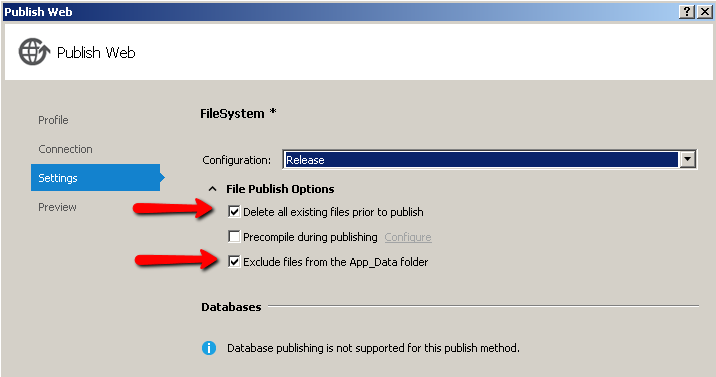
In my case the MVC4 application was running fine in the VS2012 debugger, but I was getting the “Could not load file or assembly ‘DotNetOpenAuth.Core’” error when I publish the application on the server.
Checking the “Delete all existing files prior to publish” checkbox on the settings tab of Publish Web window solved the issue.
Method 5
I solved the problem by installing the package using Nuget
Install-Package Microsoft.AspNet.WebPages.OAuth
Method 6
Just select “Remove additional files at destination” on publish settings.
This works for me
Method 7
By installing the following two packages I resolved this problem on VS2012 Professional Update 4 RC:
-
Open the Package Manager Console from the Menu:
Tools| Library Package Manage | Package Manager Console
- Install-Package DotNetOpenAuth.AspNet
- Install-Package Microsoft.AspNet.WebHelpers
Hope this helps for you!!!
Method 8
Try doing a global solution search (ctrl+shift+f if you haven’t changed it) for the value ‘2780ccd10d57b246’. I’m guessing you’ll find it in your web.config.
Method 9
for me, it worked like the following, using packager manager console, I’ve uninstall the packages, by the following order sequence and I re installed it, it solved my issue..
Uninstalling
Uninstall-Package Microsoft.AspNet.WebPages.OAuth
Uninstall-Package DotNetOpenAuth.AspNet
Uninstall-Package DotNetOpenAuth.OpenId.RelyingParty
Uninstall-Package DotNetOpenAuth.OpenId.Core
Uninstall-Package DotNetOpenAuth.OAuth.Consumer
Uninstall-Package DotNetOpenAuth.OAuth.Core
Uninstall-Package DotNetOpenAuth.core
Build, If you are not using the above packages then this should solve the problem, to Install the above again in case you need it, do the following..
Reinstall
install-Package DotNetOpenAuth.AspNet
install-Package Microsoft.AspNet.WebPages.OAuth
install-Package DotNetOpenAuth.OpenId.RelyingParty
install-Package DotNetOpenAuth.OpenId.Core
install-Package DotNetOpenAuth.OAuth.Consumer
install-Package DotNetOpenAuth.OAuth.Core
install-Package DotNetOpenAuth.core
recommanded:
- go to the bin folder of the project, clear it
- when to publish to the IIS, delete the virtual directory and assign the website again to the IIS, since I faced that issue of having cash in the server which was making the problem…
Method 10
One more solution option is to have assembly dependency as follows:
<dependentAssembly>
  <assemblyIdentity name="DotNetOpenAuth.AspNet"
                    publicKeyToken="2780ccd10d57b246"
                    culture="neutral" />
  <bindingRedirect oldVersion="0.0.0.0-4.3.0.0" newVersion="4.3.0.0" />
</dependentAssembly>
<dependentAssembly>
  <assemblyIdentity name="DotNetOpenAuth.Core"
                    publicKeyToken="2780ccd10d57b246"
                    culture="neutral" />
  <bindingRedirect oldVersion="0.0.0.0-4.3.0.0" newVersion="4.3.0.0" />
</dependentAssembly>
Method 11
I do not have the reputation to comment but I can verify that I had this exact problem and Jack gave the correct solution for me. I had recently pressed Add Service Reference and it broke the program with the above error message.
Deleting the _bin_deployableAssemblies folder, and your application’s bin folder and then clean and rebuild your application made it work again.
Method 12
In case this helps anyone – I was unable to uninstall the DotNetOpenAuth components through Nuget, so I resolved this error by deleting them from the references list directly and then re-installing dotnetopenauth through nuget.
Method 13
I was getting this error as well, but with an ASP.NET MVC 5 project. I solved it by installing the Package DotNetOpenAuth.Mvc5 and calling AsActionResultMvc5() instead of AsActionResult()
Method 14
For me helped adding to csproj file the following section:
<PropertyGroup>
   <PostSharpHostConfigurationFile>web.config</PostSharpHostConfigurationFile>
</PropertyGroup>
Method 15
I had the same problem here.
My published web.config didn’t have the lines:
  <dependentAssembly>
    <assemblyIdentity name="DotNetOpenAuth.Core" publicKeyToken="2780ccd10d57b246" />
    <bindingRedirect oldVersion="1.0.0.0-4.1.0.0" newVersion="4.1.0.0" />
  </dependentAssembly>
Just added and it worked.
Method 16
Simply remove BIN folder from wwwroot, and publish again.
Method 17
I was able to resolved it on my end by removing Microsoft.AspNet.Membership.OpenAuth
Method 18
I run into this issue when working on updating all of ours libraries. this link helped me fix this issue. https://www.devexpress.com/Support/Center/Question/Details/Q554890/the-could-not-load-file-or-assembly-dotnetopenauth-core-version-4-0-0-0-error-message-is .
Specially I added these binding redirects to my web.config file.
      <dependentAssembly>
    <assemblyIdentity name="DotNetOpenAuth.Core" publicKeyToken="2780CCD10D57B246" culture="neutral" />
    <bindingRedirect oldVersion="1.0.0.0-4.1.0.0" newVersion="4.3.0.0" />
  </dependentAssembly>
  <dependentAssembly>
    <assemblyIdentity name="DotNetOpenAuth.AspNet" publicKeyToken="2780CCD10D57B246" culture="neutral" />
    <bindingRedirect oldVersion="1.0.0.0-4.1.0.0" newVersion="4.3.0.0" />
  </dependentAssembly>
Method 19
Remove any Microsoft.Web.WebPages.OAuth dependencies everywhere in your projects.
All methods was sourced from stackoverflow.com or stackexchange.com, is licensed under cc by-sa 2.5, cc by-sa 3.0 and cc by-sa 4.0