Working on a new site design in asp.net with master pages. Header of the page is a 35px tall “menu bar” which contains an asp menu control rendered as an unordered list.
The selected menu item is styled with a differenct colored background and 2px border around the left top and right sides. The bottom of the selected menu item should line up with the bottom of the menu bar so the selected “tab” looks as if it flows into the content beneath. Looks fine in firefox and IE but in chrome the “tab” seems to be 1 pixel higher than the bottom of the menu bar.
Just wondering if there is some sort of bug I dont know about.
I realize that you will most likely need code to help with this problem so ill post up the css as soon as possible.
EDIT:
here is the css for the menu…
div.hideSkiplink
{
    width:40%;
    float:right;
    height:35px;
}

div.menu
{
    padding: 0px 0px 0px 0px;
    display:inline;
}

div.menu ul
{
    list-style: none;
}

div.menu ul li
{
    margin:0px 4px 0px 0px;
}

div.menu ul li a, div.menu ul li a:visited
{
  color: #ffffff;
  display: block;
  margin-top:0px;
  line-height: 17px;
  padding: 1px 20px;
  text-decoration: none;
  white-space: nowrap;
}

div.menu ul li a:hover
{
  color: #ffffff;
  text-decoration: none;
  border-top: 1px solid #fff;
  border-right: 1px solid #fff;
  border-bottom: none;
  border-left: 1px solid #fff;
}


div.menu ul li a:active
{
 background:#ffffff !important;
 border-top:2px solid #a10000;
 border-right:2px solid #a10000;
 border-bottom: none;
 border-left:2px solid #a10000;
 color: #000000 !important;
 font-weight:bold;

}


div.menu ul a.selected
{
  color: #000000 !important;
  font-weight:bold;
}

div.menu ul li.selected
{
 background:#ffffff !important;
 border-top:2px solid #a10000;
 border-right:2px solid #a10000;
 border-bottom: none;
 border-left:2px solid #a10000;
}

div.menu ul li.selected a:hover
{
  border: none;
}
The selected classes are added to the li and a elements via jquery…
Here is a screenshot of the problem…
The chrome example is on the top and u can see 1px of red border below the tab.
On the bottom is the firefox image where everything looks OK.
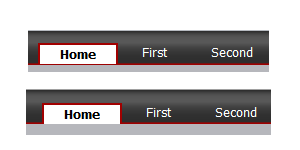
EDIT:
After playing around with this a bit more, I have discovered that it is actually the “header” div itself that is growing by 1px in chrome… This seems very strange to me.
Answers:
Thank you for visiting the Q&A section on Magenaut. Please note that all the answers may not help you solve the issue immediately. So please treat them as advisements. If you found the post helpful (or not), leave a comment & I’ll get back to you as soon as possible.
Method 1
None of these answers solve the problem.
Set:
line-height: 1;
padding-top: 2px;
Because webkit & mozilla rendering engines implement line height differently do not use this it to manipulate measurement for single line items.
For items like menus, buttons and especially really small notification bubbles, reset the line-height to normal and use padding or margins to make them behave the same.
Here’s a JSFiddle illustrating this issue:
http://jsfiddle.net/mahalie/BSMZe/6/
Method 2
I just had this same problem, and I solved it by explicitly setting the line height and font size in <li> element that contains the <a> elements that are the tab links. Hope this helps someone in the future.
(edited html links)
Method 3
This is a common issue I run into on some of my sites… when it’s IE having the pixel difference, I can usually just add a pixel of margin/padding in my IE stylesheet. But when it’s Safari/FireFox/Chrome, I usually just live with the pixel and make the FireFox crowd happy (for now—until Webkit rules the web!), even though it looks a little strange in the opposite browser.
However, you might also want to check out the line-height values (or add a value, if there isn’t one already) on the containing ul or div element. Tinkering with that allowed me to get the padding exactly the same in FireFox, Chrome and IE.
Method 4
Here is the solution that I found in this page :
   button::-moz-focus-inner {
        border: 0;
        padding: 0;
    }
Method 5
I have been fighting with this problem for a little while now, and almost gave up on the pixel. However it’s come to me in one of those eurika moments: if you get the tab lined up perfectly in Chrome (which leaves an overlap in Firefox), set the ul height to the height of the li (including any padding), you can remove the offending pixels in Firefox by setting overflow to hidden on the ul.
Hope this helps someone out there!
Method 6
I had the same problem with my main tabs displaying them in Chrome, they were one pixel off in height and there for leaving an ugly slit between the tabs and the white background of the mainframe.
I solved the problem by giving the tab div an upper margin with a floated value. First tried margin-top:0.1px nothing then 0.2 etc. until with an upper margin of 0.5 everything displayed fine over all the major browsers.
Method 7
I had the exact same issue, turns out chrome had zoom set to 110% and that was breaking the menu. I noticed it when I fired up chrome on another computer and it looked fine.
Method 8
I had a similar issue and it was due to using ems for font sizes, margins and padding. The browsers were rounding the ems differently and causing intermittent off-by-1px issues all over the site depending on the length of content. Once I changed everything to pixel measurements my problems went away.
Hope this helps!
Method 9
I’ve come across this problem in relation to text with transparent backgrounds.
I couldn’t get any of the above solutions to work consistently so I ended up using a webkit hack to give those browsers a different line-height. Like so:
@media screen and (-webkit-min-device-pixel-ratio:0) {
    .your-class {
        line-height:20px;
    }
}
Eww, hacky! I try to avoid CSS hacks but I just couldn’t find another way. I hope that helps someone.
Method 10
I managed to solve this issue with a web font I was working with by setting the following:
.some-class {
    display: inline-table;
    vertical-align: middle;
}
Granted it’s a bit hacky but does the job. It does mean though you will have target styles specifically for Internet Explorer
Method 11
try using display:block with the a element”
eg…
<li><a href="">Link</a></li>
css:
li{line-height:20px;}/*example only*/

li a{display:block;}
Method 12
I guess this is the only way , use different styles for different browsers the problematic sections
/* FOR MOZILLA */
@-moz-document url-prefix() {
.selector {
 color:lime;
}
}
/* FOR CHROME */
@media screen and (-webkit-min-device-pixel-ratio:0) {
/* Safari and Chrome, if Chrome rule needed */
.container {
 margin-top:100px;
}
/* Safari 5+ ONLY */
::i-block-chrome, .container {
 margin-top:0px;
}``
Method 13
if line-height is used for vertically aligning text in a container (which it shouldn’t), then consistent behaviour across browsers can be enforced like this:
line-height: 75px
height: 75px
overflow: hidden
Method 14
you can also make different css for mozila:
-moz-height:2em;
one can also use:
@-moz-document url-prefix{
    // your css
}
Method 15
It’s important to realize that web pages will always render differently in different browsers. Acheiving pixel perfection is futile, and nowadays I try to explain to my clients what kind of cost is involved to make every browser render the site exactly alike. More often now, they understand that IE6 and FF4 won’t ever render any page the same way. We must try to make our clients understand and embrace the dynamics of the web.
Progressive enhancement and graceful degradation. Peace.
Method 16
I might be a beginner in CSS, but I found the same problem in W3Cschools.com, in one of their examples.
http://www.w3schools.com/css/tryit.asp?filename=trycss_sprites_hover_nav
this example is about image sprites. You can see in this example, in Chrome, the home icon and prev icon have the 1px divider line, which is not the case in Firefox.
It seems that in Chrome the pixel count is 1pixel different to that of Firefox.
All methods was sourced from stackoverflow.com or stackexchange.com, is licensed under cc by-sa 2.5, cc by-sa 3.0 and cc by-sa 4.0