My website has complete https and its using outer jquery resource which is http.
In IE 8, when I’m redirecting the site it giving me
“do you want to view only the webpage content that was delivered securely” warning How to avoid this?
Is there any script available which solve this problem?
Thanks in Advance.
Answers:
Thank you for visiting the Q&A section on Magenaut. Please note that all the answers may not help you solve the issue immediately. So please treat them as advisements. If you found the post helpful (or not), leave a comment & I’ll get back to you as soon as possible.
Method 1
There seem to be two possible problem areas and your post doesn’t make clear which is the issue:
- You are referencing a jquery script file hosted on another site which is not secure.
As JamWaffles said, you should simply host a copy of the jquery file on your own site so it can be accessed using https. See this answer for details: https://stackoverflow.com/a/1458356/773798
Or …
- You are redirecting from a secure to an unsecure site.
I don’t think this is what’s causing the problem, because it will generate a different message, but for details on how to redirect from a secure to an unsecure page, see this answer: https://stackoverflow.com/a/3784676/773798
Method 2
it is a setting on Internet Options – Advance , once u uncheck “Warn if changing between secure and unsecure mode.” u wont get the message.
Method 3
Check and Change your Internet options In IE.
How ever u needed change like that.First Use Google it will be better.
http://blogs.msdn.com/b/ieinternals/archive/2009/06/22/9797918.aspx
Hope this may helpful…
Method 4
We cannot bypass the security alert using any javascript or jquery, because it is concern to security.
Method 5
Please refer to link below.
Solution to disable the https alert
Method 6
This may not be useful for you but to your website users will benefit from it:
Disabling “Do you want to view only the webpage content that was delivered securely?” in IE 8
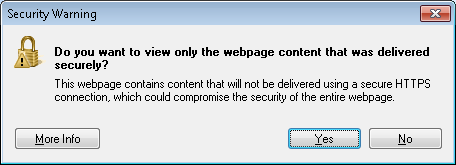
Follow the steps as shown:
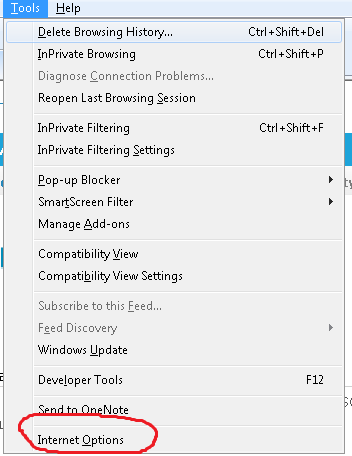
Go to Tools -> Internet options
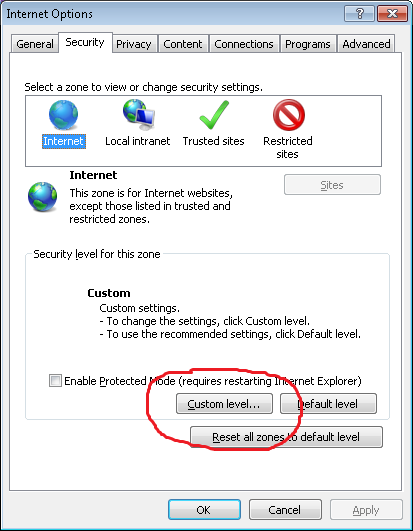
Go to Security tab -> Internet -> Custom level
In the Security settings pop up enable Display mixed content
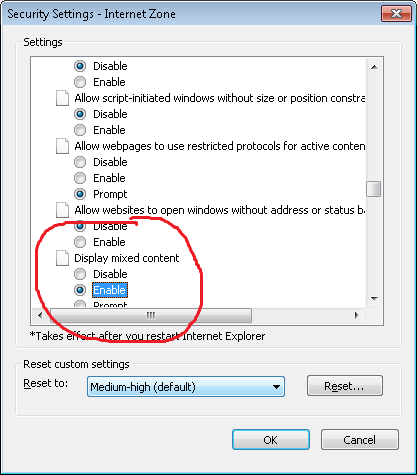
Repeat these steps for Local intranet and Trusted sites sections
All methods was sourced from stackoverflow.com or stackexchange.com, is licensed under cc by-sa 2.5, cc by-sa 3.0 and cc by-sa 4.0