I am trying to build an ASP.NET MVC 5 Web Application which has a MyDatabase.mdf file in the App_Data folder. I have SQL Server 2014 Express installed with a LocalDb instance. I can edit the database tables using the Server Explorer, however when I debug the application and go to a page where the database is needed I get the following error.
A network-related or instance-specific error occurred while establishing a connection to SQL Server. The server was not found or was not accessible. Verify that the instance name is correct and that SQL Server is configured to allow remote connections. (provider: SQL Network Interfaces, error: 50 – Local Database Runtime error occurred. Cannot create an automatic instance. See the Windows Application event log for error details.
So I looked in the Event Viewer under Application and only see one Warning over and over again.
The directory specified for caching compressed content C:UsersUser1AppDataLocalTempiisexpressIIS Temporary Compressed FilesClr4IntegratedAppPool is invalid. Static compression is being disabled.
So I tried rebooting the server, still no go. Same error 50 as before.
I have created an class under Models where I have a class called Post.
namespace MyApplication.Models
{
    public class Post
    {
        public int Id { get; set; }
        public string Title { get; set; }
        public string Content { get; set; }
    }

    public class MyDatabase : DbContext
    {
        public DbSet<Post> Posts { get; set; }
    }
}
I also have a Controller setup to list the posts from MyDatabase.
namespace MyApplication.Controllers
{
    public class PostsController : Controller
    {
        private MyDatabase db = new MyDatabase();

        // GET: Posts
        public ActionResult Index()
        {
            return View(db.Posts.ToList());
        }
    }
In my web.config file the connection string looks like this…
<connectionStrings>
    <add name="DefaultConnection"
         connectionString="Data Source=(LocalDB)v12.0;AttachDbFilename=|DataDirectory|MyDatabase.mdf;Integrated Security=True"
         providerName="System.Data.SqlClient" />
</connectionStrings>
I’ve tried the suggestion posted here but it didn’t work. Also tried this.
I also notice that the MyDatabase instance gets disconnected after I start running the application. If I refresh the database using Server Explorer in Visual Studio I can view the tables.
How is it that I can connect to the database and edit it within Visual Studio 2013 but when I debug the application it cannot connect to the database?
Answers:
Thank you for visiting the Q&A section on Magenaut. Please note that all the answers may not help you solve the issue immediately. So please treat them as advisements. If you found the post helpful (or not), leave a comment & I’ll get back to you as soon as possible.
Method 1
Breaking Changes to LocalDB: Applies to SQL 2014; take a look over this article and try to use (localdb)mssqllocaldb as server name to connect to the LocalDB automatic instance, for example:
<connectionStrings>
  <add name="ProductsContext" connectionString="Data Source=(localdb)mssqllocaldb;
  ...
The article also mentions the use of 2012 SSMS to connect to the 2014 LocalDB. Which leads me to believe that you might have multiple versions of SQL installed – which leads me to point out this SO answer that suggests changing the default name of your LocalDB “instance” to avoid other version mismatch issues that might arise going forward; mentioned not as source of issue, but to raise awareness of potential clashes that multiple SQL version installed on a single dev machine might lead to … and something to get in the habit of in order to avoid some.
Another thing worth mentioning – if you’ve gotten your instance in an unusable state due to tinkering with it to try and fix this problem, then it might be worth starting over – uninstall, reinstall – then try using the mssqllocaldb value instead of v12.0 and see if that corrects your issue.
Method 2
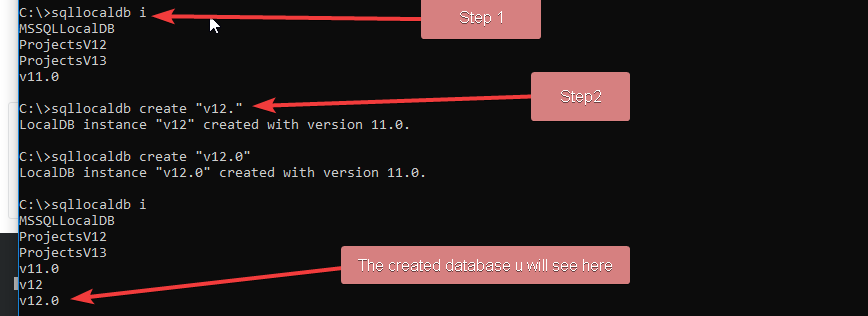
Running this:
sqllocaldb create “v12.0”
From cmd prompt solved this for me…
Method 3
I usually fix this errore following this msdn blog post Using LocalDB with Full IIS
This requires editing applicationHost.config file which is usually located in C:WindowsSystem32inetsrvconfig. Following the instructions from KB 2547655 we should enable both flags for Application Pool ASP.NET v4.0, like this:
<add name="ASP.NET v4.0" autoStart="true" managedRuntimeVersion="v4.0"     managedPipelineMode="Integrated">
    <processModel identityType="ApplicationPoolIdentity" loadUserProfile="true" setProfileEnvironment="true" />
</add>
Method 4
To begin – there are 4 issues that could be causing the common LocalDb SqlExpress Sql Server connectivity errors SQL Network Interfaces, error: 50 - Local Database Runtime error occurred, before you begin you need to rename the v11 or v12 to (localdb)mssqllocaldb
Possible Issues
- You don’t have the services running
- You don’t have the firelwall ports here
configured - Your install has and issue/corrupt (the steps below help give you a nice clean start)
- You did not rename the V11 or 12 to mssqllocaldb
 \ rename the conn string from v12.0 to MSSQLLocalDB -like so->
 `<connectionStrings>
      <add name="ProductsContext" connectionString="Data Source= (localdb)mssqllocaldb;
      ...`
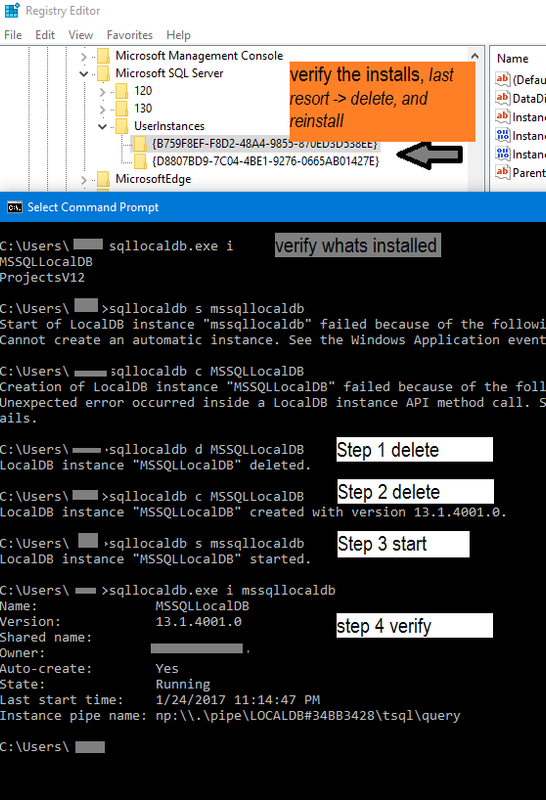
I found that the simplest is to do the below – I have attached the pics and steps for help.
First verify which instance you have installed, you can do this by checking the registry& by running cmd
 1. `cmd> Sqllocaldb.exe i`
 2. `cmd> Sqllocaldb.exe s "whicheverVersionYouWantFromListBefore"`
if this step fails, you can delete with option `d` cmd> Sqllocaldb.exe d "someDb"
 3. `cmd> Sqllocaldb.exe c "createSomeNewDbIfyouWantDb"`
 4. `cmd> Sqllocaldb.exe start "createSomeNewDbIfyouWantDb"`
ADVANCED Trouble Shooting
Registryconfigurations
Edit 1, from requests & comments: Here are the Registry path for all versions, in a generic format to track down the registry
Paths
// SQL SERVER RECENT VERSIONS
HKEY_LOCAL_MACHINESOFTWAREMicrosoftMicrosoft SQL Server(instance-name)

// OLD SQL SERVER
HKEY_LOCAL_MACHINESYSTEMCurrentControlSetServicesMSSQLServer
HKEY_LOCAL_MACHINESOFTWAREMicrosoftMSSQLServer
// SQL SERVER 6.0 and above.

HKEY_LOCAL_MACHINESystemCurrentControlSetServicesMSDTC
HKEY_LOCAL_MACHINESYSTEMCurrentControlSetServicesSQLExecutive
// SQL SERVER 7.0 and above

HKEY_LOCAL_MACHINESYSTEMCurrentControlSetServicesSQLServerAgent
HKEY_LOCAL_MACHINESoftwareMicrosoftMicrosoft SQL Server 7
HKEY_LOCAL_MACHINESoftwareMicrosoftMSSQLServ65
Searching
SELECT registry_key, value_name, value_data
FROM sys.dm_server_registry
WHERE registry_key LIKE N'%SQLAgent%';
or Run this in SSMS Sql Management Studio, it will give a full list of all installs you have on the server
DECLARE     @SQL VARCHAR(MAX)
SET         @SQL = 'DECLARE @returnValue NVARCHAR(100)'
SELECT @SQL = @SQL + CHAR(13) + 'EXEC   master.dbo.xp_regread

 @rootkey      = N''HKEY_LOCAL_MACHINE'',
 @key          = N''SOFTWAREMicrosoftMicrosoft SQL Server' + RegPath + 'MSSQLServer'',
 @value_name   = N''DefaultData'',
 @value        = @returnValue OUTPUT;

 UPDATE #tempInstanceNames SET DefaultDataPath = @returnValue WHERE RegPath = ''' + RegPath + '''' + CHAR(13) FROM #tempInstanceNames

 -- now, with these results, you can search the reg for the values inside reg
 EXEC (@SQL)
 SELECT      InstanceName, RegPath, DefaultDataPath
 FROM        #tempInstanceNames
Trouble Shooting
Networkconfigurations
SELECT registry_key, value_name, value_data
FROM sys.dm_server_registry
WHERE registry_key LIKE N'%SuperSocketNetLib%';
Method 5
An instance might be corrupted or not updated properly.
Try these Commands:
C:>sqllocaldb stop MSSQLLocalDB
LocalDB instance "MSSQLLocalDB" stopped.

C:>sqllocaldb delete MSSQLLocalDB
LocalDB instance "MSSQLLocalDB" deleted.

C:>sqllocaldb create MSSQLLocalDB
LocalDB instance "MSSQLLocalDB" created with version 13.0.1601.5.

C:>sqllocaldb start MSSQLLocalDB
LocalDB instance "MSSQLLocalDB" started.
Method 6
maybe this error came because this version of Sql Server is not installed
connectionString="Data Source=(LocalDB)v12.0;....
and you don’t have to install it
the fastest fix is to change it to any installed version you have
in my case I change it from v12.0 to MSSQLLocalDB
Method 7
Final Solution for this problem is below :
- First make changes in applicationHost config file. replace below string setProfileEnvironment=”false” TO setProfileEnvironment=”true”
- In your database connection string add below attribute : Integrated Security = SSPI
Method 8
I ran into the same problem. My fix was changing
<parameter value="v12.0" />
to
<parameter value="mssqllocaldb" />
into the “app.config” file.
Method 9
All PLEASE note what Tyler said
Note that if you want to edit this file make sure you use a 64 bit text editor like notepad. If you use a 32 bit one like Notepad++ it will automatically edit a different copy of the file in SysWOW64 instead. Hours of my life I won’t get back
Method 10
In my case, we had several projects in one solution and had selected a different start project than in the package manager console when running the “Update-Database” Command with Code-First Migrations.
Make sure to select the proper start project.
Method 11
I have solved above problem Applying below steps
And after you made thses changes, do following changes in your web.config
<add name="DefaultConnection" connectionString="Data Source=(LocalDb)v12.0;AttachDbFilename=|DataDirectory|aspnet-Real-Time-Commenting-20170927122714.mdf;Initial Catalog=aspnet-Real-Time-Commenting-20170927122714;Integrated Security=true" providerName="System.Data.SqlClient" />
Method 12
My issue was that i had multiple versions of MS SQL express installed. I went to installation folder C:/ProgramFiles/MicrosoftSQL Server/ where i found
3 versions of it. I deleted 2 folders, and left only MSSQL13.SQLEXPRESS which solved the problem.
All methods was sourced from stackoverflow.com or stackexchange.com, is licensed under cc by-sa 2.5, cc by-sa 3.0 and cc by-sa 4.0