I’m trying to use Session to record the data of the 1st column of current row to be used in another Web From which will be opened using a LinkButton that is in the GridView.
Basically, if I click the LinkButton on the 1st row, the 1st column data of the 1st row will be copied to the next Web Form. But before I do that, I want to do a smaller scale experiment to test it. So instead for now I want the Session to copy the data into a TextBox in the same form.
For reference, here is the design of the GridView, most rows removed since they’re not relevant:
<asp:GridView ID="GridView1" runat="server" AutoGenerateColumns="False"
    BorderColor="Black" BorderStyle="Solid" BorderWidth="1px" Font-Names="Arial">
    <AlternatingRowStyle BackColor="#B7DBFF" />
    <Columns>

        <asp:BoundField DataField="caseticket" HeaderText="Ticket #" >
                <HeaderStyle BackColor="#000066" ForeColor="White" Wrap="False" width="10%"/>
                <ItemStyle Wrap="False" />
        </asp:BoundField>

        <asp:TemplateField ShowHeader="False">
            <HeaderStyle BackColor="#000066" ForeColor="White" Wrap="False" width="10%"/>
            <ItemTemplate>
                <asp:linkbutton ID="newLog" runat="server" onclick = "CaseLog_click" >Add Log </asp:linkbutton>
            </ItemTemplate>
        </asp:TemplateField>

    </Columns>
    <HeaderStyle BackColor="#000066" />
    <RowStyle HorizontalAlign="Center" />
</asp:GridView>
For the TemplateField is a LinkButton with a onclick property. With it, I created the sub:
Sub CaseLog_click(ByVal sender As Object, ByVal e As EventArgs)

    Session("ticket") = GridView1.SelectedRow.Cells(1).Text
    'Response.Redirect("~/CaseLog.aspx")  ==> will be using this to proceed to next Web Form
    TextBox1.Text = Session("ticket")    '==> For test use only.

End Sub
If I only kept the Response.Redirect("~/CaseLog.aspx") in the sub, the LinkButton can direct me to the next Web Form. But as it is now, during testing when I use the LinkButton I get an error on the session line of the sub.
Object reference not set to an instance of an object.
Is the code salvageable, or do I need to redo this?
Thanks.
Answers:
Thank you for visiting the Q&A section on Magenaut. Please note that all the answers may not help you solve the issue immediately. So please treat them as advisements. If you found the post helpful (or not), leave a comment & I’ll get back to you as soon as possible.
Method 1
It looks like the button event to select the row is not wired up.
I would use say this:
<asp:BoundField DataField="HotelName" HeaderText="HotelName" SortExpression="HotelName" />
<asp:ButtonField CommandName="Select"  HeaderText="Select" ShowHeader="True" Text="Button" />
Note CAREFULL how we put the CommandName=”Select” in above. If you don’t do this, then the selected row does not come though correctly to the click event you have.
You could try the select command as per above on your link button, but I would just use the above. Now, hightlight the grid in the form desinger. On the properity sheet, go to events, and double click on the SelectedIndex Change event. So, your buttion is not changing the selected index correctly.
The code stub will look like this:
 Protected Sub GridView1_SelectedIndexChanged(sender As Object, e As EventArgs) Handles GridView1.SelectedIndexChanged

    Dim lgridrow As GridViewRow = Me.GridView1.SelectedRow

    Debug.Print("<" & lgridrow.Cells(0).Text & ">")
    Debug.Print("<" & lgridrow.Cells(3).Text & ">")

    Debug.Print("<" & Me.GridView1.SelectedRow.Cells(3).Text & ">")


End Sub
Note VERY careful how the event code stub is setup – the event args are different then yours.
So, you can try the CommandName=”Select” in your existing code, but if not, then try the above button field as opposed to your custom asp.net button you have. As it stands, it don’t look like your asp.net button is firing the row-changed event.
Edit and follow up:
Can I have extra buttons – run their own code?
Yes, you can. You can do this several ways (one is to pick up which button was clicked in the SelectedIndex change event.
Or, you can drop in extra buttons and use that event code stub.
So, in my example, lets add an extra button.
we now have this:
       <Columns>
            <asp:BoundField DataField="ID" HeaderText="ID" InsertVisible="False" ReadOnly="True" SortExpression="ID" />
            <asp:BoundField DataField="LastName" HeaderText="LastName" SortExpression="LastName" />
            <asp:BoundField DataField="FirstName" HeaderText="FirstName" SortExpression="FirstName" />
            <asp:BoundField DataField="HotelName" HeaderText="HotelName" SortExpression="HotelName" />
            <asp:ButtonField CommandName="Select"  HeaderText="Select" ShowHeader="True" Text="Button" />
            <asp:TemplateField>
                <ItemTemplate>
                    <asp:LinkButton ID="LinkButton1" runat="server"   OnClick="LinkButton1_Click"
                        CommandName="MySelect" CommandArgument  ="<%# Container.DisplayIndex %>"
                        style="background-color:gray;color:white;text-decoration:none;padding-left:6px;padding-right:6px"
                        text="Mybutton"></asp:LinkButton>
                </ItemTemplate>
            </asp:TemplateField>
        </Columns>
We thus have this:
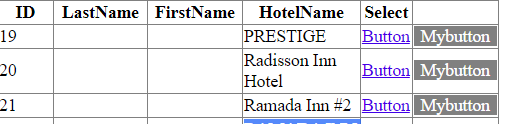
Now, we can attach/have button code for the extra button. But NOTE careful we did NOT use the built in SELECT for the command argument. The REASON is that if we have Command=select, then the selected index WILL fire, but AFTER our button code stub. That means we cannot use the selectedrow (too early).
So, what we do/did in above was have the CommandArguemnt PASS the selected row value – that value will pass ok, and thus we don’t care that the selected index event does not fire (and by CHANGING our command argument to NOT “select”, then in fact the selectedindexchange event DOES NOT fire.
As a result, we use the passed row in the command argument, and we have this for the button code:
Protected Sub LinkButton1_Click(sender As Object, e As EventArgs)

    Dim ixrow As Integer = sender.CommandArgument

    Debug.Print(Me.GridView1.Rows(ixrow).Cells(0).Text)

End Sub
And note while we are editing the markup, intel-sense will give a list of options when editing. Eg this:
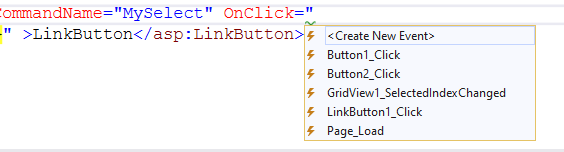
So, that gives us a chance to wire up (add) a standard click event). No selected index code stub is required (since the button would fire before selected index anyway). So we are now manually wiring up this event. We are NOT thus using the selectedindex change event – we don’t even need it.
So, now in our button stub, we are free to do anything we want – including jumping to another page
eg:
Protected Sub LinkButton1_Click(sender As Object, e As EventArgs)

    Dim ixrow As Integer = sender.CommandArgument

    Debug.Print(Me.GridView1.Rows(ixrow).Cells(0).Text)
    Session("HotelName") = Me.GridView1.Rows(ixrow).Cells(3)
    Response.Redirect("~/ShowHotelDetails.aspx")

End Sub
So, to add separate code buttons:
Don’t use selected index change event – you MIGHT still want it to run but it will run/fire AFTER your button code (so can’t use selectedrow – too early).
But, you do need Command=”myjunk” because without a command, then the command argument does not work. By passing the row index in commandargument, then we are free to grab data from the gridview as per above code via row index.
So, you can well dump the selected index change event. You just have to pass the row index, and work from that. The code stub can thus walk the dog, setup values in session, or even pass/make the url with parameters.
All methods was sourced from stackoverflow.com or stackexchange.com, is licensed under cc by-sa 2.5, cc by-sa 3.0 and cc by-sa 4.0