I have an ASP.NET Core API and a html-css-js client side. I try to send a post request to said API, but Firefox throws an error that the same origin policy forbids reading of external resource.
The Startup.cs looks like this:
public Startup(IConfiguration configuration)
{
    Configuration = configuration;
}

public IConfiguration Configuration { get; }

// This method gets called by the runtime. Use this method to add services to the container.
// For more information on how to configure your application, visit https://go.microsoft.com/fwlink/?LinkID=398940
public void ConfigureServices(IServiceCollection services)
{
    services.AddCors();
    services.AddControllers()
            .AddNewtonsoftJson(options =>
                   {
                       options.SerializerSettings.ReferenceLoopHandling = Newtonsoft.Json.ReferenceLoopHandling.Ignore;
                   });

    IGameManager gameManager = new GameManager();

    services.AddTransient<IGameManager>(gm => gameManager);
}

// This method gets called by the runtime. Use this method to configure the HTTP request pipeline.
public void Configure(IApplicationBuilder app, IWebHostEnvironment env)
{
    if (env.IsDevelopment())
    {
        app.UseDeveloperExceptionPage();
    }

    app.UseCors(options =>
                   options.WithOrigins("https://localhost:44314").AllowAnyMethod());
    app.UseHttpsRedirection();
    app.UseRouting();
    app.UseAuthorization();

    app.UseEndpoints(endpoints =>
                         { endpoints.MapControllers(); });
}
And the jQuery request:
var data = {
    Name : "Test"
};
$.ajax({
    type: "POST",
    url: "https://localhost:44314/api/test",
    data: data,
    success: (data, status, xhr) => {alert("SUCCESS!")},
    contentType: 'application/json',
    dataType:'json'
  });
I know the url and body are correct, I can see the API reacting by initializing the corresponding controller and I think I get a ACK response for the connection:
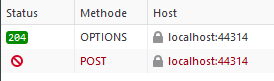
But before even entering the Method with the Attribute [HttpGet] Firefox throws the error.
When I do the same request in Postman, everything works just fine, though I could imagine, that postman routes every request through their servers, with would eliminate any CORS problems.
Interestingly I get two errors: (sorry, they are German)

Answers:
Thank you for visiting the Q&A section on Magenaut. Please note that all the answers may not help you solve the issue immediately. So please treat them as advisements. If you found the post helpful (or not), leave a comment & I’ll get back to you as soon as possible.
Method 1
Alright, so changing the code from
app.UseCors(options =>
   options.WithOrigins("https://localhost:44314").AllowAnyMethod());
to
app.UseCors(
   options => options
    .AllowAnyOrigin()
    .AllowAnyMethod()
    .AllowAnyHeader()
  );
did the trick. Apparently the url I had provided as an exception was not correct (?). I still don’t know, WHY my code didn’t work, but this is the solution for me. If someone can explain, what I did wrong, please leave a comment, I would like to know!
All methods was sourced from stackoverflow.com or stackexchange.com, is licensed under cc by-sa 2.5, cc by-sa 3.0 and cc by-sa 4.0