I’ve created two new Custom Post types using code that I’ve used successfully on other projects without issue. The first is called top_charts, the other case_studies, and both appear correctly in the admin menu and I can create new posts.
Unfortunately the new posts don’t appear. I just get a 404.php response.
I’ve created an archive-top_charts.php to see if I can get anything to appear, but I see a 404.php “page not found” reply.
I originally named the custom posts top-charts and case-studies, but I thought the hyphen might have been the problem, and so renamed them to use an underscore instead. It hasn’t helped.
I’ve tried re-saving my Permalinks, but nothing has changed. My .htaccess page looks like what you’d expect, too (and other pages works fine). What else can I check?
Answers:
Thank you for visiting the Q&A section on Magenaut. Please note that all the answers may not help you solve the issue immediately. So please treat them as advisements. If you found the post helpful (or not), leave a comment & I’ll get back to you as soon as possible.
Method 1
For fixing custom post not found please use below code in your functions.php:
flush_rewrite_rules( false );
You should only do this as a temporary measure otherwise it will run on every page load.
For more details please follow this link
As for the archive-top_charts.php not appearing, make sure you have 'has_archive' => true when you’re registering your post type.
Method 2
You don’t have to edit your php code!
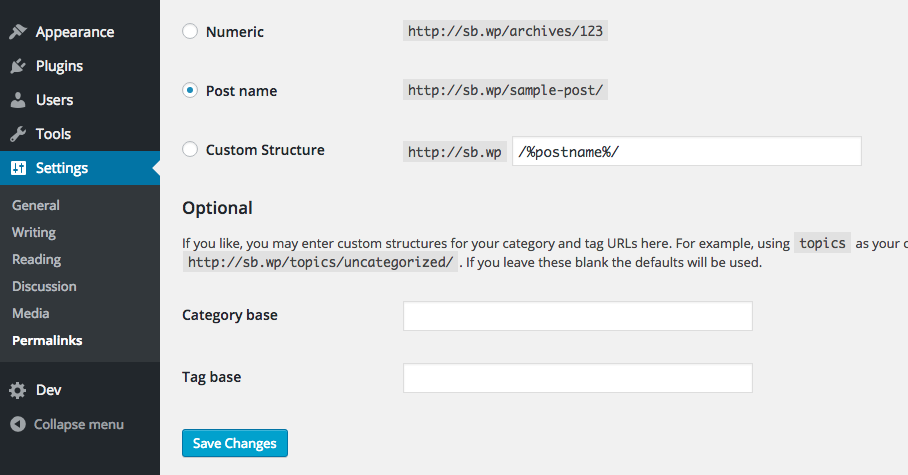
While you can do this in the function that registers your custom post type, like the other answers, you can also do this in the settings menu, thus avoiding touching your php code:
To flush WordPress rewrite rules or permalinks (usually needs to be done manually for new custom post types) from the Dashboard:
- In the main menu find “Settings > Permalinks”.
- Scroll down if needed and click “Save Changes”.
- Rewrite rules and permalinks are flushed.
It’s that simple!
Method 3
I realize that this is late in the game (and may not be the related problem), but I wanted to point out to others a possible issue.
In my case, I had set my taxonomy rewrite to tools and the content type rewrite to the same thing. Therefore, it would never work properly as it was a conflict. Unfortunately, there is no detection for such a thing so I figured I would just point it out to others.
Method 4
I just added this line for rewrite rules this was the reason for me.
after comment or removed it solved but you can make it true also.
flush_rewrite_rules( true );
Method 5
In my case it was missing rights in my development folder so .htaccess file could not have been created ad/or modified.
So manual flushing or Saving changes in WP Permalinks was not helping.
Solution was to create .htaccess file by myself
All methods was sourced from stackoverflow.com or stackexchange.com, is licensed under cc by-sa 2.5, cc by-sa 3.0 and cc by-sa 4.0