I have created some custom widgets for my client to use, but I want to make them stand out amidst the fifteen or so standard widgets in the admin area. How can I do this?
I have solved this problem myself and will place the solution here, but please feel free it add a better solution if you have one.
Answers:
Thank you for visiting the Q&A section on Magenaut. Please note that all the answers may not help you solve the issue immediately. So please treat them as advisements. If you found the post helpful (or not), leave a comment & I’ll get back to you as soon as possible.
Method 1
All widgets in the admin area get an id in the style widget-[global_counter]_[widget_key]-[widget_id], like widget-59_monkeyman_widget_shortcut-5 (installed widget) or widget-11_monkeyman_widget_shortcut-__i__ (an uninstalled widget in the list).
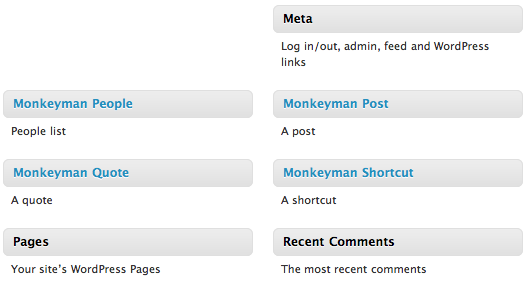
If your widget key contains something unique for all your widgets (like your company name), you can use this and add a substring attribute CSS selector (which works in most browsers). In my case div.widget[id*=_monkeyman_] does the trick, so I add a little CSS snippet in the widgets.php admin page header:
add_action('admin_print_styles-widgets.php', 'monkeyman_widgets_style');
function monkeyman_widgets_style()
{
    echo <<<EOF
<style type="text/css">
div.widget[id*=_monkeyman_] .widget-title {
    color: #2191bf;
}
</style>
EOF;
}
This gives me the following result:
All methods was sourced from stackoverflow.com or stackexchange.com, is licensed under cc by-sa 2.5, cc by-sa 3.0 and cc by-sa 4.0