Now, when you add or edit a particular post within your desired post type, there are more screen options as well. Although, these Screen Options are showing/hiding meta boxes. I would like to be able to programmatically obtain a list of all of these registered Screen Options of meta boxes, so that I can again check if a certain array of Screen Options exist, and if they do, I plan on removing them programmatically.

Click Here For Full Size Screenshot
Question
How can I programmatically obtain a list of all registered Screen Options (meta boxes) on post types, where you want to add or edit a particular post within your desired post type.
Ultimately, the goal here is to remove these options and not simply just disable them. I’m looking to do something along the lines of what I have accomplished for removing unnecessary dashboard meta boxes.
Answers:
Thank you for visiting the Q&A section on Magenaut. Please note that all the answers may not help you solve the issue immediately. So please treat them as advisements. If you found the post helpful (or not), leave a comment & I’ll get back to you as soon as possible.
Method 1
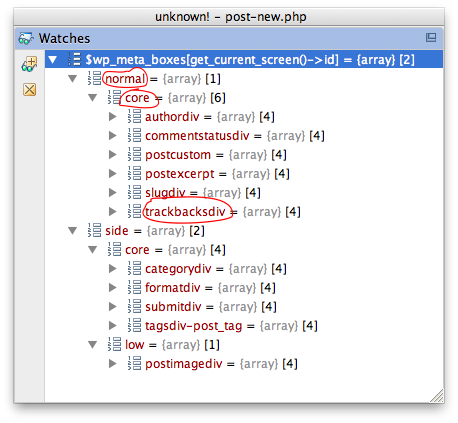
What you need is in global $wp_meta_boxes indexed by get_current_screen()->id. Removing the screen options will also remove the metaboxes which you can do just before screen options are displayed using the 'in_admin_header' hook.
So let’s assume you want to get rid of the “Send Trackbacks” screen option which you see in this screenshot:
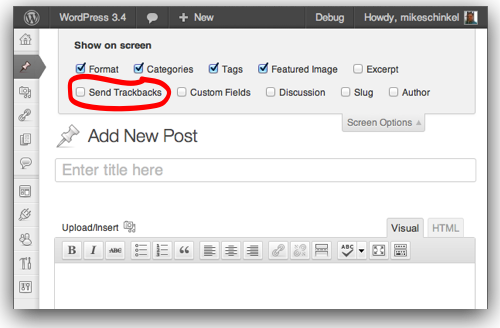
Drop the following class into your theme’s functions.php file or in a plugin you might be building and the code will remove the “Send Trackbacks” screen option (and it’s associated metabox, which is also what you wanted, right?):
class Michael_Ecklunds_Admin_Customizer {
  function __construct() {
    add_action( 'in_admin_header', array( $this, 'in_admin_header' ) );
  }
  function in_admin_header() {
    global $wp_meta_boxes;
    unset( $wp_meta_boxes[get_current_screen()->id]['normal']['core']['trackbacksdiv'] );
  }
}
new Michael_Ecklunds_Admin_Customizer();
And here’s what it looks like after added the above code to a WordPress 3.4 site:
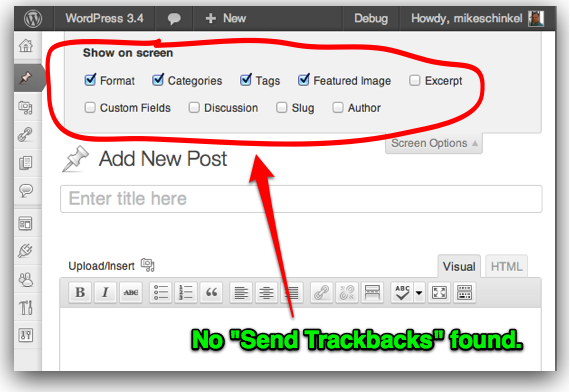
Using the Zend debugger within PhpStorm here is the inspection of $wp_meta_boxes[get_current_screen()->id] so you can see what values a default installation of WordPress 3.4 has in the Post edit screen (I’ve circled the array indexes I referenced in my example, i.e. $wp_meta_boxes[get_current_screen()->id]['normal']['core']['trackbacksdiv']:
Hopefully this is what you were looking for?
Method 2
Sorry it’s a bit side track but I found it is useful when it comes to removing wp out of box meta boxes but not so much for custom or custom theme related meta boxes. To illustrate a bit more: I installed a new theme which introduced a custom meta box whenever you new a post/page it shows up in the screen options. (I am new to wp so) For some reason using Mike’s approach I wasn’t able to remove this custom meta box but it worked for everything non-custom. For my stupidity I kept hitting the wall for hours still couldn’t figure out so I had to go back to this:
if (is_admin()) :
function my_remove_meta_boxes()
{
  if(!current_user_can('administrator'))
  {
    remove_meta_box('theme_custom_meta_box', 'post', 'side');
  }
}
add_action( 'add_meta_boxes', 'my_remove_meta_boxes' );
endif;
All methods was sourced from stackoverflow.com or stackexchange.com, is licensed under cc by-sa 2.5, cc by-sa 3.0 and cc by-sa 4.0