Is there a way to create deep-level sub Panel in Theme Customizer(like roots of plants) ? My theme that I have been developing seem to be more complicated. I think that if we can create deep-level sub Panel, our Customizer Page won’t look messy, our user will customize our theme easier and we will be able to make much more complicated WordPress theme easier. Images below describe what my idea is…
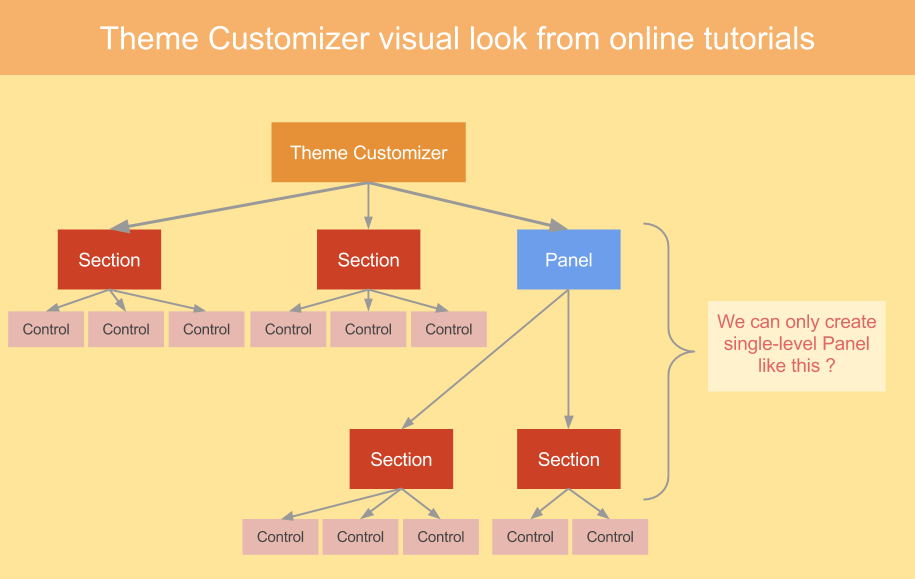
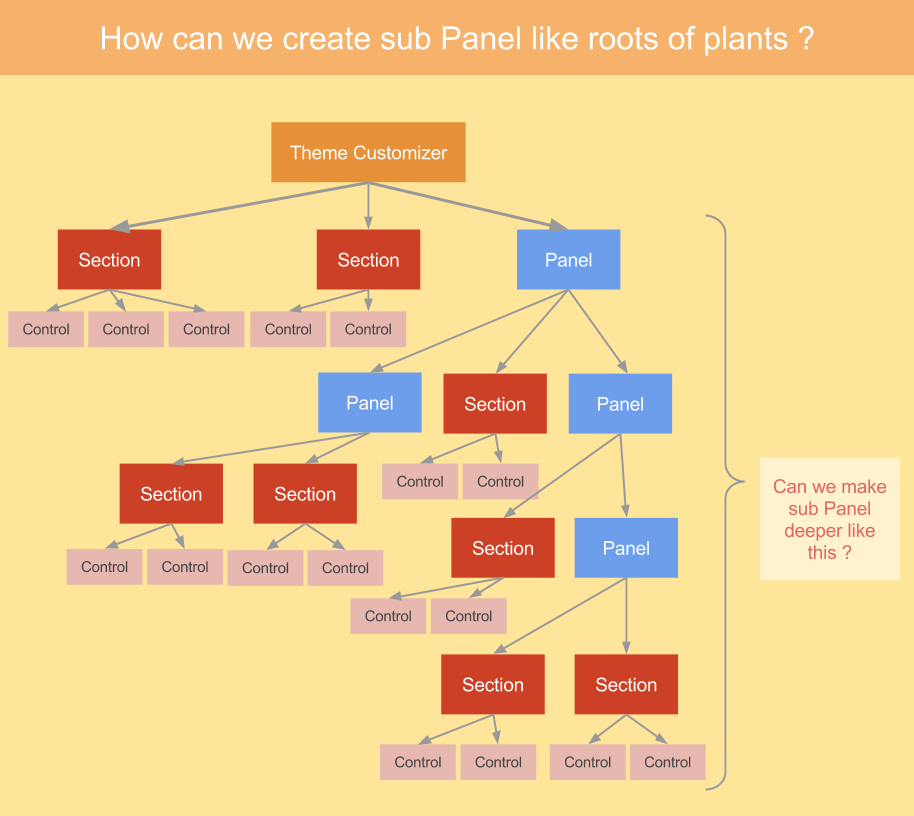
Unfortunately, I have tried to search out about this one, but I could only find a way to create single-level Panel in the Theme Customizer here is what I found on another thread , couldn’t find a way to make sub Panel deeper. Could you please shade some light in my life ?
Update : following code is some code I use to create Panel and Control like image #1 which is single-level Panel. they all work fine.
$wp_customize->add_panel('panel1',
        array(
            'title' => 'Panel 1',
            'priority' => 1,
            )
        );
        $wp_customize->add_section( 'section1',
            array(
                'title' => 'This is section 1',
                'priority' => 1,
                'panel' => 'panel1'
                )
            );
            $wp_customize->add_setting('field1', array('default' => 'default text'));
            $wp_customize->add_control('field1', array(
                'label' => 'Text field',
                'section' => 'section1',
                'type' => 'text',
                )
            );
My problem is that I want to create new panel and let them stick in another panel which will make it look like roots hierarchy(image #2) I think that if we can do some thing like that, we will be able to make much more powerful Theme Customizer. I then tried to accomplish that idea and tried to rewrite my code. Unluckily, it didn’t work. Please check up the following one.
$wp_customize->add_panel('panel1',
        array(
            'title' => 'Panel 1',
            'priority' => 1,
            )
        );
        $wp_customize->add_section( 'section1',
            array(
                'title' => 'This is section 1',
                'priority' => 1,
                'panel' => 'panel1'
                )
            );
            $wp_customize->add_setting('field1', array('default' => 'default text'));
            $wp_customize->add_control('field1', array(
                'label' => 'Text field',
                'section' => 'section1',
                'type' => 'text',
                )
            );
        // I used the code below with a little hope that it will help me accomplish my idea, but it didn't work T^T.
        $wp_customize->add_panel('panel1_1',
            array(
                'title' => 'Panel 1.1',
                'priority' => 2,
                'panel' => 'panel1' // I tried adding this line of code in order to let it depend on another panel
                )
            );
            $wp_customize->add_section( 'section1_1',
            array(
                'title' => 'This is section 1',
                'priority' => 1,
                'panel' => 'panel1_1'
                )
            );
            $wp_customize->add_setting('field1_1', array('default' => 'default text'));
            $wp_customize->add_control('field1_1', array(
                'label' => 'Text field',
                'section' => 'section1_1',
                'type' => 'text',
                )
            );
Could you please give me the solution, I can’t figure out how to make panel look like roots hierarchy. Any help would be appreciated 🙂
Answers:
Thank you for visiting the Q&A section on Magenaut. Please note that all the answers may not help you solve the issue immediately. So please treat them as advisements. If you found the post helpful (or not), leave a comment & I’ll get back to you as soon as possible.
Method 1
For anyone that comes here looking for this, I was able to do it after battling with it for a few hours.
The code is a bit extensive so did not want to post here, (mods feel free to let me now if that would be better), instead I created a gist: https://gist.github.com/OriginalEXE/9a6183e09f4cae2f30b006232bb154af
What it does is it basically allows you yo specify panel property on panels (for nesting panels under panels) and section property on sections (for nesting sections under sections).
Notes:
- The php code includes an example of how to create
panels/sub-panels/sections/sub-sections. It is worth noting that you
instantiate new panels/sections using the subclass I created, instead
of directly calling$wp-customize->add_paneland passing it a
configuration array. - JS and CSS files don’t need to be modified. If you were wondering why CSS is needed, it’s there to fix the animation when transitioning from panels to sub-panels and sections to sub-sections.
- When creating sub-sections, make sure you also add a
panelproperty which should be the same as thepanelof the parent section
I tried to do this with as little code as possible, and without overriding anything that might screw up with others people code. Some refactoring might be needed if they change logic in the future versions, I made it as future-proof as I could.
Method 2
At the moment it is simply not possible to have more than panels, sections and controls. Expanding this system would require extensive programming at WP. Given the narrow size of the customizer you could also easily get lost if you have so many nested panels. So it’s probably not desirable either.
All methods was sourced from stackoverflow.com or stackexchange.com, is licensed under cc by-sa 2.5, cc by-sa 3.0 and cc by-sa 4.0