I would like to show a widget in only one page of my site, as i can see it is not possible right?
Should i add that for all my site pages or not?
Answers:
Thank you for visiting the Q&A section on Magenaut. Please note that all the answers may not help you solve the issue immediately. So please treat them as advisements. If you found the post helpful (or not), leave a comment & I’ll get back to you as soon as possible.
Method 1
It depends on where you want to show the widget.
Let’s start with the widget area (sidebar) registration:
add_action( 'wp_loaded', 'wpse_76959_register_widget_area' );
function wpse_76959_register_widget_area()
{
    register_sidebar(
        array (
            'name'          => __(
                'Widgets on page Sample Page',
                'theme_textdomain'
                ),
            'description'   => __(
                'Will be used on a page with a slug "sample-page" only.',
                'theme_textdomain'
                ),
            'id'            => 'sample-only',
            'before_widget' => '<div id="sample-only-widget">',
            'after_widget'  => '</div>',
            'before_title'  => '<h2>',
            'after_title'   => '</h2>',
        )
    );
}
This is quite simple. We register a new widget area with some custom markup.
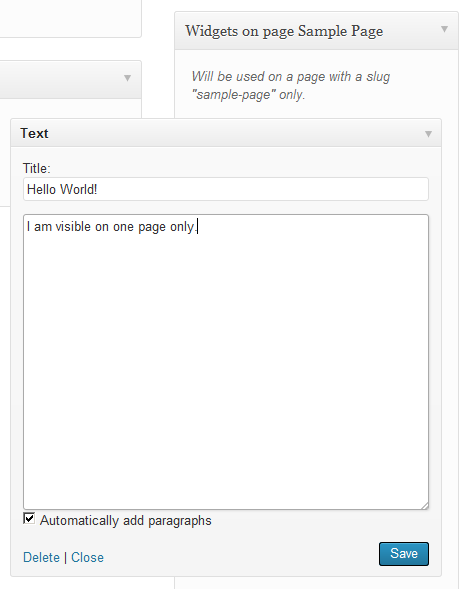
Now we have to show it somewhere. We could add a custom action in our page.php template:
do_action( 'show_sample_widget' );
Or we could use an existing action, this would limit the places where the widget is available. For example the action loop_start is called the first time we call the_post() in a loop. If we want to set the widget on top of the page content, we use that hook:
add_action( 'loop_start', 'wpse_76959_render_widget' );

function wpse_76959_render_widget()
{
    is_page( 'sample-page' ) && dynamic_sidebar( 'sample-only' );
    remove_action( current_filter(), __FUNCTION__ );
}
For a custom action we’d use instead:
add_action( 'show_sample_widget', 'wpse_76959_render_widget' );
Method 2
There are several plugins that allow to show widgets based on specific conditions:
- Display Widgets: Clean and simple interface
- Widget Context: It has a few more options than the previous one
- Dynamic Widgets: This is the most rich of features
- Widget Logic: This is aimed to programmers as you need to write the condition in PHP code. I.e.
is_page('about')
An alternative solution is given by the following plugin, which allows you to define a custom set of widgets on a per-page basis, directly from the edit page screen:
Method 3
If you are comfortable editing the templates files for your theme:
Find where
dynamic_sidebar('side_bar_name');
is called, and either before or after it, or prettymuch anywhere on your site use:
$pageTitle =  get_the_title($post->ID);
$targetPage = 'the title of the page you want to target goes here';

    if($pageTitle == $targetTitle){
     the_widget( 'the_widget_unique_id_aka_name', $instance, $args);
    }
   //the_widget() calls a specific widget and displays it
If you want to be cleaner about it: Create a function in functions.php that would look like:
function call_my_widget( $post ){
    $pageTitle =  get_the_title($post-ID);
    $targetPage = 'the title of the page you want to target goes here';

        if($pageTitle == $targetTitle){
         the_widget( 'the_widget_unique_id_aka_name', $instance, $args);
        }
}
call the function with:
call_my_widget( $post );
this has to be called in the loop or where the $post global variable is existant.
Then call that function in your template file (page.php perhaps?) to display your target widgets on only your target page.
Method 4
You can use widget_display_callback : https://developer.wordpress.org/reference/hooks/widget_display_callback/ and just change the page id on the code below.
function custom_display_callback( $instance, $widget, $args ){
    if( is_page( 10 ) ){
        return false;
    }
    return $instance;
}
add_filter( 'widget_display_callback', 'custom_display_callback', 50, 3 );
I hope this helps. Cheers!
All methods was sourced from stackoverflow.com or stackexchange.com, is licensed under cc by-sa 2.5, cc by-sa 3.0 and cc by-sa 4.0