I am creating a widget, it needs to store about 10 IDs. Right now I’m using following field method to store each of the ID in a separate field. It stores data of each field in a separately in the wordpress. Is it possible to store the data of all fields in just one row in wordpress for examlpe using an array?
<input
    class="widefat"
    id="<?php echo $this->get_field_id('item1_id'); ?>"
    name="<?php echo $this->get_field_name('item1_id'); ?>"
    value="<?php echo $instance['item1_id']; ?>"
    />

<input
    class="widefat"
    id="<?php echo $this->get_field_id('item2_id'); ?>"
    name="<?php echo $this->get_field_name('item2_id'); ?>"
    value="<?php echo $instance['item2_id']; ?>"
    />
Answers:
Thank you for visiting the Q&A section on Magenaut. Please note that all the answers may not help you solve the issue immediately. So please treat them as advisements. If you found the post helpful (or not), leave a comment & I’ll get back to you as soon as possible.
Method 1
You have to collect multiple fields under the same name like this …
name="collect[1]"
name="collect[2]"
… and adjust your widget logic to this.
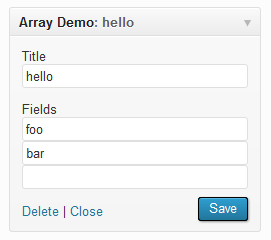
Here is a very simple demo widget:
<?php  # -*- coding: utf-8 -*-
/* Plugin Name: Store Options as array */

add_action( 'widgets_init', array ( 'T5_Array_Options_Widget', 'register' ) );

class T5_Array_Options_Widget extends WP_Widget
{
    /**
     * Constructor.
     */
    public function __construct()
    {
        parent::__construct( strtolower( __CLASS__ ), 'Array Demo' );
    }

    /**
     * Echo the settings update form
     *
     * @param array $instance Current settings
     */
    public function form( $instance )
    {
        $title = isset ( $instance['title'] ) ? $instance['title'] : '';
        $title = esc_attr( $title );

        printf(
            '<p><label for="%1$s">%2$s</label><br />
            <input type="text" name="%3$s" id="%1$s" value="%4$s" class="widefat"></p>',
            $this->get_field_id( 'title' ),
            'Title',
            $this->get_field_name( 'title' ),
            $title
        );

        $fields = isset ( $instance['fields'] ) ? $instance['fields'] : array();
        $field_num = count( $fields );
        $fields[ $field_num + 1 ] = '';
        $fields_html = array();
        $fields_counter = 0;

        foreach ( $fields as $name => $value )
        {
            $fields_html[] = sprintf(
                '<input type="text" name="%1$s[%2$s]" value="%3$s" class="widefat">',
                $this->get_field_name( 'fields' ),
                $fields_counter,
                esc_attr( $value )
            );
            $fields_counter += 1;
        }

        print 'Fields<br />' . join( '<br />', $fields_html );
    }

    /**
     * Renders the output.
     *
     * @see WP_Widget::widget()
     */
    public function widget( $args, $instance )
    {
        print $args['before_widget']
        . $args['before_title']
        . apply_filters( 'widget_title', $instance['title'] )
        . $args['after_title']
        . join( '<br />', $instance['fields'] )
        . $args['after_widget'];
    }

    /**
     * Prepares the content. Not.
     *
     * @param  array $new_instance New content
     * @param  array $old_instance Old content
     * @return array New content
     */
    public function update( $new_instance, $old_instance )
    {
        $instance          = $old_instance;
        $instance['title'] = esc_html( $new_instance['title'] );

        $instance['fields'] = array();

        if ( isset ( $new_instance['fields'] ) )
        {
            foreach ( $new_instance['fields'] as $value )
            {
                if ( '' !== trim( $value ) )
                    $instance['fields'][] = $value;
            }
        }

        return $instance;
    }

    /**
     * Tell WP we want to use this widget.
     *
     * @wp-hook widgets_init
     * @return void
     */
    public static function register()
    {
        register_widget( __CLASS__ );
    }
}
Backend
Frontend

Method 2
The above answer is good if you need the fields to be numbered. In my case, I didn’t. I have a widget with options that allow the user to select any number of categories to be used within the widget.
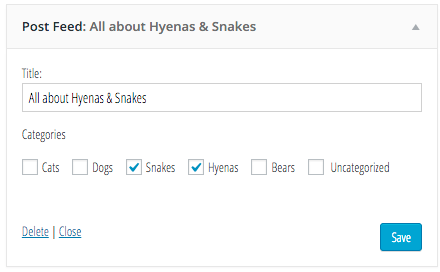
Here’s my widget form. — Three important things here
- Make sure to default the value to an empty
array()if the widget’s value is not set - In the form
<label>nameattribute, notice that I attach a[]at the end. This tells PHP that I’m submitting an array of values for this key - Wrap the checkbox in the label as
<label><input type="checkbox" ...></label>. — Each of our checkboxes will not have a uniqueidattribute, so the<label>forattribute will not work. We could generate unique IDs, but that’s a hassle. If you just wrap the label around the input, the label get associated properly without the hassle of connecting thefor+id
Now the code
public function form($instance) {
  $title = isset($instance['title']) ? $instance['title'] : '';
  $categories = isset($instance['categories']) ? $instance['categories'] : array();
  ?>

  <p>
    <label for="<?php echo $this->get_field_id('title') ?>">
      <?php _e( 'Title:' ) ?>
    </label>
    <input class="widefat"
           id="<?php echo $this->get_field_id('title') ?>"
           name="<?php echo $this->get_field_name('title') ?>"
           value="<?php echo $title ?>" />
  </p>

  <p>Categories</p>
  <ul>
  <?php foreach (get_categories() as $category): ?>
    <li>
      <label>
        <input type="checkbox"
             class="checkbox"
             name="<?php echo $this->get_field_name('categories') ?>[]"
             value="<?php echo $category->cat_ID ?>"
             <?php checked(in_array($category->cat_ID, $categories)) ?> />
        <?php echo $category->name ?>
      </label>
    </li>
  <?php endforeach ?>
  </ul>
  <?php
}
And here’s my update function
I’m interested in saving the Category IDs in an array, which are numbers, so I use array_map with intval to ensure that all submitted datum are valid integers. Additionally, I use array_filter to remove any invalid submissions.
// @param array $a - the new instance options
// @param arram $b - the old instance options
public function update($a, $b) {
  return array(
    'title'      => isset($a['title']) ? strip_tags($a['title']) : $b['title'],
    'categories' => isset($a['categories']) ? array_filter(array_map(function($id) { return intval($id); }, (array) $a['categories'])) : (array) $b['title']
  );
}
It’s particularly challenging to describe this WordPress stuff. If you have any questions, I’ll be happy to elaborate.
All methods was sourced from stackoverflow.com or stackexchange.com, is licensed under cc by-sa 2.5, cc by-sa 3.0 and cc by-sa 4.0