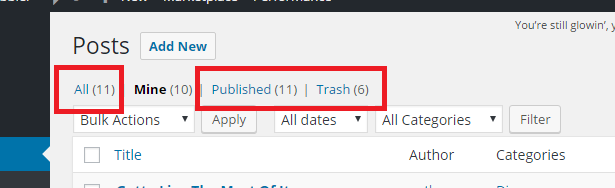
I have been looking for ways to completely remove the All, Published, and Trash webpages for USERS other than the me, the Administrator.
So the scenario for me is: I have registered users (which I would like to assign with the roles of authors, contributors, etc). Now, when they log in to my website and access the Posts area, I wish for them not to see these three links (All, Published, Trash).
I have tried using the jquery function, which is basically the same as display: none, but I don’t think it’s the optimal choice. I know there’s better ways for me to do this.
I did try using plugins, such as Member and Adminimize, among other things, but I can’t find the right one.
I hope there’s someone out there who can help me. Thanks in advance.
Answers:
Thank you for visiting the Q&A section on Magenaut. Please note that all the answers may not help you solve the issue immediately. So please treat them as advisements. If you found the post helpful (or not), leave a comment & I’ll get back to you as soon as possible.
Method 1
The WP_Posts_List_Table class extends WP_List_Table and within the WP_List_Table::views() method we have the following dynamic views filter:
/**
 * Filter the list of available list table views.
 *
 * The dynamic portion of the hook name, `$this->screen->id`, refers
 * to the ID of the current screen, usually a string.
 *
 * @since 3.5.0
 *
 * @param array $views An array of available list table views.
 */
 $views = apply_filters( "views_{$this->screen->id}", $views );
So we can use the generated views_edit-post filter to adjust the views of the post list table.
Example:
Let’s remove the all, publish, future, sticky, draft, pending and trash for non-admins (PHP 5.4+):
/**
 * Remove the 'all', 'publish', 'future', 'sticky', 'draft', 'pending', 'trash'
 * views for non-admins
 */
add_filter( 'views_edit-post', function( $views )
{
    if( current_user_can( 'manage_options' ) )
        return $views;

    $remove_views = [ 'all','publish','future','sticky','draft','pending','trash' ];

    foreach( (array) $remove_views as $view )
    {
        if( isset( $views[$view] ) )
            unset( $views[$view] );
    }
    return $views;
} );
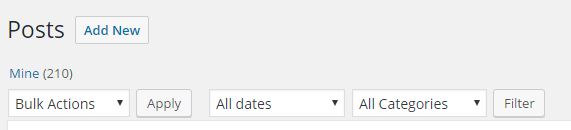
where you can modify the $remove_views to your needs. Another approach would be to only pick up mine and only return that view.
Then we could try to force the mine view further with:
/**
 * Force the 'mine' view on the 'edit-post' screen
 */
add_action( 'pre_get_posts', function( WP_Query $q )
{
    if(
           is_admin()
        && $q->is_main_query()
        && 'edit-post' === get_current_screen()->id
        && ! current_user_can( 'manage_options' )
    )
        $q->set( 'author', get_current_user_id() );
} );
Before:

After:
Method 2
Those statuses are turned from get_available_post_statuses(), which in turn gets its values from wp_count_posts().
wp_count_posts() passes it’s values through the wp_count_posts filter. So you can tap into that and hijack what gets returned.
Try this:
function _dbdb_wp_count_posts( $counts, $type, $perm ) {
    global $pagenow;

    if( 'edit.php' !== $pagenow ){
        return $counts;
    }

    if( current_user_can( 'manage_options' ) ){
        return $counts;
    }

    $_counts = new stdClass();
    foreach ( $counts as $status => $count ){
        $_counts->$status = '';
    }

    return $_counts;
}
add_filter('wp_count_posts', '_dbdb_wp_count_posts', 99, 3 );
What this does is check if we’re on the edit.php page in the Admin,and if not, just return the counts.
Then it checks if the current user can manage site options, which only an Administrator can. If the current user can, all counts are returned.
If you get past this check, it assumes you’re not an Administrator, so it resets all counts to 0, effectively removing the status links.
Note: the “all” and “mine” status links are hard-coded in the get_views() method of the WP_Posts_List_Table Class and aren’t filterable.
I quickly tested this on my dev server, first signing in as an Admin, and then as an Author. It worked as expected, but be sure to test thoroughly.
All methods was sourced from stackoverflow.com or stackexchange.com, is licensed under cc by-sa 2.5, cc by-sa 3.0 and cc by-sa 4.0