Normal WordPress Menu looks like:
Home | Blog | About us | Contact
But I’ve seen many pages with descriptions under these links:
Home Page | Our Blogs | About us
| Contact
….meet us…| read more| basic info| contact form
How to achieve this?
(I want it to be core function for all my themes, so no plugins please, I just want to know how it’s done)
Answers:
Thank you for visiting the Q&A section on Magenaut. Please note that all the answers may not help you solve the issue immediately. So please treat them as advisements. If you found the post helpful (or not), leave a comment & I’ll get back to you as soon as possible.
Method 1
You need a custom walker for the nav menu.
Basically, you add a parameter 'walker' to the wp_nav_menu() options and call an instance of an enhanced class:
wp_nav_menu(
    array (
        'menu'            => 'main-menu',
        'container'       => FALSE,
        'container_id'    => FALSE,
        'menu_class'      => '',
        'menu_id'         => FALSE,
        'depth'           => 1,
        'walker'          => new Description_Walker
    )
);
The class Description_Walker extends Walker_Nav_Menu and changes the function start_el( &$output, $item, $depth, $args ) to look for $item->description.
A basic example:
/**
 * Create HTML list of nav menu items.
 * Replacement for the native Walker, using the description.
 *
 * @see    https://wordpress.stackexchange.com/q/14037/
 * @author fuxia
 */
class Description_Walker extends Walker_Nav_Menu
{
    /**
     * Start the element output.
     *
     * @param  string $output Passed by reference. Used to append additional content.
     * @param  object $item   Menu item data object.
     * @param  int $depth     Depth of menu item. May be used for padding.
     * @param  array|object $args    Additional strings. Actually always an
                                     instance of stdClass. But this is WordPress.
     * @return void
     */
    function start_el( &$output, $item, $depth = 0, $args = array(), $id = 0 )
    {
        $classes     = empty ( $item->classes ) ? array () : (array) $item->classes;

        $class_names = join(
            ' '
        ,   apply_filters(
                'nav_menu_css_class'
            ,   array_filter( $classes ), $item
            )
        );

        ! empty ( $class_names )
            and $class_names = ' class="'. esc_attr( $class_names ) . '"';

        $output .= "<li id='menu-item-$item->ID' $class_names>";

        $attributes  = '';

        ! empty( $item->attr_title )
            and $attributes .= ' title="'  . esc_attr( $item->attr_title ) .'"';
        ! empty( $item->target )
            and $attributes .= ' target="' . esc_attr( $item->target     ) .'"';
        ! empty( $item->xfn )
            and $attributes .= ' rel="'    . esc_attr( $item->xfn        ) .'"';
        ! empty( $item->url )
            and $attributes .= ' href="'   . esc_attr( $item->url        ) .'" rel="nofollow noreferrer noopener"';

        // insert description for top level elements only
        // you may change this
        $description = ( ! empty ( $item->description ) and 0 == $depth )
            ? '<small class="nav_desc">' . esc_attr( $item->description ) . '</small>' : '';

        $title = apply_filters( 'the_title', $item->title, $item->ID );

        $item_output = $args->before
            . "<a $attributes>"
            . $args->link_before
            . $title
            . '</a> '
            . $args->link_after
            . $description
            . $args->after;

        // Since $output is called by reference we don't need to return anything.
        $output .= apply_filters(
            'walker_nav_menu_start_el'
        ,   $item_output
        ,   $item
        ,   $depth
        ,   $args
        );
    }
}
Or, alternatively as @nevvermind commented, you could inherit all the functionalities of the parent’s start_el function and just append the description to $output:
function start_el( &$output, $item, $depth = 0, $args = array(), $id = 0 )
{
    parent::start_el( $output, $item, $depth, $args );
    $output .= sprintf(
        '<i>%s</i>',
        esc_html( $item->description )
    );
}
Sample output:
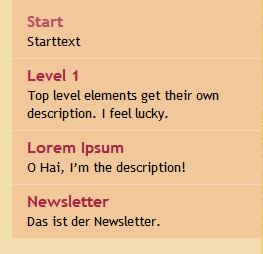
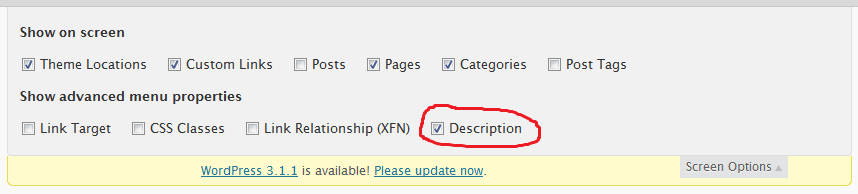
Now enable the description field in wp-admin/nav-menus.php to get the ability to edit this field. If you don’t WP just trashes your complete post content into it.
Further reading:
- Associated bugs
- Similar example with different markup and formatting
- Enable description box in menu management screen programmatically
- Collect the item description for later usage
And that’s it.
Method 2
Since WordPress 3.0, you don’t need a custom walker anymore!
There is the walker_nav_menu_start_el filter, see https://developer.wordpress.org/reference/hooks/walker_nav_menu_start_el/
Example:
function add_description_to_menu($item_output, $item, $depth, $args) {

   if (strlen($item->description) > 0 ) {
      // append description after link
      $item_output .= sprintf('<span class="description">%s</span>', esc_html($item->description));

      // or.. insert description as last item inside the link ($item_output ends with "</a>{$args->after}")
      // $item_output = substr($item_output, 0, -strlen("</a>{$args->after}")) . sprintf('<span class="description">%s</span >', esc_html($item->description)) . "</a>{$args->after}";
   }
   return $item_output;
}
add_filter('walker_nav_menu_start_el', 'add_description_to_menu', 10, 4);
Method 3
This isn’t better or worse than other suggestions; it’s just different. It’s short and sweet too.
Rather than using the description field as @toscho suggests, you could fill in the “Title” field on each menu item with the text you want, and then use this CSS:
.menu-item a:after { content: attr(title); }
It would also be easy to use jQuery to append it, but the text is ornamental enough that CSS seems appropriate.
Method 4
You can also write a <span> element after the navigation label in menus and use the following CSS rule to change its display setting (it’s inline by default):
span {display:block}
All methods was sourced from stackoverflow.com or stackexchange.com, is licensed under cc by-sa 2.5, cc by-sa 3.0 and cc by-sa 4.0