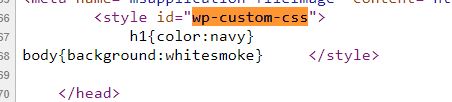
How to remove Additional CSS from loading. It loads as internal style sheet on every page. I am doing this but it is not working. if I
print_r(wp_get_custom_css());
It shows the same css. I want to disable it to load.
add_action( 'wp_enqueue_scripts', 'mywptheme_child_deregister_styles', 11 );
function mywptheme_child_deregister_styles() {
    wp_dequeue_style( 'wp-custom-css' );

}
Answers:
Thank you for visiting the Q&A section on Magenaut. Please note that all the answers may not help you solve the issue immediately. So please treat them as advisements. If you found the post helpful (or not), leave a comment & I’ll get back to you as soon as possible.
Method 1
That style HTML is added by WordPress using wp_custom_css_cb() and it’s hooked to wp_head like so:
add_action( 'wp_head', 'wp_custom_css_cb', 101 );
Which adds the custom/additional CSS in the document head.
So if you don’t want that to happen — or you’d rather add/load the CSS manually, you can add this to your theme functions.php file:
remove_action( 'wp_head', 'wp_custom_css_cb', 101 );
All methods was sourced from stackoverflow.com or stackexchange.com, is licensed under cc by-sa 2.5, cc by-sa 3.0 and cc by-sa 4.0