I am working on a wordpress site and i am little stuck into one situation , what i want is that:_
- I have one resume page, which shows resume posts from wp_postmeta table and each post have a downlaod link button so that users can download that specific post in form of pdf
- Now the tricky part:- each user can download each post only for 5 times that means one post can be downloaded only 5 times, after 5 times click on download button, the download button disappears(everything working fine till now )
- what i want now is that saving the clicks of download button; for example:- i have 5 clicks of a download link button of a specific resume post, i used 2 clicks now when i refresh the page i want the remaining 3 clicks not all 5 clicks, on page reload or login/logout of a specific user.**
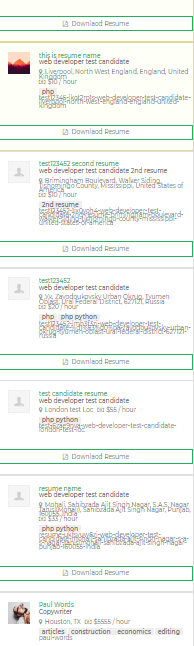
Here below is the screenshot of my resume page
here below is the js i am using for hiding the buttons after 5 clicks.
<script>
                 $(document).ready(function(){
                     $(".gotocls").click(function() {
                         count= $(this).attr("data-click");
                         count ++;
                             if(count==5){
                                 $(this).hide();
                                         }
                   else{
                        $(this).attr('data-click', count);
                        }
                         });
                     });
            </script>

            <a data-click="0" class="dkpdf-button gotocls" href="www.downloadlin.com">Downlaod Resume</a>
Answers:
Thank you for visiting the Q&A section on Magenaut. Please note that all the answers may not help you solve the issue immediately. So please treat them as advisements. If you found the post helpful (or not), leave a comment & I’ll get back to you as soon as possible.
Method 1
So,
The ideal way to do it is to have some identifier and save it in Database. But this can only happen if either user is logged in, in which case we can use, user meta to save the number of clicks, or we can use User IP and save it as transients. User IP again shall mean, that you need to get into hassles of policies and all, as IP is considered private information.
The strategy is to use Local Storage or Cookies, We could have used cookies, but due to the GDPR insanity making you have things included in policies, I always prefer to store the data in local storage.
So we shall assign different data-click="n" values to each link, where n is a unique value per link. When user clicks the link, we shall use local storage of format, {post-id} + {data-click attribute} and the value would be the number of link clicks.
$(document).ready(function() {
  var PostId = 2;
     var i = 0;
$('.gotocls').each(function() {
  jQuery(this).attr('data-click', i);
  var ClickId = $(this).attr('data-click');
  var LocalKey = PostId + '+' + ClickId;
  if(localStorage.getItem(LocalKey)){
    if(localStorage.getItem(LocalKey) == '5'){
      $(this).hide();
    }
  }
  else{
    localStorage.setItem(LocalKey,0);
  }
   i++
});
});
You need to yourself put in the post id into the code. The above code runs on page load, and checks for buttons which have already had 5 clicks and hides them. If there exists a link that has never ever been clicked, it would create a new local storage item with value 0,
  $(document).ready(function(){
   $(".gotocls").click(function() {
       var PostId = 2;
      var ClickId = $(this).attr("data-click");
     var LocalKey = PostId + '+' + ClickId;
     count = localStorage.getItem(LocalKey);
     count ++;
       if(count > 4){
                localStorage.setItem(LocalKey, 5);
                $(this).hide();
       }
       else{
         localStorage.setItem(LocalKey, count);
       }
   });
  });
This code is responsible for handling the clicks. On each click it increments the value of clicks, and hides if the limit is reached. I havent tested the code, but you can try, I have high hopes for it. For Post Id, you can manually type in post id, or you can use it as Inline JS, and echo get_the_ID(); to get what you want.
All methods was sourced from stackoverflow.com or stackexchange.com, is licensed under cc by-sa 2.5, cc by-sa 3.0 and cc by-sa 4.0