I can’t find any useful information in Gutenberg Handbook. Here is information about adding gradients, but it only works for some core blocks.
I use ColorPalette to create colors (or to use the color picker) but still don’t know how to use gradients. I also found PanelColorSettings but still without success.
I am looking for instructions/documentation on how to add this component:
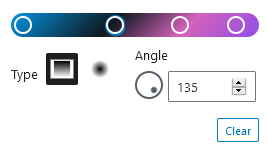
Answers:
Thank you for visiting the Q&A section on Magenaut. Please note that all the answers may not help you solve the issue immediately. So please treat them as advisements. If you found the post helpful (or not), leave a comment & I’ll get back to you as soon as possible.
Method 1
The documentation for that control does not exist at this time. Instructions have not been written yet. It is an experimental component.
You need to use an appropriate control in your blocks Edit component.
Note that these are very new components, their design will likely change, it should be considered experimental and unstable.
There is the GradientPicker component, https://github.com/WordPress/gutenberg/blob/master/packages/components/src/gradient-picker/index.js
And ColorGradientControl https://github.com/WordPress/gutenberg/blob/26e4d59e6fd3ed78d0213d60abca31c6dc1fa9cb/packages/block-editor/src/components/colors-gradients/control.js
        <ColorGradientControl
            { ...otherProps }
            onColorChange={ onChange }
            colorValue={ value }
            gradients={ [] }
            disableCustomGradients={ true }
        />
Method 2
I found support for custom block, it really helps.
supports: {
    color: {
        // This also enables text and background UI controls.
        gradients: true; // Enable gradients UI control.
    }
}
https://developer.wordpress.org/block-editor/reference-guides/block-api/block-supports/
All methods was sourced from stackoverflow.com or stackexchange.com, is licensed under cc by-sa 2.5, cc by-sa 3.0 and cc by-sa 4.0