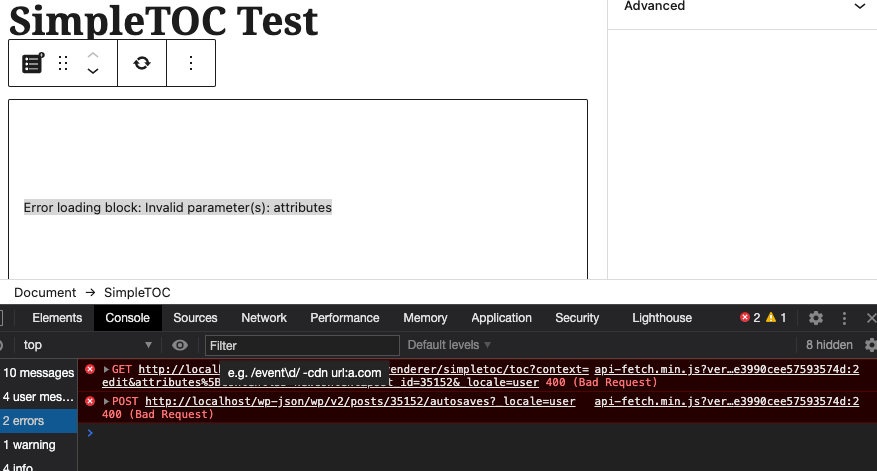
I managed to get an attribute working in my plugin. Well, sort of. I can read and write the attribute props.attributes.content . But I get the message in the Gutenberg block itself:
Error loading block: Invalid parameter(s): attributes
And in the network inspector I see a 400:
data: {status: 400, params: {attributes: “content is not a valid property of Object.”}}
params: {attributes: “content is not a valid property of Object.”}
Here is the relevant code:
registerBlockType('simpletoc/toc', {
  title: __('SimpleTOC', 'simpletoc'),
  icon: simpletocicon,
  category: 'layout',
  attributes: {
        content: {
            type: 'string',
      source: 'text',
      selector: 'div',
        },
    },
  edit: function(props) {
    props.setAttributes( { content: "newContent" } );

    console.info(props.attributes.content);

    const mycontent = props.attributes.content;

    return (
    <div>
    <InspectorControls>
      <ToggleControl
          label={mycontent}
      />
    </InspectorControls>
    <BlockControls>
      <ToolbarGroup>
        <ToolbarButton
          className="components-icon-button components-toolbar__control"
          label={__('Update table of contents', 'simpletoc')}
          onClick={function() {
            sendfakeAttribute(props)
          }}
          icon="update"
        />
      </ToolbarGroup>
  </BlockControls>
  <p className={props.className}>
    <ServerSideRender block={props.name} attributes={props.attributes} />
  </p>
  </div>
    )
  },
  save: props => {
    return null;
  },
});
But I can write the attribute with
props.setAttributes( { content: "newContent" } );
with console.info and my ToggleControl I can actually read the value! What is going on?
Answers:
Thank you for visiting the Q&A section on Magenaut. Please note that all the answers may not help you solve the issue immediately. So please treat them as advisements. If you found the post helpful (or not), leave a comment & I’ll get back to you as soon as possible.
Method 1
The error in question is likely because when you run register_block_type(), you didn’t set the block attributes or that it (which is an array in PHP) doesn’t have the attribute named content.
So make sure the attributes are defined in both JavaScript (via registerBlockType()) and PHP (via the above-mentioned function), and that the schema is valid. E.g.
-
In JS:
registerBlockType( 'simpletoc/toc', { attributes: { content: { type: 'string', // other args }, // other attributes }, // ... } ); -
In PHP:
register_block_type( 'simpletoc/toc', array(
    'attributes' => array(
        'content' => array(
            'type' => 'string',
            // other args
        ),
        // other attributes
    ),
    // ...
) );
All methods was sourced from stackoverflow.com or stackexchange.com, is licensed under cc by-sa 2.5, cc by-sa 3.0 and cc by-sa 4.0