Does anyone know how to disable WordPress reorder button? I mean the up and down arrow (located in the upper right corner of the image attached below), and not the collapse button. So the box will stay at the default original position. Fyi, I’m using the classic editor plugin.
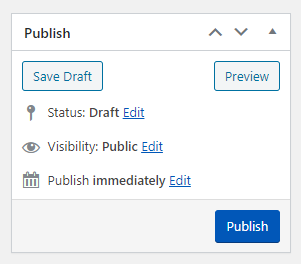
It will be nice if this can be solved without a plugin 🙂
Answers:
Thank you for visiting the Q&A section on Magenaut. Please note that all the answers may not help you solve the issue immediately. So please treat them as advisements. If you found the post helpful (or not), leave a comment & I’ll get back to you as soon as possible.
Method 1
You have to add the following CSS to an admin.css file (name it whatever you like but it has to be a css file that applies to the admin.
You need the following in that file:
.order-lower-indicator,
.order-higher-indicator{
    display:none;
}
To enqueue a stylesheet properly in the admin:
https://developer.wordpress.org/reference/hooks/admin_enqueue_scripts/
It’s the same basic process as enqueuing for the front end but you’re just applying a different action: do_action( 'admin_enqueue_scripts', string $hook_suffix );
All methods was sourced from stackoverflow.com or stackexchange.com, is licensed under cc by-sa 2.5, cc by-sa 3.0 and cc by-sa 4.0