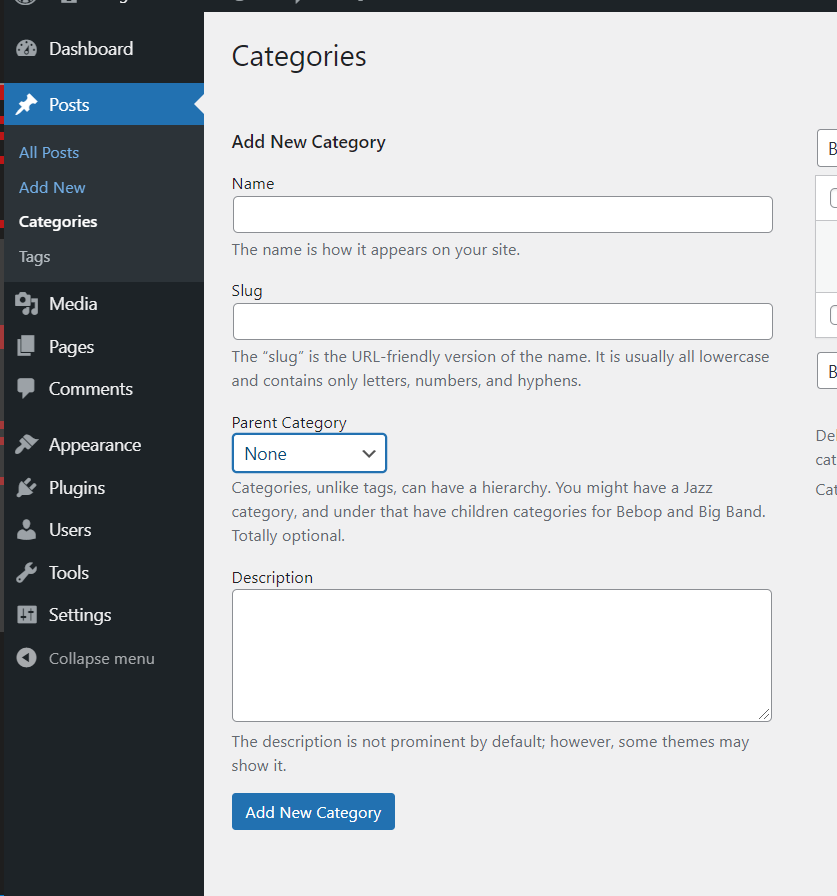
I’m creating a website, and I want to associate images every time I create a new category? Does anyone know how I give this option to the user through this menu?
Answers:
Thank you for visiting the Q&A section on Magenaut. Please note that all the answers may not help you solve the issue immediately. So please treat them as advisements. If you found the post helpful (or not), leave a comment & I’ll get back to you as soon as possible.
Method 1
Simply add this code to functions.php file
add_action ( 'category_add_form_fields', '___add_form_field_term_meta_text' );
function ___add_form_field_term_meta_text() {
    ?>
    <div class="form-field custom_image_upload">
        <label for="tag-description">File Upload</label>
        <img src="" style="width:100px;height:100px;border:0;display:none;" />
        <a title="Set listing image" href="javascript:;" id="upload_listing_image_button" id="set-listing-image" data-uploader_title="Choose an image" data-uploader_button_text="Set listing image">Set listing image</a>
        <input type="hidden" id="upload_listing_image" name="_listing_cover_image" value="" />
    </div>
    <?php
}

add_action ( 'category_edit_form_fields', '___edit_form_field_term_meta_text' );
function ___edit_form_field_term_meta_text($term) {
    $image_id = get_term_meta ( $term->term_id, '_listing_cover_image', true );
    if( empty ( $image_id ) ) {
        $display_none = 'display:none;';
        $upload_link  = '<a title="Set listing image" href="javascript:;" id="upload_listing_image_button" id="set-listing-image" data-uploader_title="Choose an image" data-uploader_button_text="Set listing image">Set listing image</a>';
    } else {
        $display_none = '';
        $upload_link  = '<a title="Set listing image" href="javascript:;" id="remove_listing_image_button" data-uploader_title="Choose an image" data-uploader_button_text="Set listing image">Remove listing image</a>';
    }
    ?>
    <tr class="form-field custom_image_upload">
        <th scope="row"><label for="term-meta-text"><?php _e ( 'File Upload', 'text_domain' ); ?></label></th>
        <td>
            <img src="<?php echo wp_get_attachment_image_src ( $image_id )[ 0 ]; ?>" style="width:100px;height:100px;border:0;<?php echo $display_none; ?>" />
            <?php echo $upload_link; ?>
            <input type="hidden" id="upload_listing_image" name="_listing_cover_image" value="<?php echo $image_id; ?>" />
        </td>
    </tr>
    <?php
}

add_action ( 'edit_category', '___save_term_meta_text' );
add_action ( 'create_category', '___save_term_meta_text' );
function ___save_term_meta_text($term_id) {
    if( isset ( $_POST[ '_listing_cover_image' ] ) ) {
        $image_id = (int) $_POST[ '_listing_cover_image' ];
        update_term_meta ( $term_id, '_listing_cover_image', $image_id );
    }
}

add_filter ( 'manage_edit-category_columns', '___edit_term_columns' );
function ___edit_term_columns($columns) {
    $columns[ '__term_meta_text' ] = __ ( 'Image', 'text_domain' );
    return $columns;
}

// RENDER COLUMNS (render the meta data on a column)
add_filter ( 'manage_category_custom_column', '___manage_term_custom_column', 10, 3 );
function ___manage_term_custom_column($out, $column, $term_id) {
    if( '__term_meta_text' === $column ) {
        $image_id = get_term_meta ( $term_id, '_listing_cover_image', true );
        if( ! empty ( $image_id ) ) {
            $out = '<span class="term-meta-text-block" style="" ><img src="' . wp_get_attachment_image_src ( $image_id )[ 0 ] . '"style="width:50px;height:50px;border:0;" /></div>';
        }
    }
    return $out;
}
add following code in registered admin javascript file which is enqueue via admin_enqueue_scripts
ex. mine is admin-script.js
jQuery(document).ready(function ($) {

    // Uploading files
    var file_frame;

    jQuery.fn.upload_listing_image = function (button) {
        var button_id = button.attr('id');
        var field_id = button_id.replace('_button', '');

        // If the media frame already exists, reopen it.
        if (file_frame) {
            file_frame.open();
            return;
        }

        // Create the media frame.
        file_frame = wp.media.frames.file_frame = wp.media({
            title: jQuery(this).data('uploader_title'),
            button: {
                text: jQuery(this).data('uploader_button_text'),
            },
            multiple: false
        });

        // When an image is selected, run a callback.
        file_frame.on('select', function () {
            var attachment = file_frame.state().get('selection').first().toJSON();
            jQuery("#" + field_id).val(attachment.id);
            jQuery(".custom_image_upload img").attr('src', attachment.url);
            jQuery('.custom_image_upload img').show();
            jQuery('#' + button_id).attr('id', 'remove_listing_image_button');
            jQuery('#remove_listing_image_button').text('Remove listing image');
        });

        // Finally, open the modal
        file_frame.open();
    };

    jQuery('.custom_image_upload').on('click', '#upload_listing_image_button', function (event) {
        event.preventDefault();
        jQuery.fn.upload_listing_image(jQuery(this));
    });

    jQuery('.custom_image_upload').on('click', '#remove_listing_image_button', function (event) {
        event.preventDefault();
        jQuery('#upload_listing_image').val('');
        jQuery('.custom_image_upload img').attr('src', '');
        jQuery('.custom_image_upload img').hide();
        jQuery(this).attr('id', 'upload_listing_image_button');
        jQuery('#upload_listing_image_button').text('Set listing image');
    });
    jQuery(document).ajaxSuccess(function (event, xhr, settings) {
        if (settings.data.indexOf('add-tag') > -1) {
            jQuery(document).find('#remove_listing_image_button').trigger('click');
        }
    });

});
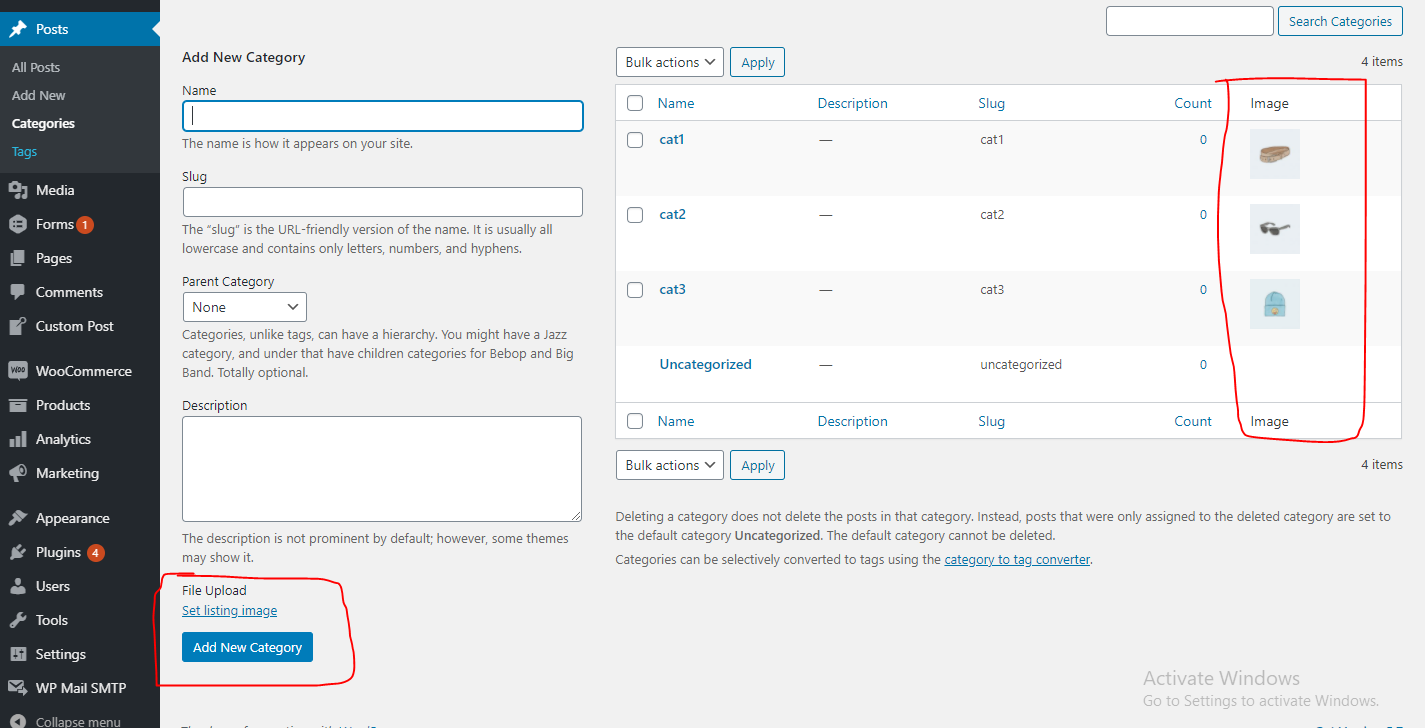
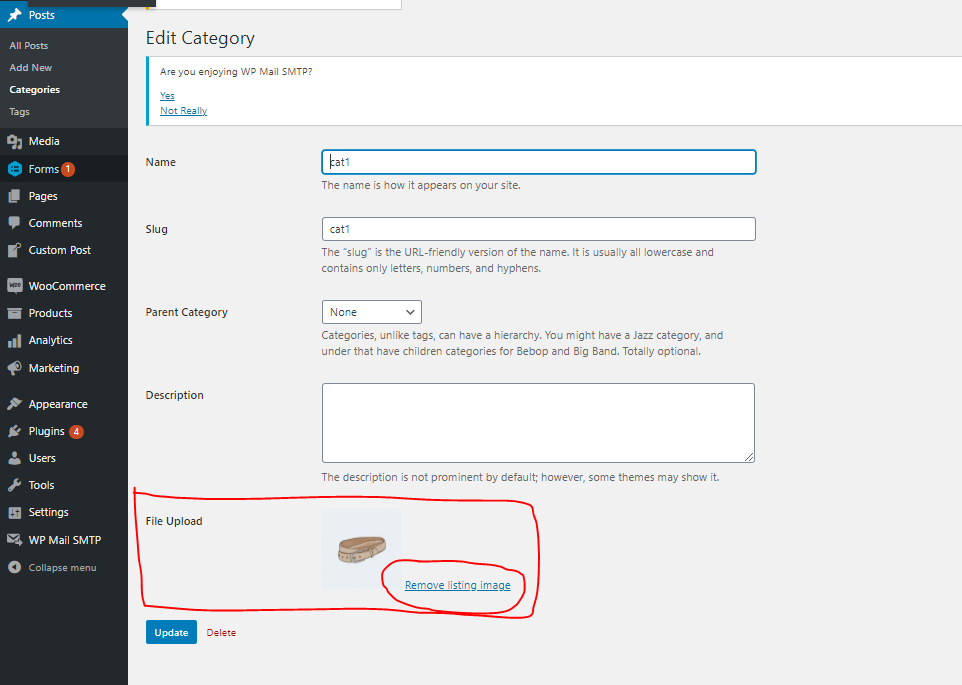
you should get result like this
All methods was sourced from stackoverflow.com or stackexchange.com, is licensed under cc by-sa 2.5, cc by-sa 3.0 and cc by-sa 4.0