I want to access a shared mailbox via Microsoft Graph.
What I found so far to access a shared mailbox is the following GET request: “https://graph.microsoft.com/v1.0/users/{sharedmailboxmailaddress}/messages”
As a respond I get:
"error": {
    "code": "ErrorAccessDenied",
    "message": "Access is denied. Check credentials and try again.",
    "innerError": {
        "date": "2020-08-31T10:12:28",
        "request-id": "1346f752-1041-495e-b880-375c6011aa8a"
    }
}
My user has full access to this shared mailbox – e.g. I can read/write the mailbox in Outlook.
To consent the permission (modify permissions) is not an option because I am not an admin of the organization – I think I would need the permission “Mail.ReadWrite.Shared”.
Is there a way without consenting the permission because my user has full access to the shared mailbox? There has to be a way to access the mailbox, without having admin permissions in the organization?
I am looking forward to read an answer 🙂
Thanks
Answers:
Thank you for visiting the Q&A section on Magenaut. Please note that all the answers may not help you solve the issue immediately. So please treat them as advisements. If you found the post helpful (or not), leave a comment & I’ll get back to you as soon as possible.
Method 1
No matter whether your account has full access to the shared mailbox, Azure AD authorization cannot be bypassed.
You should have known you need to register an Azure AD app to sign in your account.
The permissions are controlled by the Azure AD app. In your case, “Mail.ReadWrite.Shared” permission is necessary.
Only by adding this permission, you can use Microsoft Graph to access the shared mailbox messages.
You can ask your admin to add this permission for you.
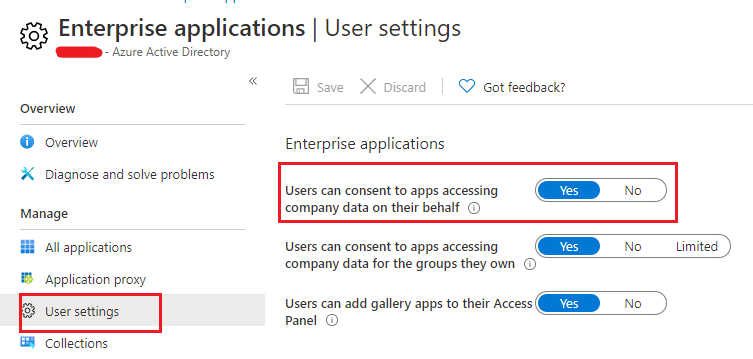
In fact, “Mail.ReadWrite.Shared” doesn’t require admin consent. User can consent it by themselves if the admin enables Users can consent to apps accessing company data on their behalf.
All methods was sourced from stackoverflow.com or stackexchange.com, is licensed under cc by-sa 2.5, cc by-sa 3.0 and cc by-sa 4.0