I’m attempting to read some performance counters from my ASP.NET application. When I do, I get the error “Access to the registry key ‘Global’ is denied.”
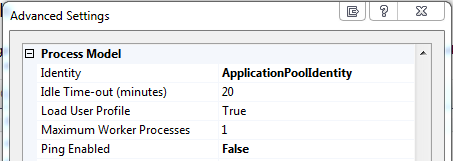
I have tried following the instructions here and here, using the user IIS AppPoolDefaultAppPool, which is the identity my app pool is configured to use:
I have added that user to the Performance Monitor Users group:
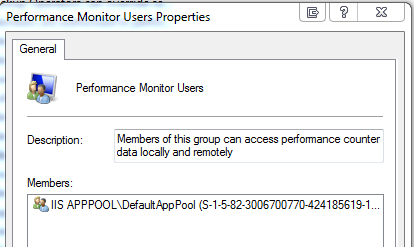
And after adding the user, I restarted my computer. But I am still getting the error.
I have also tried adding the users IUSR and NETWORK SERVICE to the Performance Monitor Users group, but those don’t work either. Out of desperation, I tried adding the user “Everyone” to the Performance Monitor Users group, and that actually does work. But my goal is to log statistics from my application in production, and I don’t want to add “Everyone” to that group on the production server.
What else needs to happen in order to read the performance counters without generating a security exception?
Answers:
Thank you for visiting the Q&A section on Magenaut. Please note that all the answers may not help you solve the issue immediately. So please treat them as advisements. If you found the post helpful (or not), leave a comment & I’ll get back to you as soon as possible.
Method 1
I found the solution. Whereas various links around the Internet tell you to use the identity IIS APPPOOLDefaultAppPool, that is NOT the full story. That will only work if you are in fact assigning your applications to an app pool named “DefaultAppPool”.
This link at ServerFault has the answer. You must use the name of your app pool. In my case, the app pool’s name was “staging”, so the correct user was IIS APPPOOLstaging. Putting this user in the Performance Monitor Users group fixed my issue.
Method 2
In my case I added the correct Application pool (the one I used for my web site) to Performance Users and Log, but it was still giving me the issue.
What I did was to
- stop my application pool
- switch my web site so it uses DefaultAppPool
- restarted the web site
- switched web site back to correct app pool (which is stopped)
- started app pool
- restarted the web site
All methods was sourced from stackoverflow.com or stackexchange.com, is licensed under cc by-sa 2.5, cc by-sa 3.0 and cc by-sa 4.0