How can add a new menu item underneath the “insert From URL” on the left sidebar in the new WordPress 3.5 Media Manager?
I’ve been looking at the backbone js and tried my hand at hooking into it with my own JS but without success.
Edit 2:
This seems to do the trick:
http://sumtips.com/2012/12/add-remove-tab-wordpress-3-5-media-upload-page.html
It should do for simple stuff, but I guess its also possible to do the same thing in Javascript. Would be nice if there was a tutorial/explanation on how the new media manager internals work.
Answers:
Thank you for visiting the Q&A section on Magenaut. Please note that all the answers may not help you solve the issue immediately. So please treat them as advisements. If you found the post helpful (or not), leave a comment & I’ll get back to you as soon as possible.
Method 1
OK, I think that I have something that is really close to be an answer:
I put my code in a gist
Here is the result :
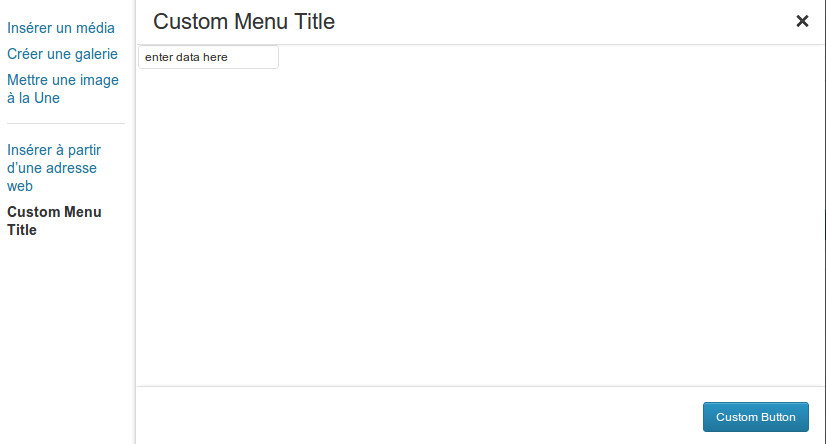
I built several Backbone object to respect the MVC pattern : the controller.Custom is in charge of doing all the logic, the view.Toolbar.Custom deals with toolbar buttons, and the view.Custom display the inner UI.
Method 2
I’m working on adding a button to the “router menu” (adding something right of “Media Library”), but the system is the same.
<script type="text/javascript">
    jQuery(window).on('load', function() {
        var media   = window.wp.media,
        Attachment  = media.model.Attachment,
        Attachments = media.model.Attachments,
        Query       = media.model.Query,
        l10n = media.view.l10n = typeof _wpMediaViewsL10n === 'undefined' ? {} : _wpMediaViewsL10n,
        NewMenuItem;

        jQuery(document).on( 'click', '.insert-media', function( event ) {
            var workflow = wp.media.editor.get();
            var options = workflow.options;
            if( undefined == NewMenuItem ) {
                NewMenuItem = new wp.media.view.RouterItem( _.extend( options, { text: 'New Item!' } ) );
                workflow.menu.view.views.set( '.media-menu', NewMenuItem, _.extend( options, { add: true } ) );
            }

        });
    });
</script>
Now, it doesn’t do anything yet. That’s the next step!
Method 3
You can hook into the media_upload_tabs filter to add the tab. This is the method used by the Network Shared Media plugin:
function wpse_76980_add_upload_tab( $tabs ) {
    $newtab = array( 'tab_slug' => 'Tab Name' );
    return array_merge( $tabs, $newtab );
}
add_filter( 'media_upload_tabs', 'wpse_76980_add_upload_tab' );
You can then hook to the media_upload_tab_slug action (where tab_slug is as used above) to display the tab contents:
function wpse_76980_media_upload() {
    // display tab contents
}
add_action( 'media_upload_tab_slug', 'wpse_76980_media_upload' );
Method 4
I have not a solution, but hints. The strings get from a array. You can filter via hook media_view_strings. The modal box after click is a javascript, build with backbone.js since WP 3.5. See in /wp-includes/js/media-views.js for a solution. Backbone is also new for me and the scripts have many lines of source.
All methods was sourced from stackoverflow.com or stackexchange.com, is licensed under cc by-sa 2.5, cc by-sa 3.0 and cc by-sa 4.0