I’m try to add a custom button to the toolbar for paragraph blocks.
I followed the steps reproduced in this great tutorial:
https://neliosoftware.com/blog/how-to-add-a-button-to-the-gutenberg-editor-using-wordpress-scripts/
The button is correctly showing up and every piece of code in that project is working good.
I have some trouble to get the content updated inside the editor when the button is clicked.
I tried to follow this guidelines:
https://developer.wordpress.org/block-editor/tutorials/format-api/3-apply-format/ but I get a console error saying that the method toggleFormat is undefined.
I share this github: Gutenberg Buttons, if someone can help me to fix the issue.
Thank you
Answers:
Thank you for visiting the Q&A section on Magenaut. Please note that all the answers may not help you solve the issue immediately. So please treat them as advisements. If you found the post helpful (or not), leave a comment & I’ll get back to you as soon as possible.
Method 1
Now I can see what the problem is. You are not using the onChange properly. It comes from the props of the edit component:
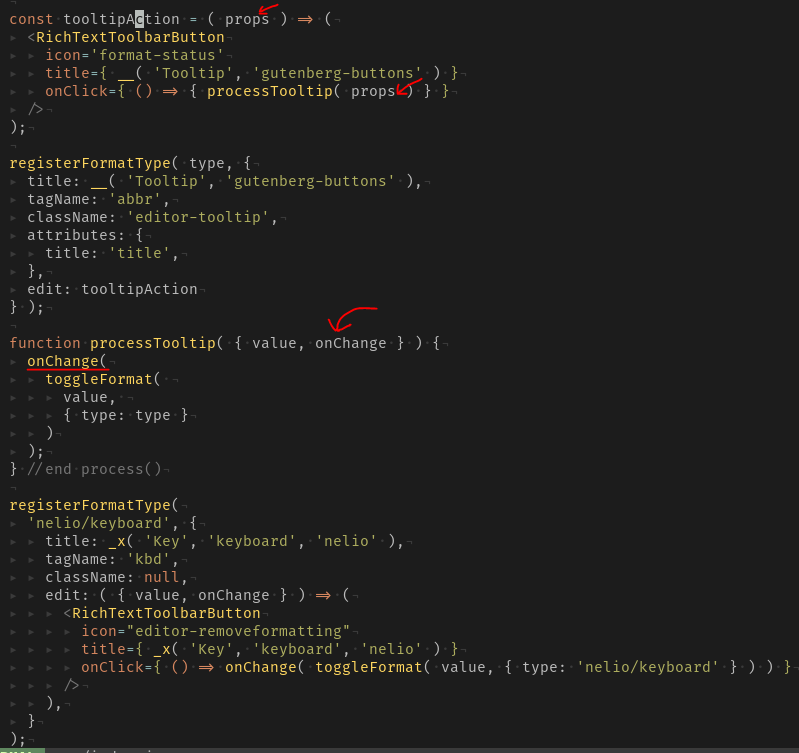
Here you have a complete example that works:
registerFormatType(
    'nelio/keyboard', {
        title: __( 'Key', 'nelio' ),
        tagName: 'kbd',
        className: null,
        edit: ( { value, onChange } ) => (
            <RichTextToolbarButton
                icon="editor-removeformatting"
                title={ __( 'Key', 'nelio' ) }
                onClick={ () => onChange( toggleFormat( value, { type: 'nelio/keyboard' } ) ) }
            />
        ),
    }
);
All methods was sourced from stackoverflow.com or stackexchange.com, is licensed under cc by-sa 2.5, cc by-sa 3.0 and cc by-sa 4.0