I have found many tutorials for adding columns to the Identity tables (which I have successfully moved to the application database) with database migrations however my understanding is this is not applicable in database fist projects. So…how do I add columns to the aspnetusers table in a database first project?
I would like to ad a bit type column called Is RegComplete which is initially set to 0 then at some point when the user has completed some more tasks then set to 1.
Answers:
Thank you for visiting the Q&A section on Magenaut. Please note that all the answers may not help you solve the issue immediately. So please treat them as advisements. If you found the post helpful (or not), leave a comment & I’ll get back to you as soon as possible.
Method 1
OK, I’ve cracked it! Firstly I didn’t realise that although I have moved the Identity tables to the Application database there is still two Database Contexts, one for the application tables which are DB First, and the other for the Identities tables.
I was able to enable migrations and add the column using code first and migrate then update the database. The new column is now available in the controller.
I found this tutorial which helped me: http://blogs.msdn.com/b/webdev/archive/2013/10/16/customizing-profile-information-in-asp-net-identity-in-vs-2013-templates.aspx
Method 2
The easiest solution:
- Add columns into
AspNetUserstable - Add properties into
IdentityModels.csclass (Check attachment) - Add same properties into
AccountViewModels.csRegisterViewModelclass - Compile and it will work.
Attachment
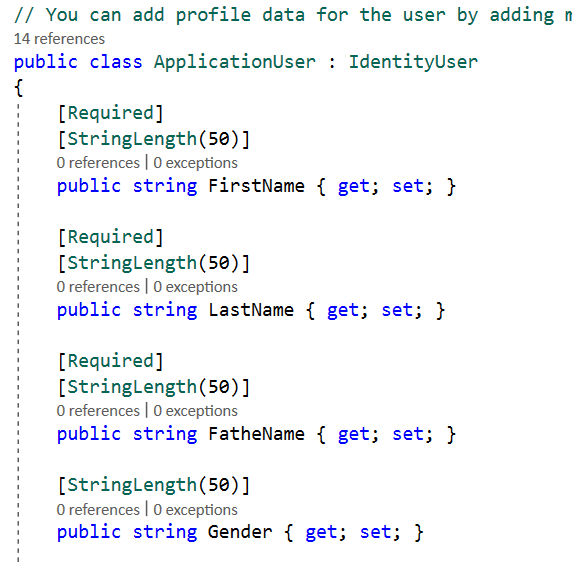
(VS 2017, MVC5)
All methods was sourced from stackoverflow.com or stackexchange.com, is licensed under cc by-sa 2.5, cc by-sa 3.0 and cc by-sa 4.0