I want to add controller in my MVC 4 application in VS2012 as this image:
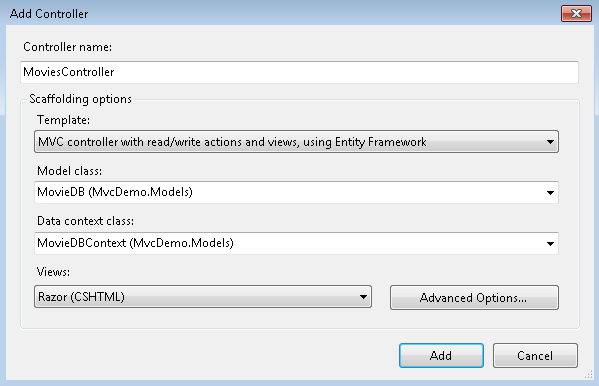
Model:
using System;
using System.Collections.Generic;
using System.Linq;
using System.Web;
using System.Data.Entity;

namespace MvcDemo.Models
{
    public class MovieDB
    {
        public int ID { get; set; }
        public string Title { get; set; }
        public string Director { get; set; }
        public DateTime Date { get; set; }
    }
    public class MovieDBContext : DbContext
    {
        public DbSet<MovieDB> Movies { get; set; }
    }
}
Connection strings:
<connectionStrings>

<add name="DefaultConnection"
connectionString="Data Source=(LocalDb)v11.0;Initial Catalog=aspnet-MvcDemo-20130315191956;Integrated Security=SSPI;AttachDBFilename=|DataDirectory|aspnet-MvcDemo-20130315191956.mdf"
providerName="System.Data.SqlClient" />

<add name="MovieDBContext"
connectionString="Data Source=|DataDirectory|Movies.sdf"
providerName="System.Data.SqlServerCe.4.0"/>

</connectionStrings>
After clicking “add”, this error occurs:
unable to retrieve metadata for 'MvcDDemo.Models.MovieDB'.Using the
same DbCompiledModel to create contexts against different type of
database servers is not supported.instead,create a
separate DbCompiledModel for each type of server being used.
Any suggestion?
Answers:
Thank you for visiting the Q&A section on Magenaut. Please note that all the answers may not help you solve the issue immediately. So please treat them as advisements. If you found the post helpful (or not), leave a comment & I’ll get back to you as soon as possible.
Method 1
In Web.config, set second providerName same as first providerName, and after creating controller, undo that!
from:here
Method 2
My post may help in case someone has the same problem.
I tried experimenting with EF6 and EF5 in the same project, and I noticed that the <entityFramework> tag was messed up, and got the same problem above.
Here is what I did, and it solved the problem:
- I removed the <entityFramework> tag from Web.config
- Uninstalled entity framework from my MVC app using nuget
- Installed entity framework to my MVC app again
After removing the <entityFramework> tag and re-installing EF5 it was fixed, and I can scaffold my controllers again.
Method 3
Change
providerName="System.Data.SqlServerCe.4.0
to
providerName="System.Data.SqlClient to fix this error.
Method 4
Don’t forget to clean and rebuild before you try to scaffold! That was my mistake.
Method 5
In web.config, delete the AttachDBFilename=|DataDirectory|****.mdf line.
Method 6
User following for providerName = "System.Data.SqlServerCe.4.0"
<add name="MovieDBContext"
connectionString="Data Source=|DataDirectory|Movies.sdf"
providerName="System.Data.SqlServerCe.4.0" />
Method 7
I had the same issue and below is the change which fixed the issue for me. Had to change localhost to . And Added Initial catalog=Movies.
Before
<add name="MovieDBContext" connectionString="Data Source= localhostSQLEXPRESS;AttachDbFilename=|DataDirectory|MoviesDB.mdf;Integrated Security=True" providerName="System.Data.SqlClient"/>
After (fix)
<add name="MovieDBContext" connectionString="Data Source= .SQLEXPRESS;Initial Catalog=Movies; AttachDbFilename=|DataDirectory|MoviesDB.mdf;Integrated Security=True" providerName="System.Data.SqlClient"/>
Reference:
ASP .Net MVC 4, Invalid value for key ‘attachdbfilename’
Method 8
Make sure that the context section has access to the context created in that class library.
for example:
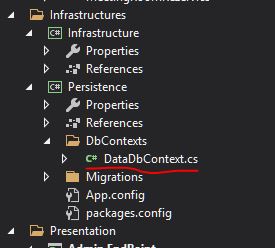
Persistence.DbContexts is not Correct
you must use this Persistence.DbContexts.DataDbContext
All methods was sourced from stackoverflow.com or stackexchange.com, is licensed under cc by-sa 2.5, cc by-sa 3.0 and cc by-sa 4.0