I need to attach meta data to every menu item, with a key ‘foo’. Is it possible to do that, without editing core WP?
A quick look at the nav-menu files showed that no hooks exist near the place I want to add the input box (below Description, here – http://cl.ly/0v2Z0X1n2e1L431t0h1G)
Answers:
Thank you for visiting the Q&A section on Magenaut. Please note that all the answers may not help you solve the issue immediately. So please treat them as advisements. If you found the post helpful (or not), leave a comment & I’ll get back to you as soon as possible.
Method 1
here is a quick code that should do the job, paste this in your theme’s functions.php file
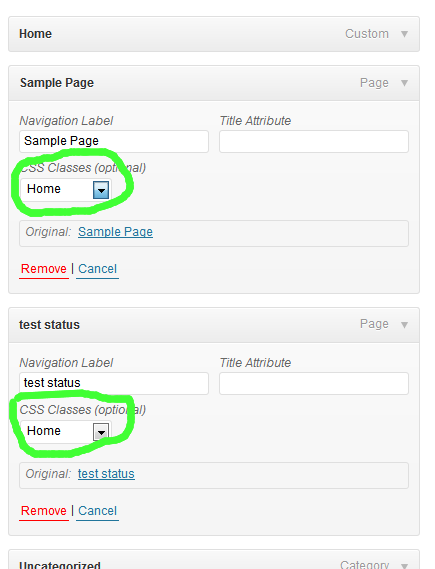
basically what it does is hide all regular class input boxes and adds a new select dropdown which changes the value of the hidden input based on the selected value.
and it looks like this;
function menu_item_class_select(){
    global $pagenow;
    if ($pagenow == "nav-menus.php"){
    ?>
    <script>
    jQuery(document).ready(function(){
        function create_dd(v){
            //create dropdown
            var dd = jQuery('<select class="my_class"></select>');
            //create dropdown options
            //array with the options you want
            var classes = ["","class1","class2","class3"];
            jQuery.each(classes, function(i,val) {
                if (v == val){
                    dd.append('<option value="'+val+'" selected="selected">'+val+'</option>');
                }else{
                    dd.append('<option value="'+val+'">'+val+'</option>');
                }
            });
            return dd;
        }

        jQuery(".edit-menu-item-classes").each(function() {
            //add dropdown
            var t = create_dd(jQuery(this).val());
            jQuery(this).before(t);
            //hide all inputs
            jQuery(this).css("display","none");

        });
        //update input on selection
        jQuery(".my_class").bind("change", function() {
            var v = jQuery(this).val();
            var inp = jQuery(this).next();
            inp.attr("value",v);
        });
    });


    </script>
    <?php
    }
}
add_action('admin_footer','menu_item_class_select');
Method 2
this answer in here is little bit of overdoing. I prefer to do not interfere with walkers in this case so I did my job with more jquery involved.
add_action('wp_update_nav_menu_item', 'custom_nav_update', 10, 3);
function custom_nav_update($menu_id, $menu_item_db_id, $args)
{
    if (is_array($_REQUEST['menu-item-icon'])) {
        $custom_value = $_REQUEST['menu-item-icon'][$menu_item_db_id];
        update_post_meta($menu_item_db_id, '_menu_item_icon', $custom_value);
    }
}

function menu_item_class_select()
{
    global $pagenow;
    if ($pagenow == "nav-menus.php") {
        ?>
        <script>
            (function ($) {
                $(document).ready(function () {
                    var menu_item_collection = {};
                    var item_holder = $("#menu-to-edit");
                    menu_item_collection.items = item_holder.find("li");

                    // extract id of a menu item from this pattern (menu-item-109)
                    // which 109 is the id
                    function getId(item_id) {
                        var arrayed = item_id.split("-");
                        return arrayed[2];
                    }

                    // return template wrapped in jquery object
                    function extra_field(id, value) {
                        if (value === null) {
                            value = "";
                        }
                        var template = '<p class="field-title-attribute description description-wide">' +
                            '<label for="edit-menu-item-attr-title-108">' +
                            'icon' +
                            '<input type="text" class="widefat edit-menu-item-attr-title" name="menu-item-icon[' + id + ']" value="' + value + '">' +
                            '</label>' +
                            '</p>';

                        return $(template);
                    }

                    // ajax out to get metadata
                    function getMetaData(id, callback) {
                        $.ajax({
                            method: "POST",
                            url: "/wp-admin/admin-ajax.php",
                            data: {id: id, post_type: "menu", action: "menu_metadata"}
                        }).done(function (msg) {
                            callback(msg);
                        }).fail(function (msg) {
                            console.log("failed : " + msg);
                        });
                    }

                    // these lines of codes initialize menus with their custom attributes values
                    if (menu_item_collection.items.length > 0) {
                        var id;
                        menu_item_collection.items.each(function () {
                            id = getId($(this).attr("id"));
                            var _this = $(this);
                            getMetaData(id, function (msg) {
                                var attribute = (_this.find(".field-title-attribute"));
                                if (msg._menu_item_icon === 'undefined') {
                                    msg._menu_item_icon = "";
                                }
                                attribute.after(extra_field(getId(_this.attr('id')), msg._menu_item_icon[0]));
                                _this.addClass("icon-link-was-added");
                            });
                        });
                    }

                    // this listener interact with adding live menus
                    item_holder.on('DOMNodeInserted', function (e) {
                        try {
                            // sortable script code that they used made me to check upon whether our intended child is li or not
                            // yet i wrap this code into try catch because some nodes was`nt inserted to the dome
                            // and null pointer would cause undefined error some times
                            if (
                                !$(e.target).hasClass("icon-link-was-added") &&
                                $(e.target).is("li") &&
                                $(e.target).attr("id").search(/menu-item-[0-9]+/) !== -1) {

                                var attribute = ($(e.target).find(".field-title-attribute"));
                                attribute.after(extra_field(getId($(e.target).attr('id'))));
                                $(e.target).addClass("icon-link-was-added");
                            }
                        } catch (e) {
                            // silent
                        }
                    });
                });
            })(jQuery);
        </script>
        <?php
    }
}

add_action('admin_footer', 'menu_item_class_select');
All methods was sourced from stackoverflow.com or stackexchange.com, is licensed under cc by-sa 2.5, cc by-sa 3.0 and cc by-sa 4.0