I am currently displaying a list of pages with “words” (English learning site) using WP_Query.
I want to add a search field at the top of the list, but in a way that would dynamically (is it AJAX?) modify the list below to display only the records that match with search field.
Test page: https://pweyigm9.ayz.pl/baza-wiedzy/slownictwo-angielskie/czasowniki/czasowniki-nieregularne/
Visualisation (hide red crossed records, because in “search field” there’s a value to be looked for): 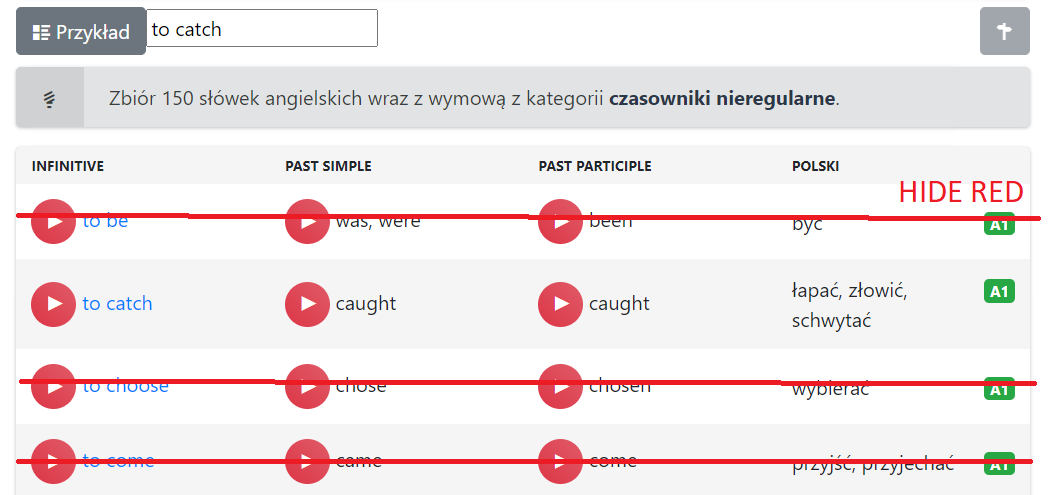
$args = array(
        'post_type' => 'post',
        'post_status' => 'publish',
        'category_name' => $postcat[0]->slug,
        'posts_per_page' => 20,
        'orderby' => 'meta_value title',
        'meta_key' => 'poziom',
        'order' => 'ASC',
        'paged' => $paged,
    );
    $arr_posts = new WP_Query( $args );
    if ( $arr_posts->have_posts() ) :
        echo '<table class="vocab table table-bordered table-hover table-striped"><tbody><tr><th class="example">Infinitive</th><th class="example">Past simple</th><th class="example">Past participle</th><th class="example">polski</th></tr>';
        while ( $arr_posts->have_posts() ) :
            $arr_posts->the_post();
            ?>
                    <?php
                echo '<tr><td>';
                echo do_shortcode(get_field('player1'));
                echo '<a href="'.get_permalink($item->ID).'" title="'.$postcat[0]->name.': to '.get_the_title($item->ID).' - odmiana czasownika">';
                echo 'to '.get_field('en1');
                echo '</a></td><td>';
                echo do_shortcode(get_field('player2')); echo get_field('en2');
                echo '</td><td>';
                echo do_shortcode(get_field('player3')); echo get_field('en3');
                echo '</td><td>';
                echo '<span class="float-right">';
                echo get_field('poziom');
                echo '</span>';
                echo get_field('pl');
                echo '</td></tr>';
                if (get_field('przyklad_en')) {
                echo '<tr style="display:none;"><td></td></tr><tr class="en-vocab-example"><td colspan="2">';
                echo do_shortcode(get_field('przyklad_player')); echo get_field('przyklad_en');
                echo '</td><td colspan="2">';
                echo get_field('przyklad_pl');
                echo '</td></tr>';
                }
                ?>
            <?php
        endwhile;
        echo '</tbody></table>';
        wp_pagenavi( array( 'query' => $arr_posts ));
    endif;
Answers:
Thank you for visiting the Q&A section on Magenaut. Please note that all the answers may not help you solve the issue immediately. So please treat them as advisements. If you found the post helpful (or not), leave a comment & I’ll get back to you as soon as possible.
Method 1
since in the comments you explained by dynamically you mean without reloading/refreshing the page.
the answer to the first question is: yes, you will use AJAX calls.
first, create the search input
<input name='input_name' placeholder="<?php echo __('search','textdomain'); ?>">
second, the Javascript registered and enqueued script in functions.php
(function ($) {
  $(document).ready(function () {
    $("[name=input_name]").keyup(function () {
      $.post(
        ajaxurl,
        /*
            if ajaxurl is not defined you need to use wp_localize_script()
            or depending on how your wordpress is hosted use simply admin-ajax.php
        */
        {
          action: "random-name",
          search_data: $(this).val(),
        },
        function (response) {
          // use "response" to draw the new table rows
        }
      );
    });
  });
})(jQuery);
finally in your functions.php
function my_ajax_handler(){
    $_POST['search_data']; // here the searched word, push it to $args then run the loop Query again
    wp_die();
}
add_action('wp_ajax_random-name','my_ajax_handler');
keep in mind there are existing plugins for tables. but doing an AJAX call yourself shouldn’t be that hard.
the code above does the task.
All methods was sourced from stackoverflow.com or stackexchange.com, is licensed under cc by-sa 2.5, cc by-sa 3.0 and cc by-sa 4.0