Starting from the following code, I’d like to add a legend to this tabular:
from dash import Dash, dash_table
import pandas as pd

df = pd.read_csv('https://raw.githubusercontent.com/plotly/datasets/master/solar.csv')

app = Dash(__name__)

app.layout = dash_table.DataTable(df.to_dict('records'), [{"name": i, "id": i} for i in df.columns])

if __name__ == '__main__':
    app.run_server(debug=True)
See also: https://dash.plotly.com/datatable
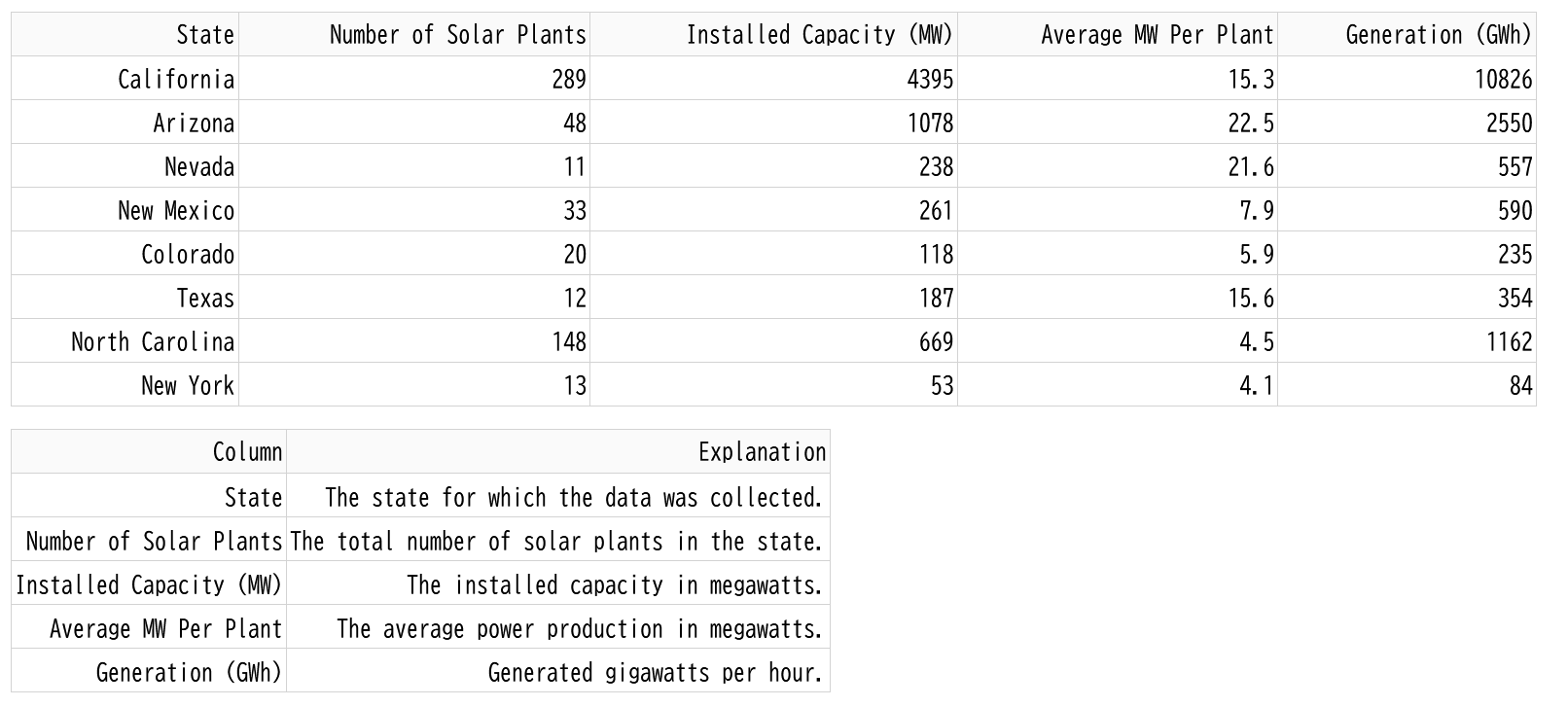
I’d like to have something like this on the bottom of the screen:
| Column | Explanation |
|---|---|
| State | The state for which the data was collected. |
| Number of Solar Plants | The total number of solar plants in the state. |
| Installed Capacity (MW) | The installed capacity in megawatts. |
| Average MW Per Plant | The average power production in megawatts. |
| Generation (GWh) | Generated gigawatts per hour. |
Answers:
Thank you for visiting the Q&A section on Magenaut. Please note that all the answers may not help you solve the issue immediately. So please treat them as advisements. If you found the post helpful (or not), leave a comment & I’ll get back to you as soon as possible.
Method 1
Since the table is displayed close together and at full display width, you can use inine-block to insert spaces and optimize column widths.
from dash import Dash, html, dash_table
from jupyter_dash import JupyterDash
import pandas as pd

explain = ["The state for which the data was collected.",
           "The total number of solar plants in the state.",
           "The installed capacity in megawatts.",
           "The average power production in megawatts.",
           "Generated gigawatts per hour."]

df = pd.read_csv('https://raw.githubusercontent.com/plotly/datasets/master/solar.csv')
df_legend = pd.DataFrame({'Column':df.columns, 'Explanation': explain})

#app = Dash(__name__)
app = JupyterDash(__name__)

app.layout = html.Div([
    html.Div(id='div1', children=[
        dash_table.DataTable(df.to_dict('records'), [{"name": i, "id": i} for i in df.columns])
    ]),
    html.Div(id='div2', children=[
        dash_table.DataTable(
        data=df_legend.to_dict('records'),
        columns=[{"name": i, "id": i} for i in df_legend.columns],
        )
    ], style={'display': 'inline-block'})
])

if __name__ == '__main__':
    app.run_server(debug=True)#, mode='inline'
Method 2
I found a solution for my problem. I simply added a second tabular as a legend.
from dash import Dash, dash_table
import pandas as pd
from dash import html

df = pd.read_csv('https://raw.githubusercontent.com/plotly/datasets/master/solar.csv')

app = Dash(__name__)

explanations = ["The state for which the data was collected.", "The total number of solar plants in the state.", "The installed capacity in megawatts.", "The average power production in megawatts.", "Generated gigawatts per hour."]

app.layout = html.Div([
    dash_table.DataTable(df.to_dict('records'),
                         [{"name": i, "id": i} for i in df.columns]),
    dash_table.DataTable([{"Column": "State", "Explanation": "The state for which the data was collected."},
                          {"Column": "Number of Solar Plants", "Explanation": "The total number of solar plants in the state."},
                          {"Column": "Installed Capacity (MW)", "Explanation": "The installed capacity in megawatts."},
                          {"Column": "Average MW Per Plant", "Explanation": "The average power production in megawatts."},
                          {"Column": "Generation (GWh)", "Explanation": "Generated gigawatts per hour."},],
                           [{"name": i, "id": i} for i in ["Column", "Explanation"]]),
    html.Div(id='datatable-interactivity-container')
])

#app.layout =

if __name__ == '__main__':
    app.run_server(debug=True)
All methods was sourced from stackoverflow.com or stackexchange.com, is licensed under cc by-sa 2.5, cc by-sa 3.0 and cc by-sa 4.0