I want to add a option to the “Gallery settings” (when you insert a gallery into a post).
I once found some code on how to do this, but unfortunately I can’t find it anymore.
I can’t even remenber if it was a hook, but I think it was some hackish stuff 😉
Thx
Answers:
Thank you for visiting the Q&A section on Magenaut. Please note that all the answers may not help you solve the issue immediately. So please treat them as advisements. If you found the post helpful (or not), leave a comment & I’ll get back to you as soon as possible.
Method 1
Thanks to the hint with the multiple galleries plugin from Niall Campbell and thanks to this question How to Add a Custom Colum on Thickbox Media Gallery Tab? (where I got the hook admin_head-media-upload-popup from), I was able to complete the task.
I’ve added an option to add a style attribute to the gallery shortcode.
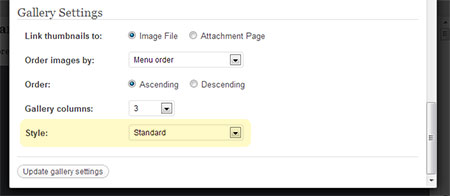
Here is the complete code:
add_action( 'admin_head-media-upload-popup', 'wpse_53803_script_enqueuer' );

function wpse_53803_script_enqueuer()
{
    if( $_GET['tab'] == 'gallery' )
    {
        ?>
        <script type="text/javascript">
        jQuery(document).ready( function($) {

            // append the table row
            $('#gallery-settings table#basic tbody').append('<tr><th scope="row" class="label"><label><span class="alignleft">Style:</span></label></th><td class="field"><select id="style" name="style"><option value="standard">Standard</option><option value="slideshow">Slideshow</option></select></td></tr>');

            // set our vars
            var $style = '', $is_update = false;

            // Select parent editor, read existing gallery data
            w = wpgallery.getWin();
            editor = w.tinymce.EditorManager.activeEditor;

            if (editor !== null) {
                gal = editor.selection.getNode();

                if (editor.dom.hasClass(gal, 'wpGallery')) {
                    $style = editor.dom.getAttrib(gal, 'title').match(/style=['"]([^'"]+)['"]/i);
                    var $is_update = true;
                    if ($style != null) {
                        $style = $style[1];
                        $('table#basic #style').find('option[value="' + $style + '"]').attr('selected','selected');
                    }
                } else {
                    $('#insert-gallery').show();
                    $('#update-gallery').hide();
                }
            }

            // remove standard onmousedown action
            $('#insert-gallery').attr('onmousedown', '');

            // Insert or update the actual shortcode
            $('#update-gallery, #insert-gallery, #save-all').mousedown(function() {
                var $styleAdd = '';
                if (editor !== null)
                    var orig_gallery = editor.dom.decode(editor.dom.getAttrib(gal, 'title'));
                else
                    var orig_gallery = '';

                // Check which which style is selected
                if($('table#basic #style').val() != 'standard') {
                    $styleAdd = ' style="slideshow"';
                }

                if ($(this).attr('id') == 'insert-gallery') {
                    w.send_to_editor('[gallery' + wpgallery.getSettings() + $styleAdd + ']');
                }

                // Update existing shortcode
                if ($is_update) {
                    if ($styleAdd != '' && orig_gallery.indexOf(' style=') == -1)
                        editor.dom.setAttrib(gal, 'title', orig_gallery + $styleAdd);
                    else if (orig_gallery.indexOf(' style=') != -1)
                        editor.dom.setAttrib(gal, 'title', orig_gallery.replace(' style="slideshow"', $styleAdd));
                    else
                        editor.dom.setAttrib(gal, 'title', orig_gallery.replace(' style="slideshow"', ''));
                }
            });

        });
        </script>
        <?php
    }
}
It adds style="slideshow" if the slideshow style is selected, otherwise it doesn’t add anything. And it recognizes the set style if you update the gallery, so that the right option is selected.
Thank you!
Method 2
hmmm check out the code to Mutliple Galleries plugin, it uses a javascript workaround due to the absence of a wordpress hook for the media_upload_gallery_form function (in wp-admin/includes). It then outputs a modified gallery shortcode to the editor (with some extra attributes).
If you’re adding in additional attributes that aren’t covered by the gallery shortcode, you’ll need to write your own function for it, but there’s alot of information available to do that out there so I won’t go into that.
All methods was sourced from stackoverflow.com or stackexchange.com, is licensed under cc by-sa 2.5, cc by-sa 3.0 and cc by-sa 4.0