The introduction of the Block Editor killed all plugins which offered publishing conditions, such as minimum word counts, featured image requirements etc.
But the Block Editor did introduce the pre-publish checks:
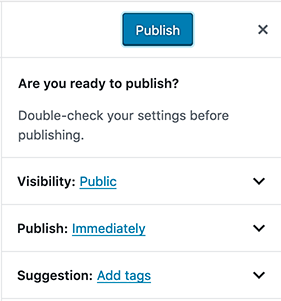
Beautiful. How can we disable the Publish button until a set amount of conditions have been fulfilled?
Examples of four (very) different conditions:
- Minimum word count (example:
500words) - Min/max tags (example:
3-5tags) - Min category (that isn’t
uncategorized) - Featured image is assigned
What we have so far
As expected, the documentation is non-existent. But leads are scattered across the web.
In core/editor, we can use .lockPostSaving() to disabled the Publish button, and unlock it via .unlockPostSaving().
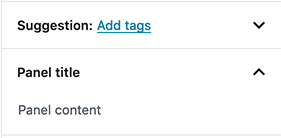
We can add a panel to the pre-publish screen via PluginPrePublishPanel. Example (by MadMaardigan):
var PluginPrePublishPanel = wp.editPost.PluginPrePublishPanel;
var registerPlugin = wp.plugins.registerPlugin;

function Component() {
    // lock post saving
    wp.data.dispatch('core/editor').lockPostSaving()

    // unlock post saving
    // wp.data.dispatch('core/editor').unlockPostSaving()

    return wp.element.createElement(
        PluginPrePublishPanel,
        {
            className: 'my-plugin-publish-panel',
            title: 'Panel title',
            initialOpen: true,
        },
        'Panel content'
    );
}

registerPlugin( 'my-plugin', {
  render: Component,
});
It works:
And we have great discussions on GitHub: #7020, #7426, #13413, #15568, #10649…
Answers:
Thank you for visiting the Q&A section on Magenaut. Please note that all the answers may not help you solve the issue immediately. So please treat them as advisements. If you found the post helpful (or not), leave a comment & I’ll get back to you as soon as possible.
Method 1
EDIT Sept 2021:
An updated version of the answer that uses hooks.
This version tracks changes in the editor much better. It also uses import statement instead of importing directly from the wp global. This approach when used with the @wordpress/scripts package will correctly add dependencies for this file when being enqueued. Accessing the wp global will still work but you will have to be sure you’re managing your script dependencies manually.
Thanks to everyone in the comments!
import { useState, useEffect } from '@wordpress/element';
import { registerPlugin } from '@wordpress/plugins';
import { PluginPrePublishPanel } from '@wordpress/edit-post';
import { useSelect, useDispatch } from '@wordpress/data';
import { count } from '@wordpress/wordcount';
import { serialize } from '@wordpress/blocks';

const PrePublishCheckList = () => {
    // Manage the messaging in state.
    const [wordCountMessage, setWordCountMessage] = useState('');
    const [catsMessage, setCatsMessage] = useState('');
    const [tagsMessage, setTagsMessage] = useState('');
    const [featuredImageMessage, setFeaturedImageMessage] = useState('');

    // The useSelect hook is better for retrieving data from the store.
    const { blocks, cats, tags, featuredImageID } = useSelect((select) => {
        return {
            blocks: select('core/block-editor').getBlocks(),
            cats: select('core/editor').getEditedPostAttribute('categories'),
            tags: select('core/editor').getEditedPostAttribute('tags'),
            featuredImageID:
                select('core/editor').getEditedPostAttribute('featured_media'),
        };
    });

    // The useDispatch hook is better for dispatching actions.
    const { lockPostSaving, unlockPostSaving } = useDispatch('core/editor');

    // Put all the logic in the useEffect hook.
    useEffect(() => {
        let lockPost = false;
        // Get the WordCount
        const wordCount = count(serialize(blocks), 'words');
        if (wordCount < 500) {
            lockPost = true;
            setWordCountMessage(`${wordCount} - Minimum of 500 required.`);
        } else {
            setWordCountMessage(`${wordCount}`);
        }

        // Get the category count
        if (!cats.length || (cats.length === 1 && cats[0] === 1)) {
            lockPost = true;
            setCatsMessage('Missing');
            // Check that the cat is not Uncategorized - this assumes that the ID of Uncategorized is 1, which it would be for most installs.
            if (cats.length === 1 && cats[0] === 1) {
                setCatsMessage('Cannot use Uncategorized');
            }
        } else {
            setCatsMessage('Set');
        }

        // Get the tags
        if (tags.length < 3 || tags.length > 5) {
            lockPost = true;
            setTagsMessage('Required 3 - 5 tags');
        } else {
            setTagsMessage('Set');
        }
        // Get the featured image
        if (featuredImageID === 0) {
            lockPost = true;
            setFeaturedImageMessage('Not Set');
        } else {
            setFeaturedImageMessage(' Set');
        }

        if (lockPost === true) {
            lockPostSaving();
        } else {
            unlockPostSaving();
        }
    }, [blocks, cats, tags, featuredImageID]);

    return (
        <PluginPrePublishPanel title={'Publish Checklist'}>
            <p>
                <b>Word Count:</b> {wordCountMessage}
            </p>
            <p>
                <b>Categories:</b> {catsMessage}
            </p>
            <p>
                <b>Tags:</b> {tagsMessage}
            </p>
            <p>
                <b>Featured Image:</b> {featuredImageMessage}
            </p>
        </PluginPrePublishPanel>
    );
};

registerPlugin('pre-publish-checklist', { render: PrePublishCheckList });
Old Version:
const { registerPlugin } = wp.plugins;
const { PluginPrePublishPanel } = wp.editPost;
const { select, dispatch } = wp.data;
const { count } = wp.wordcount;
const { serialize } = wp.blocks;
const { PanelBody } = wp.components;

const PrePublishCheckList = () => {
    let lockPost = false;

    // Get the WordCount
    const blocks = select( 'core/block-editor' ).getBlocks();
    const wordCount = count( serialize( blocks ), 'words' );
    let wordCountMessage = `${wordCount}`;
    if ( wordCount < 500 ) {
        lockPost = true;
        wordCountMessage += ` - Minimum of 500 required.`;
    }

    // Get the cats
    const cats = select( 'core/editor' ).getEditedPostAttribute( 'categories' );
    let catsMessage = 'Set';
    if ( ! cats.length ) {
        lockPost = true;
        catsMessage = 'Missing';
    } else {
        // Check that the cat is not uncategorized - this assumes that the ID of Uncategorized is 1, which it would be for most installs.
        if ( cats.length === 1 && cats[0] === 1 ) {
            lockPost = true;
            catsMessage = 'Cannot use Uncategorized';
        }
    }

    // Get the tags
    const tags = select( 'core/editor' ).getEditedPostAttribute( 'tags' );
    let tagsMessage = 'Set';
    if ( tags.length < 3 || tags.length > 5 ) {
        lockPost = true;
        tagsMessage = 'Required 3 - 5 tags';
    }

    // Get the featured image
    const featuredImageID = select( 'core/editor' ).getEditedPostAttribute( 'featured_media' );
    let featuredImage = 'Set';

    if ( featuredImageID === 0 ) {
        lockPost = true;
        featuredImage = 'Not Set';
    }

    // Do we need to lock the post?
    if ( lockPost === true ) {
        dispatch( 'core/editor' ).lockPostSaving();
    } else {
        dispatch( 'core/editor' ).unlockPostSaving();
    }
    return (
        <PluginPrePublishPanel title={ 'Publish Checklist' }>
            <p><b>Word Count:</b> { wordCountMessage }</p>
            <p><b>Categories:</b> { catsMessage }</p>
            <p><b>Tags:</b> { tagsMessage }</p>
            <p><b>Featured Image:</b> { featuredImage }</p>
        </PluginPrePublishPanel>
    )
};

registerPlugin( 'pre-publish-checklist', { render: PrePublishCheckList } );
Display:
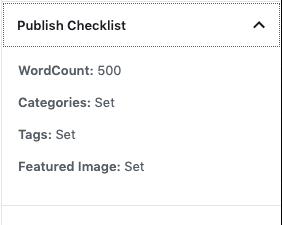
The solution above addresses the requirements listed in the question. One thing that can be expanded on is the category checking, I am making some assumptions about the category ID.
I have kept all of the checks in the same component for the sake of brevity and readability here. I would recommend moving each portion into a separate component and potentially making them Higher Order Components ( i.e withWordCount ).
I have inline comments that explain what is being done but am happy to explain further if there are any questions.
EDIT: Here’s how I’m enqueuing the script
function enqueue_block_editor_assets() {
    wp_enqueue_script(
        'my-custom-script', // Handle.
        plugin_dir_url( __FILE__ ) . '/build/index.js',
        array( 'wp-blocks', 'wp-i18n', 'wp-element', 'wp-editor', 'wp-edit-post', 'word-count' ) // Dependencies, defined above.
    );
}
add_action( 'enqueue_block_editor_assets', 'enqueue_block_editor_assets' );
Adding some more details about the build process. I am using @wordpress/scripts and running the following scripts:
"scripts": {
    "build": "wp-scripts build",
    "start": "wp-scripts start"
  },
Edit 2:
You can get the attachment data via:
wp.data.select('core').getMedia( ID )
Method 2
Update 29.02.2020
You have to replace select( 'core/editor' ).getBlocks() with select( 'core/block-editor' ).getBlocks() in order for this to work
This worked for me:
pathtothemepre-publish-checklistsrcindex.js
const { registerPlugin } = wp.plugins;
const { PluginPrePublishPanel } = wp.editPost;
const { select, dispatch } = wp.data;
const { count } = wp.wordcount;
const { serialize } = wp.blocks;
const { PanelBody } = wp.components;

const PrePublishCheckList = () => {
    let lockPost = false;

    // Get the WordCount
    const blocks = select( 'core/block-editor' ).getBlocks();
    const wordCount = count( serialize( blocks ), 'words' );
    let wordCountMessage = `${wordCount}`;
    if ( wordCount < 500 ) {
        lockPost = true;
        wordCountMessage += ` - Minimum of 500 required.`;
    }

    // Get the cats
    const cats = select( 'core/editor' ).getEditedPostAttribute( 'categories' );
    let catsMessage = 'Set';
    if ( ! cats.length ) {
        lockPost = true;
        catsMessage = 'Missing';
    } else {
        // Check that the cat is not uncategorized - this assumes that the ID of Uncategorized is 1, which it would be for most installs.
        if ( cats.length === 1 && cats[0] === 1 ) {
            lockPost = true;
            catsMessage = 'Cannot use Uncategorized';
        }
    }

    // Get the tags
    const tags = select( 'core/editor' ).getEditedPostAttribute( 'tags' );
    let tagsMessage = 'Set';
    if ( tags.length < 3 || tags.length > 5 ) {
        lockPost = true;
        tagsMessage = 'Required 3 - 5 tags';
    }

    // Get the featured image
    const featuredImageID = select( 'core/editor' ).getEditedPostAttribute( 'featured_media' );
    let featuredImage = 'Set';

    if ( featuredImageID === 0 ) {
        lockPost = true;
        featuredImage = 'Not Set';
    }

    // Do we need to lock the post?
    if ( lockPost === true ) {
        dispatch( 'core/editor' ).lockPostSaving();
    } else {
        dispatch( 'core/editor' ).unlockPostSaving();
    }
    return (
        <PluginPrePublishPanel title={ 'Publish Checklist' }>
            <p><b>Word Count:</b> { wordCountMessage }</p>
            <p><b>Categories:</b> { catsMessage }</p>
            <p><b>Tags:</b> { tagsMessage }</p>
            <p><b>Featured Image:</b> { featuredImage }</p>
        </PluginPrePublishPanel>
    )
};

registerPlugin( 'pre-publish-checklist', { render: PrePublishCheckList } );
Full steps to create the panel with @wordpress/scripts
- Create a folder
pre-publish-checklistin your theme - Create inside the folder package.json file with
{
 "scripts": {
   "build": "wp-scripts build",
   "check-engines": "wp-scripts check-engines",
   "check-licenses": "wp-scripts check-licenses",
   "format:js": "wp-scripts format-js",
   "lint:css": "wp-scripts lint-style",
   "lint:js": "wp-scripts lint-js",
   "lint:md:docs": "wp-scripts lint-md-docs",
   "lint:md:js": "wp-scripts lint-md-js",
   "lint:pkg-json": "wp-scripts lint-pkg-json",
   "packages-update": "wp-scripts packages-update",
   "start": "wp-scripts start",
   "test:e2e": "wp-scripts test-e2e",
   "test:unit": "wp-scripts test-unit-js"
 },
 "dependencies": {
   "@wordpress/scripts": "^7.1.2"
 }
}
- Create a file in the folder with the path ‘src/index.js’ and place the code in the file
yarnyarn build- Add this code to functions.php to enqueue the file
function enqueue_block_editor_assets() {
    wp_enqueue_script(
        'pre-publish-checklist', // Handle.
        get_template_directory_uri(). '/pre-publish-checklist/build/index.js',
        array( 'wp-blocks', 'wp-i18n', 'wp-element', 'wp-editor', 'wp-edit-post', 'word-count' ) // Dependencies, defined above.
    );
}
add_action( 'enqueue_block_editor_assets', 'enqueue_block_editor_assets' );
All methods was sourced from stackoverflow.com or stackexchange.com, is licensed under cc by-sa 2.5, cc by-sa 3.0 and cc by-sa 4.0