The add_menu_page documentation says to pass the menu title as the second parameter:
add_menu_page('Page Title', 'Menu Title', ...);
When adding more pages later via add_submenu_page, the main page becomes the first entry in the submenu:
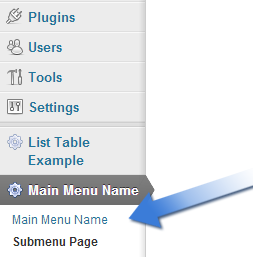
However, I want the first item in the list to have a different name (but still point to the same page), the way WordPress itself does it:
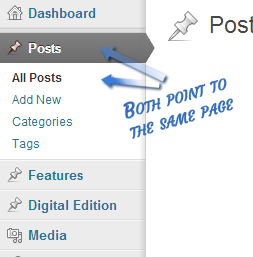
How could I accomplish that in my plugin?
Answers:
Thank you for visiting the Q&A section on Magenaut. Please note that all the answers may not help you solve the issue immediately. So please treat them as advisements. If you found the post helpful (or not), leave a comment & I’ll get back to you as soon as possible.
Method 1
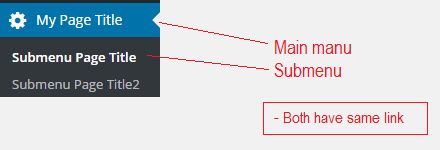
You can make the ‘slug’ for the submenu page equal that of the top level page, and they’ll point to the same place:
add_action('admin_menu', 'my_menu_pages');
function my_menu_pages(){
    add_menu_page('My Page Title', 'My Menu Title', 'manage_options', 'my-menu', 'my_menu_output' );
    add_submenu_page('my-menu', 'Submenu Page Title', 'Whatever You Want', 'manage_options', 'my-menu' );
    add_submenu_page('my-menu', 'Submenu Page Title2', 'Whatever You Want2', 'manage_options', 'my-menu2' );
}
E.g.
Method 2
Make the slug of the parent menu item and sub-menu same (first one item) as below
function actions_recent_bids_add_admin_page(){

    add_menu_page(
          'Recent Bids',
          'Auction Reports',
          'manage_options',
          'wc-auction-reports',
          'actions_recent_bids_list',
          'dashicons-chart-area',
           56
    );

    add_submenu_page(
          'wc-auction-reports',               // parent slug
          'Recent Bids',                      // page title
          'Recent Bids',                      // menu title
          'manage_options',                   // capability
          'wc-auction-reports',               // slug
          'acutions_customers_spendings_list' // callback
    );


    add_submenu_page(
          'wc-auction-reports',               // parent slug
          'Customer Spending',                // page title
          'Customer Spending',                // menu title
          'manage_options',                   // capability
          'wc-acutions-customers-spendings',  // slug
          'acutions_customers_spendings_list' // callback
    );

    add_submenu_page(
          'wc-auction-reports',          // parent slug
          'Customer Bids',               // page title
          'Customer Bids',               // menu title
          'manage_options',              // capability
          'wc-acutions-customers-bids',  // slug
          'acutions_customers_bids_list' // callback
    );
}

add_action('admin_menu','actions_recent_bids_add_admin_page');
Method 3
Hi I just spent forever looking for this and the correct way is not listed here. You want to use
remove_submenu_page('parent_slug','parent_slug');
to the end of your function
Method 4
Simply add this:
$submenu['my-menu'][0][0] = 'My New Menu Title';
For debugging purposes, you can do a print_r($menu) to check the whole WP menu.
Method 5
add_submenu_page(
        'tut_theme_settings',       // parent slug
        'Front Page Elements 2',    // page title
        'Front Page 2',             // menu title
        'manage_options',           // capability
        'tut_theme_settings2',      // slug
        'theme_front_page_settings' // callback
    );
if different name of first sub-menu create same slug of parent and first child and call same function
All methods was sourced from stackoverflow.com or stackexchange.com, is licensed under cc by-sa 2.5, cc by-sa 3.0 and cc by-sa 4.0