Say I am plotting a set of points with an image as a background. I’ve used the Lena image in the example:
import numpy as np
import matplotlib.pyplot as plt
from scipy.misc import imread

np.random.seed(0)
x = np.random.uniform(0.0,10.0,15)
y = np.random.uniform(0.0,10.0,15)
img = imread("lena.jpg")
plt.scatter(x,y,zorder=1)
plt.imshow(img,zorder=0)
plt.show()
This gives me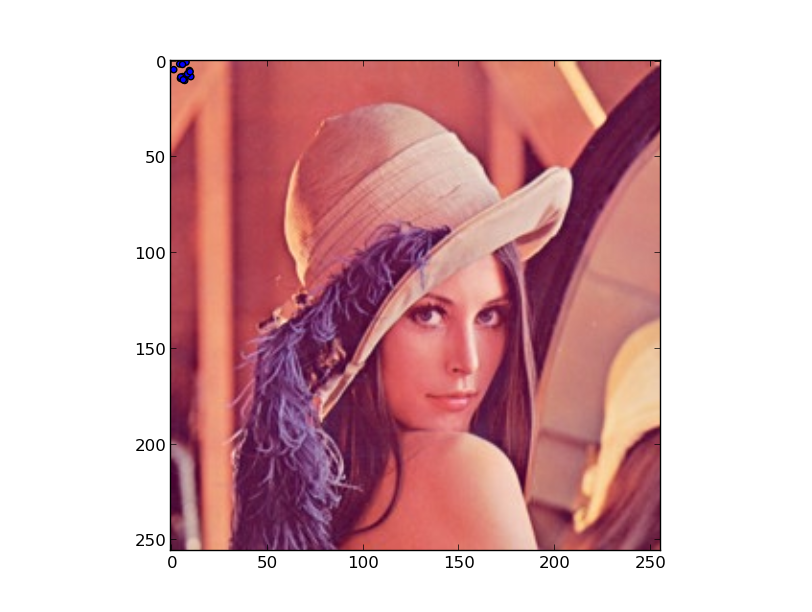 .
.
My question is: How can I specify the corner coordinates of the image in the plot? Let’s say I’d like the bottom-left corner to be at x, y = 0.5, 1.0 and the top-right corner to be at x, y = 8.0, 7.0.
Answers:
Thank you for visiting the Q&A section on Magenaut. Please note that all the answers may not help you solve the issue immediately. So please treat them as advisements. If you found the post helpful (or not), leave a comment & I’ll get back to you as soon as possible.
Method 1
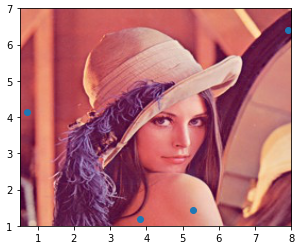
Use the extent keyword of imshow. The order of the argument is [left, right, bottom, top]
import numpy as np
import matplotlib.pyplot as plt

np.random.seed(0)
x = np.random.uniform(0.0,10.0,15)
y = np.random.uniform(0.0,10.0,15)

datafile = 'lena.jpg'
img = plt.imread(datafile)
plt.scatter(x,y,zorder=1)
plt.imshow(img, zorder=0, extent=[0.5, 8.0, 1.0, 7.0])
plt.show()
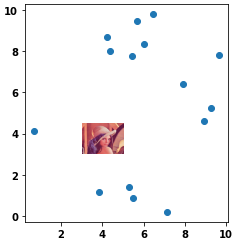
- For cases where it’s desired to have an image in a small area of the scatter plot, change the order of the plots (
.imshowthen.scatter) and change theextentvalues.
plt.imshow(img, zorder=0, extent=[3.0, 5.0, 3.0, 4.50])
plt.scatter(x, y, zorder=1)
plt.show()
Method 2
You must use the extent keyword parameter:
imshow(img, zorder=0, extent=[left, right, bottom, top])
The elements of extent should be specified in data units so that the image can match the data. This can be used, for example, to overlay a geographical path (coordinate array) over a geo-referenced map image.
All methods was sourced from stackoverflow.com or stackexchange.com, is licensed under cc by-sa 2.5, cc by-sa 3.0 and cc by-sa 4.0