I need add to the excerpt field the TinyMCE Advanced editor, any ideas?
I have the qTranslate plugin (multilanguage), and it’s impossible to connect teh excerpt with this plugin and an editor.
Thanks
Answers:
Thank you for visiting the Q&A section on Magenaut. Please note that all the answers may not help you solve the issue immediately. So please treat them as advisements. If you found the post helpful (or not), leave a comment & I’ll get back to you as soon as possible.
Method 1
Just replace the default output. Make sure you unescape the excerpt before you send it to the editor:
add_action( 'add_meta_boxes', array ( 'T5_Richtext_Excerpt', 'switch_boxes' ) );
/**
* Replaces the default excerpt editor with TinyMCE.
*/
class T5_Richtext_Excerpt
{
/**
* Replaces the meta boxes.
*
* @return void
*/
public static function switch_boxes()
{
if ( ! post_type_supports( $GLOBALS['post']->post_type, 'excerpt' ) )
{
return;
}
remove_meta_box(
'postexcerpt' // ID
, '' // Screen, empty to support all post types
, 'normal' // Context
);
add_meta_box(
'postexcerpt2' // Reusing just 'postexcerpt' doesn't work.
, __( 'Excerpt' ) // Title
, array ( __CLASS__, 'show' ) // Display function
, null // Screen, we use all screens with meta boxes.
, 'normal' // Context
, 'core' // Priority
);
}
/**
* Output for the meta box.
*
* @param object $post
* @return void
*/
public static function show( $post )
{
?>
<label class="screen-reader-text" for="excerpt"><?php
_e( 'Excerpt' )
?></label>
<?php
// We use the default name, 'excerpt', so we don’t have to care about
// saving, other filters etc.
wp_editor(
self::unescape( $post->post_excerpt ),
'excerpt',
array (
'textarea_rows' => 15
, 'media_buttons' => FALSE
, 'teeny' => TRUE
, 'tinymce' => TRUE
)
);
}
/**
* The excerpt is escaped usually. This breaks the HTML editor.
*
* @param string $str
* @return string
*/
public static function unescape( $str )
{
return str_replace(
array ( '<', '>', '"', '&', ' ', '&nbsp;' )
, array ( '<', '>', '"', '&', ' ', ' ' )
, $str
);
}
}
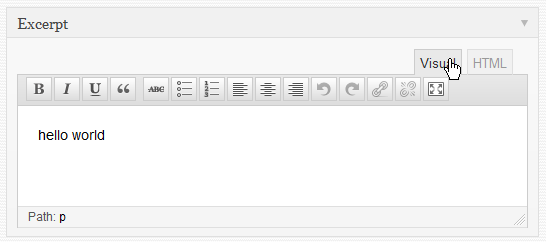
Save this code in a plugin or in your theme’s functions.php.
Method 2
A simple way is to use the plugin Rich Text Excerpt
The Plugin uses the wp_editor function to generate a rich text editor for page/post excerpts, so will only work in WordPress 3.3 or greater.
Method 3
you may need to use wp_editor function to get rich editor, then you should remove any sanitize functions with get_post_meta (or update_post_meta), then you should use htmlspecialchars_decode function to get the rich content..
look through this principle:
add_action( 'add_meta_boxes', 'adding_a_new_metaabox' );
function adding_a_new_metaabox()
    {
        add_meta_box('html_myid_31_section', 'TITLE Hellooo', 'my_output_funct');
    }

function my_output_funct( $post )
    {
    //so, dont ned to use esc_attr in front of get_post_meta
    $valueeee2=  get_post_meta($_GET['post'], 'SMTH_METANAME' , true ) ;
    wp_editor( htmlspecialchars_decode($valueeee2), 'mettaabox_ID_stylee', $settings = array('textarea_name'=>'MyInputNAMEE') );
    }


function save_my_post_data( $post_id )
{
    if (!empty($_POST['MyInputNAMEE']))
        {
        $datta=htmlspecialchars($_POST['MyInputNAMEE']);
        update_post_meta($post_id, 'SMTH_METANAME', $datta );
        }
}
add_action( 'save_post', 'save_my_post_data' );
Method 4
Follow solution add excerpt wysiwyg editor right after post title.
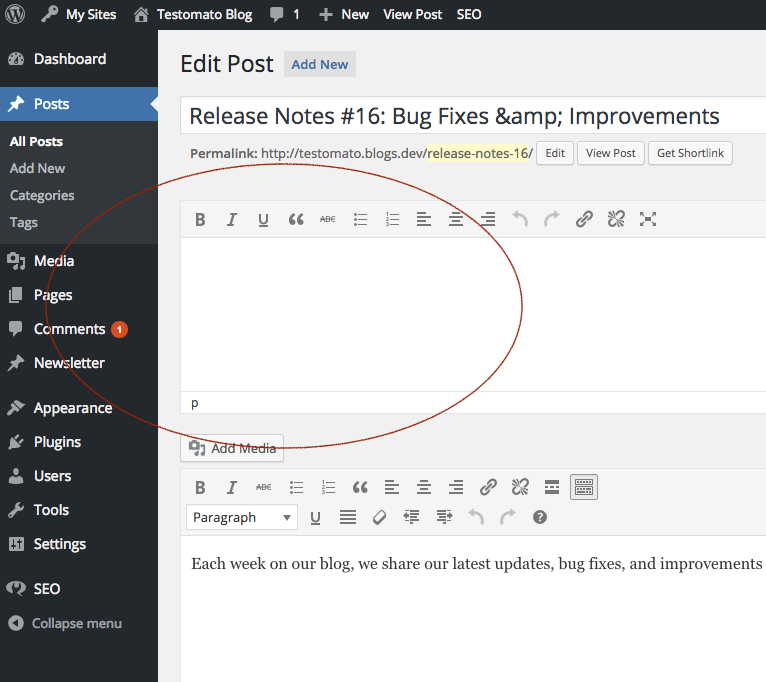
Add follow class to your WordPress project as excerpt.php
class Excerpt {
public function __construct() {
add_filter('excerpt_more', [$this, 'excerpt_more']);
add_action('edit_form_after_title', [$this, 'excerpt']);
add_action('admin_menu', [$this, 'remove_excerpt_metabox']);
add_filter('wp_trim_excerpt', [$this, 'wp_trim_excerpt'], 10, 2);
}
/**
* Remove metabox from post
*/
public function remove_excerpt_metabox() {
remove_meta_box('postexcerpt', 'post', 'normal');
}
/**
* Strip tags
*
* @param string $text
* @return string
*/
public function wp_trim_excerpt($text = '') {
return strip_tags($text, '<a><strong><em><b><i><code><ul><ol><li><blockquote><del><ins><img><pre><code><>');
}
/**
* More sign...
*
* @return string
*/
public function excerpt_more() {
return '…';
}
/**
* Excerpt editor after post title.
*
* @param $post
*/
public function excerpt($post) {
if ($post->post_type !== 'post') return;
wp_editor(
html_entity_decode($post->post_excerpt),
'html-excerpt',
[
'teeny' => true,
'quicktags' => true,
'wpautop' => true,
'media_buttons' => false,
'textarea_rows' => 7,
'textarea_name' => 'excerpt'
]
);
}
}
Then add to functions.php file follow lines:
require_once __DIR__ . '/excerpt.php';
$excerpt = new Excerpt();
All methods was sourced from stackoverflow.com or stackexchange.com, is licensed under cc by-sa 2.5, cc by-sa 3.0 and cc by-sa 4.0