I can add a y label to the left y-axis using plt.ylabel, but how can I add it to the secondary y-axis?
table = sql.read_frame(query,connection)

table[0].plot(color=colors[0],ylim=(0,100))
table[1].plot(secondary_y=True,color=colors[1])
plt.ylabel('$')
Answers:
Thank you for visiting the Q&A section on Magenaut. Please note that all the answers may not help you solve the issue immediately. So please treat them as advisements. If you found the post helpful (or not), leave a comment & I’ll get back to you as soon as possible.
Method 1
The best way is to interact with the axes object directly
import numpy as np
import matplotlib.pyplot as plt
x = np.arange(0, 10, 0.1)
y1 = 0.05 * x**2
y2 = -1 *y1

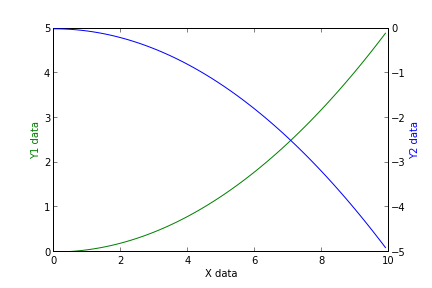
fig, ax1 = plt.subplots()

ax2 = ax1.twinx()
ax1.plot(x, y1, 'g-')
ax2.plot(x, y2, 'b-')

ax1.set_xlabel('X data')
ax1.set_ylabel('Y1 data', color='g')
ax2.set_ylabel('Y2 data', color='b')

plt.show()
Method 2
There is a straightforward solution without messing with matplotlib: just pandas.
Tweaking the original example:
table = sql.read_frame(query,connection)

ax = table[0].plot(color=colors[0],ylim=(0,100))
ax2 = table[1].plot(secondary_y=True,color=colors[1], ax=ax)

ax.set_ylabel('Left axes label')
ax2.set_ylabel('Right axes label')
Basically, when the secondary_y=True option is given (eventhough ax=ax is passed too) pandas.plot returns a different axes which we use to set the labels.
I know this was answered long ago, but I think this approach worths it.
Method 3
I don’t have access to Python right now, but off the top of my head:
fig = plt.figure()

axes1 = fig.add_subplot(111)
# set props for left y-axis here

axes2 = axes1.twinx()   # mirror them
axes2.set_ylabel(...)
Method 4
Simple example with few loc:
plot(y1)
plt.gca().twinx().plot(y2, color = 'r') # default color is same as first ax
Explanation:
ax = plt.gca()    # Get current axis
ax2 = ax.twinx()  # make twin axis based on x
ax2.plot(...)     # ...
Method 5
For everyone stumbling upon this post because pandas gets mentioned,
you now have the very elegant and straightforward option of directly accessing the
secondary_y axis in pandas with ax.right_ax
So paraphrasing the example initially posted, you would write:
table = sql.read_frame(query,connection)

ax = table[[0, 1]].plot(ylim=(0,100), secondary_y=table[1])
ax.set_ylabel('$')
ax.right_ax.set_ylabel('Your second Y-Axis Label goes here!')
(this is already mentioned in these posts as well: 1 2)
All methods was sourced from stackoverflow.com or stackexchange.com, is licensed under cc by-sa 2.5, cc by-sa 3.0 and cc by-sa 4.0