Can someone please help me adding collision points to my sprites. I had a past code where I layered a bitmap over images but the same code does not integrate well for physically drawing lines rather than detecting where the black/grey is on an image
import random
import pygame
pygame.init()

WHITE = (255,255,255)
GREY = (20,20,20)
BLACK = (0,0,0)
PURPLE = (100,0,100)
RED = (255,0,0)

size = (701,701)
screen = pygame.display.set_mode(size)

pygame.display.set_caption("Maze Generator")

done = False

clock = pygame.time.Clock()

width = 25
cols = int(size[0] / width)
rows = int(size[1] / width)

stack = []

pos = (0,0)
class Player(pygame.sprite.Sprite):
    def __init__(self, image, pos, background):
        super().__init__()
        self.image = image
        self.pos = pygame.Vector2(pos)
        self.rect = self.image.get_rect(center=self.pos)
        self.background = background

    def update(self, events, dt):
        pressed = pygame.key.get_pressed()
        move = pygame.Vector2((0, 0))
        if pressed[pygame.K_w]: move += (0, -1)
        if pressed[pygame.K_a]: move += (-1, 0)
        if pressed[pygame.K_s]: move += (0, 1)
        if pressed[pygame.K_d]: move += (1, 0)
        #if move.length() > 0: move.normalise_ip()

        self.pos = self.pos + move*(dt/5)
        self.rect.center = self.pos

        if self.background:

            new_rect.clamp_ip(self.background.get_rect())
            new_pos = new_rect.center

            hit_box = self.background.subsurface(new_rect)
            for x in range(new_rect.width):
                for y in range(new_rect.height):
                    if sum(hit_box.get_at((x, y))) < 500:
                        return

def load_background(filename=None):
    name = filename if filename else "background.jpg"
    background = pygame.image.load(name)
    background = pygame.transform.rotate(background, -90)
    background = pygame.transform.scale(background, (800,600))
    return background

def load_player(background):
    pimg = pygame.Surface((10, 10))
    pimg.fill((200, 20, 20))
    return Player(pimg, (25, 325), background)

class Cell():
    def __init__(self,x,y):
        global width
        self.x = x * width
        self.y = y * width

        self.visited = False
        self.current = False

        self.walls = [True,True,True,True] # top , right , bottom , left

        # neighbors
        self.neighbors = []

        self.top = 0
        self.right = 0
        self.bottom = 0
        self.left = 0

        self.next_cell = 0

    def draw(self):
        if self.current:
            pygame.draw.rect(screen,RED,(self.x,self.y,width,width))
        elif self.visited:
            pygame.draw.rect(screen,WHITE,(self.x,self.y,width,width))

            if self.walls[0]:
                pygame.draw.line(screen,BLACK,(self.x,self.y),((self.x + width),self.y),1) # top
            if self.walls[1]:
                pygame.draw.line(screen,BLACK,((self.x + width),self.y),((self.x + width),(self.y + width)),1) # right
            if self.walls[2]:
                pygame.draw.line(screen,BLACK,((self.x + width),(self.y + width)),(self.x,(self.y + width)),1) # bottom
            if self.walls[3]:
                pygame.draw.line(screen,BLACK,(self.x,(self.y + width)),(self.x,self.y),1) # left

    def checkNeighbors(self):
        #print("Top; y: " + str(int(self.y / width)) + ", y - 1: " + str(int(self.y / width) - 1))
        if int(self.y / width) - 1 >= 0:
            self.top = grid[int(self.y / width) - 1][int(self.x / width)]
        #print("Right; x: " + str(int(self.x / width)) + ", x + 1: " + str(int(self.x / width) + 1))
        if int(self.x / width) + 1 <= cols - 1:
            self.right = grid[int(self.y / width)][int(self.x / width) + 1]
        #print("Bottom; y: " + str(int(self.y / width)) + ", y + 1: " + str(int(self.y / width) + 1))
        if int(self.y / width) + 1 <= rows - 1:
            self.bottom = grid[int(self.y / width) + 1][int(self.x / width)]
        #print("Left; x: " + str(int(self.x / width)) + ", x - 1: " + str(int(self.x / width) - 1))
        if int(self.x / width) - 1 >= 0:
            self.left = grid[int(self.y / width)][int(self.x / width) - 1]
        #print("--------------------")

        if self.top != 0:
            if self.top.visited == False:
                self.neighbors.append(self.top)
        if self.right != 0:
            if self.right.visited == False:
                self.neighbors.append(self.right)
        if self.bottom != 0:
            if self.bottom.visited == False:
                self.neighbors.append(self.bottom)
        if self.left != 0:
            if self.left.visited == False:
                self.neighbors.append(self.left)

        if len(self.neighbors) > 0:
            self.next_cell = self.neighbors[random.randrange(0,len(self.neighbors))]
            return self.next_cell
        else:
            return False

def removeWalls(current_cell,next_cell):
    x = int(current_cell.x / width) - int(next_cell.x / width)
    y = int(current_cell.y / width) - int(next_cell.y / width)
    if x == -1: # right of current
        current_cell.walls[1] = False
        next_cell.walls[3] = False
    elif x == 1: # left of current
        current_cell.walls[3] = False
        next_cell.walls[1] = False
    elif y == -1: # bottom of current
        current_cell.walls[2] = False
        next_cell.walls[0] = False
    elif y == 1: # top of current
        current_cell.walls[0] = False
        next_cell.walls[2] = False

grid = []

for y in range(rows):
    grid.append([])
    for x in range(cols):
        grid[y].append(Cell(x,y))

current_cell = grid[0][0]
next_cell = 0

# -------- Main Program Loop -----------
def main():
    global current_cell

    player = None
    initialized = False
    current_maze = None
    dt = 0
    screen_rect = screen.get_rect()
    clock = pygame.time.Clock()
    sprites = pygame.sprite.Group()

    if not initialized:
        #current_maze = 0
        background = load_background()
        background = None
        player = load_player(background)
        sprites.add(player)
        initialized = True

    play = False
    while not done:
        # --- Main event loop
        for event in pygame.event.get():
            if event.type == pygame.QUIT:
                return

        for y in range(rows):
            for x in range(cols):
                grid[y][x].draw()

        if play == True:
            pygame.init()

            while not done:
                events = pygame.event.get()

                for e in events:
                    if e.type == pygame.QUIT:
                        return

                player_x = player.pos[0]
                player_y = player.pos[1]

                sprites.update(None, dt)

                #screen.fill(pygame.Color('grey'))
                #screen.blit(background, (0, 0))

                sprites.draw(screen)
                pygame.display.flip()
                dt = clock.tick(60)
        else:
            current_cell.visited = True
            current_cell.current = True

            next_cell = current_cell.checkNeighbors()
            if next_cell != False:
                current_cell.neighbors = []
                stack.append(current_cell)
                removeWalls(current_cell,next_cell)
                current_cell.current = False
                current_cell = next_cell
            elif len(stack) > 0:
                current_cell.current = False
                current_cell = stack.pop()
            else:
                play = True
        pygame.display.flip()


main()
pygame.quit()
I would love if anyone could help or point me in the right direction.
    end_rect = pygame.draw.rect(screen, RED, (800-width, 600-width, width, width))
    if player.rect.colliderect(end_rect):
                    screen.fill(BLACK)
                    end = True
Answers:
Thank you for visiting the Q&A section on Magenaut. Please note that all the answers may not help you solve the issue immediately. So please treat them as advisements. If you found the post helpful (or not), leave a comment & I’ll get back to you as soon as possible.
Method 1
Ensure that the Player object is positioned in the center of cell of the grid. e.g. calculate a random position for the player:
def load_player(background):
    pimg = pygame.Surface((10, 10))
    pimg.fill((200, 20, 20))

    px = random.randint(0, rows-1) * width + width//2
    py = random.randint(0, cols-1) * width + width//2
    return Player(pimg, (px, py), background)
To track the player, but highlight the player position, the current player position has to be tint in a different color, before the player is updated and is redrawn:
pygame.draw.rect(screen, (255, 164, 164), player.rect)
sprites.update(None, dt)
sprites.draw(screen)
For the collision test:
- The current position of the player in the
gridhas to be identified. - The new possible new position of the player, dependent on the movement has to be identified.
- If a wall is on the track from the current to the new position, then the movement has to be skipped
class Player(pygame.sprite.Sprite):
    def __init__(self, image, pos, background):
        super().__init__()
        self.image = image
        self.pos = pygame.Vector2(pos)
        self.rect = self.image.get_rect(center=self.pos)
        self.background = background

    def update(self, events, dt):
        pressed = pygame.key.get_pressed()
        move = pygame.Vector2((0, 0))

        # calculate maximum movement and current cell position
        testdist = dt // 5 + 2
        cellx = self.rect.centerx // width
        celly = self.rect.centery // width
        minx = self.rect.left // width
        maxx = self.rect.right // width
        miny = self.rect.top // width
        maxy = self.rect.bottom // width

        # test move up
        if minx == maxx and pressed[pygame.K_w]:
            nexty = (self.rect.top-testdist) // width
            if celly == nexty or (nexty >= 0 and not grid[celly][cellx].walls[0]):
                move += (0, -1)

        # test move right
        elif miny == maxy and pressed[pygame.K_d]:
            nextx = (self.rect.right+testdist) // width
            if cellx == nextx or (nextx < cols and not grid[celly][cellx].walls[1]):
                move += (1, 0)

        # test move down
        elif minx == maxx and pressed[pygame.K_s]:
            nexty = (self.rect.bottom+testdist) // width
            if celly == nexty or (nexty < rows and not grid[celly][cellx].walls[2]):
                move += (0, 1)

        # test move left
        elif miny == maxy and pressed[pygame.K_a]:
            nextx = (self.rect.left-testdist) // width
            if cellx == nextx or (nextx >= 0 and not grid[celly][cellx].walls[3]):
                move += (-1, 0)

        self.pos = self.pos + move*(dt/5)
        self.rect.center = self.pos
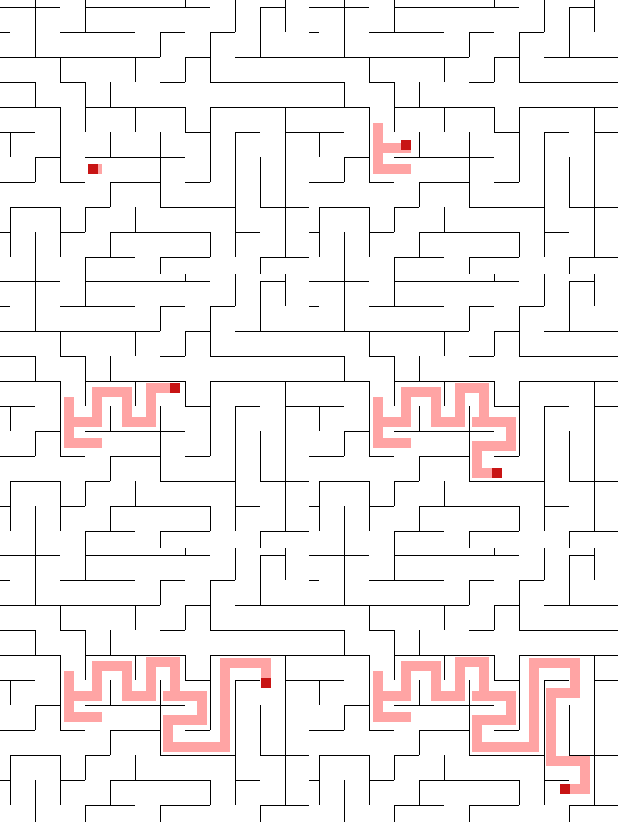
If you want to restart the maze, the you’ve to get rid of the nested game loops. Use 1 game loop and a condition, which state if the game is in play state or initializing the maze.
To check if the player has reached the goal can be done by pygame.Rect.colliderect():
finished = pygame.Rect(0, 0, width, width).colliderect(player.rect)
To restart you’ve to reset the grid:
grid = []
for y in range(rows):
    grid.append([])
    for x in range(cols):
        grid[y].append(Cell(x,y))
current_cell = grid[0][0]
Set the player to a new random position:
px = random.randint(0, rows-1) * width + width//2
py = random.randint(0, cols-1) * width + width//2
player.pos = pygame.Vector2(px, py)
player.rect = player.image.get_rect(center=player.pos)
Clear the background and reset the state play:
screen.fill(0)
play = False
Full main code:
def main():
    global current_cell, grid

    player = None
    initialized = False
    current_maze = None
    dt = 0
    screen_rect = screen.get_rect()
    clock = pygame.time.Clock()
    sprites = pygame.sprite.Group()

    if not initialized:
        #current_maze = 0
        background = load_background()
        background = None
        player = load_player(background)
        sprites.add(player)
        initialized = True

    play = False
    while not done:
        # --- Main event loop
        for event in pygame.event.get():
            if event.type == pygame.QUIT:
                return

        if play == True:

            pygame.draw.rect(screen, (255, 164, 164), player.rect)
            sprites.update(None, dt)
            sprites.draw(screen)

            dt = clock.tick(60)

            finished = pygame.Rect(0, 0, width, width).colliderect(player.rect)
            if finished:
                # init new grid
                grid = []
                for y in range(rows):
                    grid.append([])
                    for x in range(cols):
                        grid[y].append(Cell(x,y))
                current_cell = grid[0][0]
                # create new random player positon
                px = random.randint(0, rows-1) * width + width//2
                py = random.randint(0, cols-1) * width + width//2
                player.pos = pygame.Vector2(px, py)
                player.rect = player.image.get_rect(center=player.pos)
                # clear screen
                screen.fill(0)
                play = False

        else:
            current_cell.visited = True
            current_cell.current = True

            next_cell = current_cell.checkNeighbors()
            if next_cell != False:
                current_cell.neighbors = []
                stack.append(current_cell)
                removeWalls(current_cell,next_cell)
                current_cell.current = False
                current_cell = next_cell
            elif len(stack) > 0:
                current_cell.current = False
                current_cell = stack.pop()
            else:
                play = True

            for y in range(rows):
                for x in range(cols):
                    grid[y][x].draw()

        pygame.display.flip()
All methods was sourced from stackoverflow.com or stackexchange.com, is licensed under cc by-sa 2.5, cc by-sa 3.0 and cc by-sa 4.0