I have add new role in functions.php file by this code:
// Add a custom user role

$result = add_role( 'supplier_for_planvent', __(
'Supplier_For_Planavent' ),
array(
    'read' => true, // true allows this capability
    'edit_posts' => true, // Allows user to edit their own posts
    'edit_pages' => true, // Allows user to edit pages
    'edit_others_posts' => true, // Allows user to edit others posts not just their own
    'create_posts' => true, // Allows user to create new posts
    'manage_categories' => true, // Allows user to manage post categories
    'publish_posts' => true, // Allows the user to publish, otherwise posts stays in draft mode

));
But when I log-in through new role account, I got this message:
You do not have sufficient permissions to access this page.
Can anyone help me?
Answers:
Thank you for visiting the Q&A section on Magenaut. Please note that all the answers may not help you solve the issue immediately. So please treat them as advisements. If you found the post helpful (or not), leave a comment & I’ll get back to you as soon as possible.
Method 1
Happened to me first time. Not a matter at all. If you want how this thing works and how to debug it, read on. But if you want to hear the cause what just happened, go to the very bottom of this answer (#Specific Answer).
If you contact the Codex page for add_role(), the second line is saying:
NB: This setting is saved to the database (in table
wp_options, fieldwp_user_roles), so it might be better to run this on theme/plugin activation
So if you are developing a theme, go for this, use the following code into your functions.php:
add_action( 'after_switch_theme', 'wpse_create_user_roles' );

function wpse_create_user_roles() {

    $add_supplier = add_role( 'supplier_for_planvent', __( 'Supplier_For_Planavent' ),
            array(
                'read' => true,
                'edit_posts' => true,
                'edit_pages' => true,
                'edit_others_posts' => true,
                'create_posts' => true,
                'manage_categories' => true,
                'publish_posts' => true
            ));

}
The after_switch_theme hook will fire only when the theme is activated, and once. So we are creating our new user role only once, and that’s the proper way.
If you are developing a plugin, then just change the following line:
add_action( 'after_switch_theme', 'wpse_create_user_roles' );
into
register_activation_hook( __FILE__, 'wpse_create_user_roles' );
So the same thing will happen, creating a new user role only when the plugin get activated, and once. 🙂
Now what just happened: as per the Codex, open the database and see the wp_options table. Search for the wp_user_roles in option_name column, and you will get a single row.
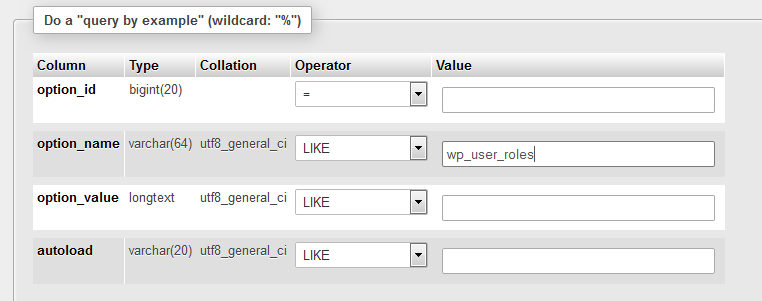
Please note that, if your database table prefix is
wp_, then the option_name would be like this. But in my case I changed to db table prefix, so in my case the option_name becomes$myprefix_user_roles.
So what you’ve just created is stored here. But the option_value is something almost unreadable and unrecognizable, don’t worry, we have the key. Copy the option_value to jsfiddle.net, paste it into the JavaScript block, and click on the TidyUp button, and you will get a readable look of that string. It’s a PHP serialized data. On the very bottom of this code, you will see your user role with its privileges.
What would happen, if we just change a single line (capability) in our code:
'edit_posts' => false,
it won’t make any change, because this field can’t update itself, it can only create/write itself, once – when fired. So what already created with the capability 'edit_posts'=>true, it can’t be false now.
So accident may happen, suppose we forget to assign the 'read'=>true privilege first, and I can’t access the backend using that user role. How can we pose it later to that role?
Ans.: We have to delete/remove the user role first.
Let’s delete it, use the following code, anywhere in your theme. But better to add it inside our function what we have made to create the new role, just like this:
add_action( 'after_switch_theme', 'wpse_create_user_roles' );

function wpse_create_user_roles() {

    $add_supplier = add_role( 'supplier_for_planvent', __( 'Supplier_For_Planavent' ),
            array(
                'read' => true,
                'edit_posts' => true,
                'edit_pages' => true,
                'edit_others_posts' => true,
                'create_posts' => true,
                'manage_categories' => true,
                'publish_posts' => true
            ));

    remove_role( 'supplier_for_planvent' ); //it will remove the user role

}
It will remove the user role just created when we will switch the theme, so activate another theme and reactivate your theme again. Now your user role is reset.
Go to the code, and remove the line remove_role(), and again, activate another theme and reactivate yours. It will create your user role with the new privilege assigned. And the codex is also saying:
This is for development only. Once you have nailed down your list of capabilities, there’s no need to keep the remove_role() code, though there is, in fact, no harm in doing so.
Specific answer
This is how the user role addition works. And answer specific to your question is: you forgot to assign the 'read'=>true privilege first and that what happened, it remembered to keep you away. 🙂 Remove the user role and create again, it will work inshALLAH.
All methods was sourced from stackoverflow.com or stackexchange.com, is licensed under cc by-sa 2.5, cc by-sa 3.0 and cc by-sa 4.0