I am binding the grid view using data table.
My task is to add new rows to my grid view dynamically when the user clicks “ADD” button in grid view it should generate new row with three text boxes.
For example: When I click the add button in the second row, a new row should be created below the second row with three text box where the user can enter details.
Can anybody help me resolve this problem? Either in jQuery/JavaScript or on the server side.
Answers:
Thank you for visiting the Q&A section on Magenaut. Please note that all the answers may not help you solve the issue immediately. So please treat them as advisements. If you found the post helpful (or not), leave a comment & I’ll get back to you as soon as possible.
Method 1
you could try this solution
  <asp:gridview ID="Gridview1" runat="server" ShowFooter="true" AutoGenerateColumns="false">
    <Columns>
    <asp:BoundField DataField="RowNumber" HeaderText="Row Number" />
    <asp:TemplateField HeaderText="Header 1">
        <ItemTemplate>
            <asp:TextBox ID="TextBox1" runat="server"></asp:TextBox>
        </ItemTemplate>
    </asp:TemplateField>
    <asp:TemplateField HeaderText="Header 2">
        <ItemTemplate>
            <asp:TextBox ID="TextBox2" runat="server"></asp:TextBox>
        </ItemTemplate>
    </asp:TemplateField>
    <asp:TemplateField HeaderText="Header 3">
        <ItemTemplate>
             <asp:TextBox ID="TextBox3" runat="server"></asp:TextBox>
        </ItemTemplate>
        <FooterStyle HorizontalAlign="Right" />
        <FooterTemplate>
         <asp:Button ID="ButtonAdd" runat="server" Text="Add New Row" />
        </FooterTemplate>
    </asp:TemplateField>
    </Columns>
inside code behind
Here’s the code block below:
private void SetInitialRow()
{
    DataTable dt = new DataTable();
    DataRow dr = null;
    dt.Columns.Add(new DataColumn("RowNumber", typeof(string)));
    dt.Columns.Add(new DataColumn("Column1", typeof(string)));
    dt.Columns.Add(new DataColumn("Column2", typeof(string)));
    dt.Columns.Add(new DataColumn("Column3", typeof(string)));
    dr = dt.NewRow();
    dr["RowNumber"] = 1;
    dr["Column1"] = string.Empty;
    dr["Column2"] = string.Empty;
    dr["Column3"] = string.Empty;
    dt.Rows.Add(dr);
    //dr = dt.NewRow();

    //Store the DataTable in ViewState
    ViewState["CurrentTable"] = dt;

    Gridview1.DataSource = dt;
    Gridview1.DataBind();
}
in page load you have to call this method
  protected void Page_Load(object sender, EventArgs e)
  {
    if (!Page.IsPostBack)
    {
        SetInitialRow();
    }
 }
this is the method for generating the rows when clicking the Button. Here are the code blocks below:
private void AddNewRowToGrid()
{
    int rowIndex =0;

    if (ViewState["CurrentTable"] != null)
    {
        DataTable dtCurrentTable = (DataTable)ViewState["CurrentTable"];
        DataRow drCurrentRow = null;
        if (dtCurrentTable.Rows.Count > 0)
        {
            for (int i = 1; i <= dtCurrentTable.Rows.Count; i++)
            {
                //extract the TextBox values
                TextBox box1 = (TextBox)Gridview1.Rows[rowIndex].Cells[1].FindControl("TextBox1");
                TextBox box2 = (TextBox)Gridview1.Rows[rowIndex].Cells[2].FindControl("TextBox2");
                TextBox box3 = (TextBox)Gridview1.Rows[rowIndex].Cells[3].FindControl("TextBox3");

                drCurrentRow = dtCurrentTable.NewRow();
                drCurrentRow["RowNumber"] = i + 1;
                drCurrentRow["Column1"] = box1.Text;
                drCurrentRow["Column2"] = box2.Text;
                drCurrentRow["Column3"] = box3.Text;

                rowIndex++;
            }
            //add new row to DataTable
            dtCurrentTable.Rows.Add(drCurrentRow);
            //Store the current data to ViewState
            ViewState["CurrentTable"] = dtCurrentTable;

            //Rebind the Grid with the current data
            Gridview1.DataSource = dtCurrentTable;
            Gridview1.DataBind();
        }
    }
    else
    {
        Response.Write("ViewState is null");
    }

    //Set Previous Data on Postbacks
    SetPreviousData();
}
this is setpreviousdata method…
 private void SetPreviousData()
{
    int rowIndex = 0;
    if (ViewState["CurrentTable"] != null)
    {
        DataTable dt = (DataTable)ViewState["CurrentTable"];
        if (dt.Rows.Count > 0)
        {
            for (int i = 1; i < dt.Rows.Count; i++)
            {
                TextBox box1 = (TextBox)Gridview1.Rows[rowIndex].Cells[1].FindControl("TextBox1");
                TextBox box2 = (TextBox)Gridview1.Rows[rowIndex].Cells[2].FindControl("TextBox2");
                TextBox box3 = (TextBox)Gridview1.Rows[rowIndex].Cells[3].FindControl("TextBox3");

                box1.Text = dt.Rows[i]["Column1"].ToString();
                box2.Text = dt.Rows[i]["Column2"].ToString();
                box3.Text = dt.Rows[i]["Column3"].ToString();

                rowIndex++;

            }
        }
    }
}
button click event for adding new row
protected void ButtonAdd_Click(object sender, EventArgs e)
{
    AddNewRowToGrid();
}
and pls take a look below image how it will generate new rows….
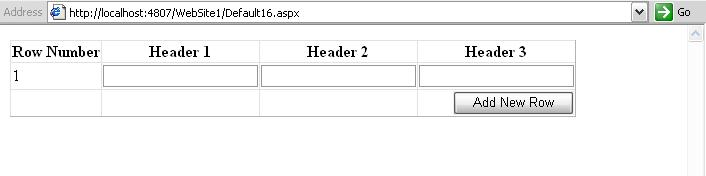
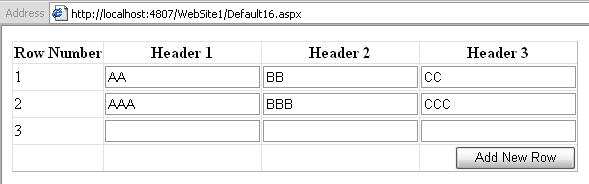
I hope it will helps you…..
Method 2
You can use fnOpen http://www.datatables.net/ref#fnOpen. It will let you add a row directly below the row you give it. you can give that new row the html you want it to have as well.
All methods was sourced from stackoverflow.com or stackexchange.com, is licensed under cc by-sa 2.5, cc by-sa 3.0 and cc by-sa 4.0